Guide to using plug-in scripts
As an expansion point of the software, plug-in scripts are called by Pickwiz. Business logic can be added without modifying the core code, and can be flexibly adapted to customized needs on site, such as compensation for robotic arm installation errors, unit conversion, obstacle avoidance strategy adjustment, protocol adaptation, etc., and does not involve network communication functions. When the system reaches the corresponding stage (such as after calculating the grasping posture and before preparing to send data to the robotic arm), these functions in the plug-in script will be automatically called.
Currently, there are four locations where plug-in scripts can be added:
When PickWiz receives the Robot message
When PickWiz handles receiving placeholder information
When PickWiz handles sending placeholder information
When PickWiz sends a message to Robot
MC/Snap7/Modbus does not have the concept of messages, so there is no mechanism for processing instructions in the first and fourth plug-in scripts.

1. Create Python files
Create a python file in the directory C:\Users\dex\.dexforce\kuawei_data\robot_hooks as shown in the figure below.
atC:\Users\dex\.dexforce\kuawei_data\robot_hooks目录下鼠标右键新建一个文本文档 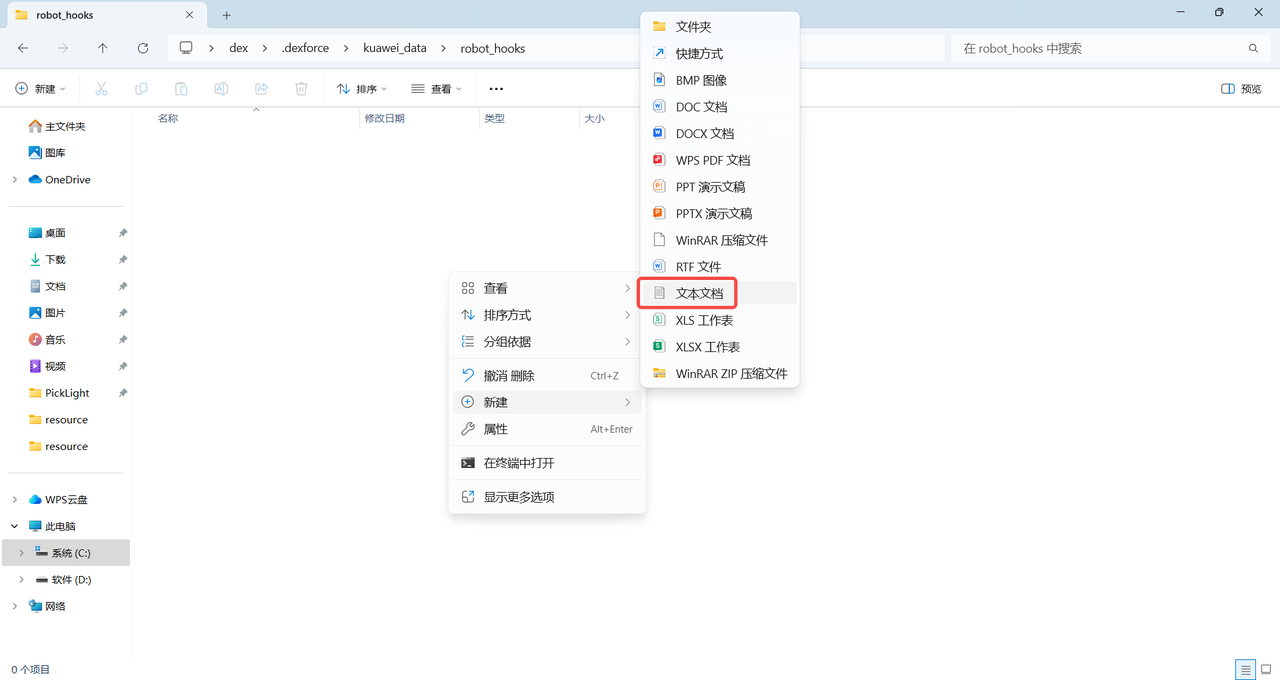
Change the extension of the newly created text document to .py, then click "Yes" to change the extension 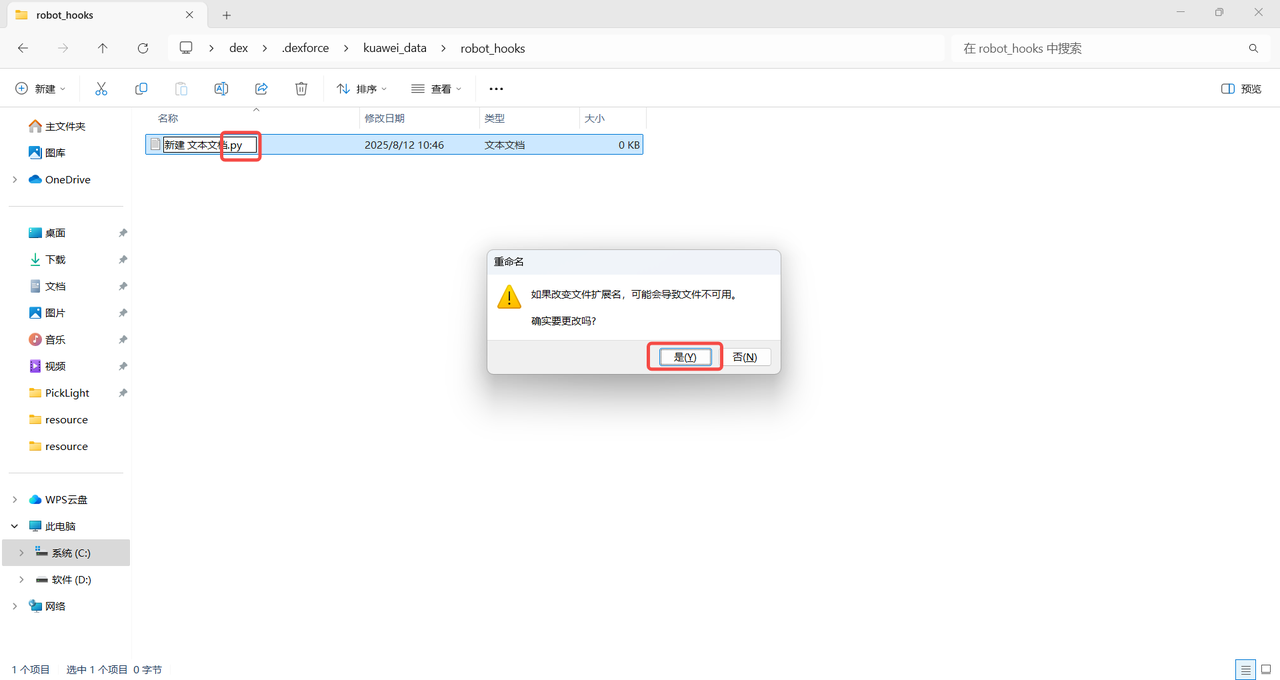
Copy the following code into the newly created Python file.
from typing import List
from PickLight.log.logger import logger_pipe
class AttrHooks(object): #Create an AttrHooks class, which contains multiple hook functions. The system will automatically identify and call these functions.
#All hook functions follow the same Parameter format:
#@staticmethod
#def received_messages_hook(data: str, context) -> str
# PickWiz received the Robot command, received_messages_hook
# Before PickWiz sends instructions to Robot, messages_hook
# PickWiz handles placeholder information, placeholder_hook
# data: the original data that needs to be processed, the type depends on the Scene; context: context information, including additional information such as Robot configuration, Task configuration id, etc.
# context: Robot context information, context information, including Robot configuration, Task configuration id and other additional information. You can use context.get_available_context() within the hook function to obtain the context information available for the current function.context: Context information, including Robot configuration, Task configuration id and other additional information. The currently available context configuration can be obtained through context.get_available_context(). The context information currently available is as follows.
Robot configuration: robot_config
Number of decimal places to retain: decimals
Robot degrees of freedom: dof_type
Rotation expression: rotation_type
Length unit: translation_unit
Angle unit: euler_angle_unit
Task configuration id: config_ids
Taskid:task
Calibration id: calibration
Robotid:robot
Vision Parameterid: vision_param
ROI id:roi
product id: product
Fixture id: end_effector
Scene Objectid: scene_object (when the collision detection plug-in is checked)
roi
2d ROI information: roi2d
3d ROI information: roi3d
2. PickWiz receives Robot command
When PickWiz receives the instruction sent by Robot, it can add the pre_receive_messages_hook function to the AttrHooks class in the newly created Python file to process the received Robot message.
❗The current plug-in script function will only be registered and effective by the system at two specific moments of "refreshing configuration" and "sending detection results". Therefore, if the
pre_receive_messages_hookfunction is modified, you need to manually switch the configuration or trigger a detection for the modified function to take effect, otherwise the system will still use the old function.
Example: When PickWiz receives a short command code from Robot (such as the short messages "210" and "211" in the example), it performs parsing processing through the pre_receive_messages_hook function in the plug-in script, and directly replaces the short command code with a command with complete Parameter that Robot can recognize and execute (such as replacing "210" with "d,0,0,0,0,0,0,1"), to avoid the Robot being unable to respond or executing errors due to incomplete short command information, and to quickly adapt to the command interaction needs of the on-site Robot.
    @staticmethod
    def pre_receive_messages_hook(data: str, context) -> str: #When PickWiz receives the instruction sent by Robot, and adjusts the Robot field received by the software according to the different fields sent by Robot.
        logger_pipe.info("available context: %s", context.get_available_context())
        logger_pipe.info("received messages: %s", data)

        if data == "210":
            data = "d,0,0,0,0,0,0,1"#When "210" is received, replace it with the complete command "d,0,0,0,0,0,0,1"
        elif data == "211":
            data = "d,0,0,0,0,0,0,2"#When "211" is received, replace it with "d,0,0,0,0,0,0,2"
        return data
Example: Fixed Task configuration (such as the ID of the ROI in the fixed Task configuration), when PickWiz receives the Robot instruction, it will first check whether the ROI ID in the current context is 1. If it is not 1, it will automatically change the instruction content to "d,0,0,0,0,0,0,1", thus fixing the ROI ID to 1 and avoiding errors in tasks such as grabbing and detection caused by confusing ROI configuration on site.
    @staticmethod
    def pre_receive_messages_hook(data: str, context) -> str: #When PickWiz receives the instruction sent by Robot, it determines whether the id of roi is 1. If it is not 1, switch roi to 1 through the placeholder ${roi_id}
        logger_pipe.info("available context: %s", context.get_available_context())
        logger_pipe.info("raw messages: %s", data)

        if context["config_ids"]["roi"] != 1:
            data = "d,0,0,0,0,0,0,1"
        logger_pipe.info("modified messages: %s", data)
        return data
3. Modify receiving placeholder information
Placeholders can be used in various configurations and messages of the system to dynamically replace them with actual values. In the instructions received by PickWiz, the meaning, default value, and data type of each placeholder are as shown in the table below.
| placeholder | meaning | data type |
|---|---|---|
| p | Robot6d pose | 6-bit floating point type |
| j | Robot joint posture | 6-bit floating point type |
| ps | Target size | 1-3-digit floating point type |
| p_tol | Target size tolerance | 1-3-digit floating point type |
| pid | TargetID | short integer |
| wid | TaskID | short integer |
| calib_id | calibration configuration ID | short integer |
| ee_id | End-effectorID | short integer |
| roi_id | ROI ID | short integer |
| vp_id | Visual ParameterID | short integer |
| so_id | Scene ObjectID | short integer |
| co | photo calculation type | short integer |
| max_merge_num | Maximum number of combinations in a single line | short integer |
| max_merge_lines | Maximum number of combined lines | short integer |
If you need to modify the placeholder information, you can add the placeholder_hook function to the AttrHooks class in the newly created Python file.
Example: Fixed Task configuration (such as fixing the ID of the ROI in the Task configuration). When PickWiz receives the instruction sent by Robot, it forcibly fixes the ROI ID to 1 to avoid errors in tasks such as crawling and detection caused by confusing ROI configuration on site.
    @staticmethod
    def roi_id_hook(data: str, context) -> str: #When PickWiz receives the instruction sent by Robot, it forces the roi id to be switched to 1
        logger_pipe.info("raw pid: %s", data)
        data = 1
        logger_pipe.info("modified pid: %s", data)
        return data
4. Modify sending placeholder information
Placeholders can be used in various configurations and messages of the system to dynamically replace them with actual values. In the instructions sent by PickWiz to Robot, the meaning, default value, and data type of each placeholder are as shown in the table below.
| placeholder | meaning | Default value | data type |
|---|---|---|---|
| s | detection result signal | 1 | short integer |
| vn | Number of valid instances | 1 | short integer |
| ln | Number of remaining instances | 1 | short integer |
| rn | returns the number of instances | 1 | short integer |
| tn | Total instance detection | 1 | short integer |
| pre_pick | forward point | 2,j1,j2,j3,j4,j5,j6,j1,j2,j3,j4,j5,j6 | floating point type |
| post_pick | retreat point | 2,j1,j2,j3,j4,j5,j6,j1,j2,j3,j4,j5,j6 | floating point type |
| pose_index | Pick Point index | 1 | short integer |
| grasp_pose | Pick Point pose | 0,0,0,0,0,0 | floating point type |
| grasp_pid | grab TargetID | 1 | short integer |
| length | Target length (along the image x direction) | 0.2 | floating point type |
| width | Target width (along the y direction of the image) | 0.2 | floating point type |
| height | Target height | 0.1 | floating point type |
| rect_length | Target length (along the image x direction) | 0.1 | floating point type |
| rect_width | Target width (along the y direction of the image) | 0.1 | floating point type |
| direction | Target orientation (0: horizontal along x, 1: vertical along y) | 1 | short integer |
| left_top | upper left vertex | x,y,z | floating point type |
| right_top | upper right vertex | x,y,z | floating point type |
| left_bottom | lower left vertex | x,y,z | floating point type |
| right_bottom | lower right vertex | x,y,z | floating point type |
| entity | returns instance type (0:Target,1:tray) | 0 | short integer |
| category_id | Target category | 0 | short integer |
| aux_info | Additional information | ... | floating point type |
| radius | circle radius | 0.2 | floating point type |
| pmf_height | Cylinder height | 0.2 | floating point type |
| sr | automatic calibration sampling result | 1 | short integer |
| cp | automatically calibrate the next sampling pose | 0,0,0,0,0,0 | floating point type |
| so_size_id | (collision detection) material frame size ID | 1 | short integer |
| so_size | (collision detection) material frame size (length, width, height, long side thickness, wide side thickness, bottom thickness) | 0.1,0.1,0.1,0.1,0.1,0.1 | floating point type |
| so_pose | (collision detection) material frame pose | 0,0,0,0,0,0 | floating point type |
If you need to modify the placeholder information, you can add the placeholder_hook function to the AttrHooks class in the newly created Python file.
Example: Adjust detection result signal
    @staticmethod
    def s_hook(data: List[int], context) -> List[int]: # Adjust the detection result signal. When the return signal is not successful (100), everything else is set to exception (-1)
        logger_pipe.info("raw signal: %s", data)
        if data and data[0] != 100:
            data[0] = -1
        logger_pipe.info("modified signal: %s", data)
        return data
Example: Adjust grab height
@staticmethod
def grasp_pose_hook(data: List[float], context) -> List[float]: #Adjust the grasp height and increase the Z coordinate of all Pick Points by 0.01. Suitable for compensating the installation error of the robot arm, or fine-tuning the Pick Point according to the target height.
logger_pipe.info("raw poses: %s", data)
# Increase Z coordinate value
if data and len(data) >= 6:
modified_data = data.copy()
pose_size = 6 # Each pose consists of 6 values
poses_count = len(data) // pose_size
for i in range(poses_count):
z_index = i * pose_size + 2 # Z coordinate is at the 3rd position (index 2)
if z_index < len(modified_data):
modified_data[z_index] += 0.01 # Z coordinate increased by 0.01
logger_pipe.info("modified poses: %s", modified_data)
return modified_data
return data5. PickWiz before sending instructions to Robot
If you need to process messages before PickWiz sends instructions to Robot, you can add the pre_send_messages_hook function to the AttrHooks class in the newly created Python file.
When Robot is not configured with the "split message" function, the
datalist usually has only one element, which is the complete command message to be sent, and the function only needs to process this one element.When Robot is configured with the "split message" function (that is, splitting a complete instruction into multiple sub-messages for sending), the
datalist will contain all split sub-messages, and each sub-message is an element of the list. The function needs to process all sub-message elements in the list separately to ensure that each sub-message meets the sending requirements.
Example: Before PickWiz sends a command to Robot, adjust the content of the first placeholder in the command string. This function will first read the original command list data to be sent (the default list length is 1, containing only one complete command), and then judge and modify the content of the first placeholder of the command string according to on-site needs (for example, when the signal corresponding to the first placeholder is not a success value of 100, it will be forcibly changed to - 1) Make sure that the content of the first placeholder in the instruction received by Robot meets the Task requirements to avoid Robot execution errors caused by abnormal original placeholder data.
    @staticmethod
    def pre_send_messages_hook(data: List[str], context) -> List[str]:# When the first placeholder is ${s}, adjust the return signal. When the return signal is not successful (100), everything else is set to exception (-1)
        logger_pipe.info("raw messages: %s", data[0])
        result = data[0]
        if result and result.split(",")[0] != "100":
            data[0] = "-1" + result[result.find(","):]
        logger_pipe.info("modified messages: %s", data[0])
        return data