V1.8.4 Release Notes
V1.8.4 Release Notes
Preface
| 版本号 | Camera SDK | ||
|---|---|---|---|
| PickWiz: | 1.8.4 | Xema: | 1.5.5 |
| PickLight: | 1.8.4 | Finch: | 1.3.0 |
| GLIA: | 0.5.4 | Sparrow: | 3.5.4 |
| RLIA: | 0.3.4 | Stereo: | 4.3.4 |
| MixedAI: | 0.6.3 | Enumerate: | 1.0 |
PickWiz 1.8.4 is an optimization/fix version based on PickWiz 1.8.3, providing centralized optimization and fixes for the issues recently discovered and reported. The specific updates in this version are as follows:
Feature Optimization
1. System Installation
- Further compressed the size of the system offline installation package from about 17G to about 15G, reducing the pressure of downloading the offline installation package at project delivery sites.
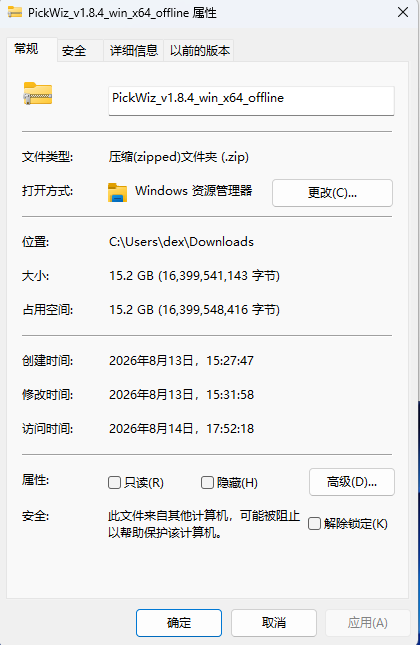
Further compressed system offline installation package
2. Eye-hand Calibration
- When performing needle point tool poke point calibration, each newly added sample undergoes real-time sample validity verification, avoiding calibration failure caused by recording invalid samples or delayed sample validity verification.
When the newly added sample is valid 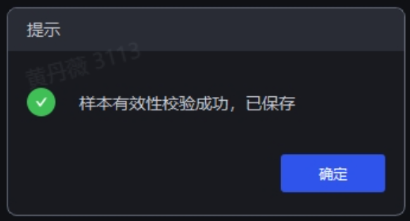
When the newly added sample is invalid 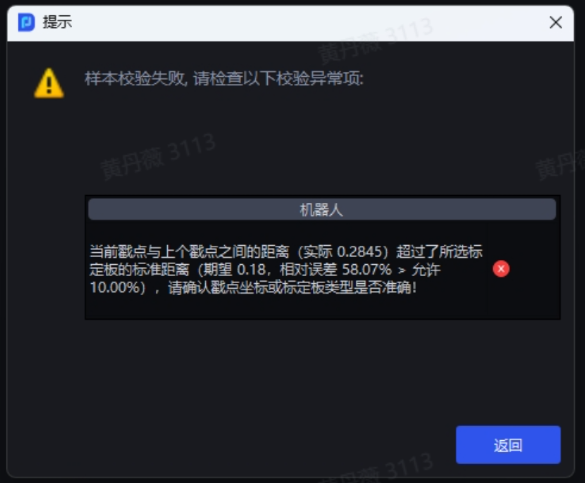
Bug Fixes
- Fixed an issue where, in parallelization mode, after the model was cleaned up, re-running a Task did not automatically reload the model, causing the system to report an error in a pop-up window.
Source: [Issue Collection] Abnormal pop-up error during software operation
- Fixed an issue where the fitting scores of serial/parallel Task runs were inconsistent after the "Instance Optimization" plugin was added.
Source: [Defect] <PickWiz> Parallelization - round-surface Task, after adding the [Instance Optimization] plugin, the fitting scores of serial and parallel runs are inconsistent
- Fixed an issue where, in carton Tasks, boundary overflow when an instance is at the ROI edge caused the Task run to fail.
Source: [Defect] <PickWiz> Carton - 帝翼丰尚 Inner Mongolia project - instance at ROI edge scenario, mask format ratio defaults to 1.3, boundary overflow, causing the Task run to fail
- Fixed an issue where, in quadrilateral-based ordered loading/unloading Tasks, the number of output instances was inconsistent across multiple runs of the same Historical Data.
Source: [Defect] <PickWiz> Parallelization - quadrilateral-based ordered loading/unloading Task, with parallelization enabled and run multiple times, results are inconsistent, and the fine matching score of the pick point for the same instance fluctuates greatly, causing the same Historical Data to output different numbers of instances across multiple runs
- Fixed an issue where, during shadow mode training, EWC consumed a large amount of GPU memory, causing training failure or a system error.
Source: [Defect] <Productization> Shadow mode - occasional shadow mode training failure, reporting OutOfMemoryError
[Defect] <Productization> Shadow mode - shadow mode model training failure, reporting DataLoader worker (pid(s) 5428, 11540) exited unexpectedly
- Fixed an issue where, during Mask mode training, the system continued training after the user manually clicked to stop the training.
Source: [Issue Collection] Mask training pop-up failure, the training logs are still refreshing
- Fixed an issue where the accuracy of the RCNN model degraded after being converted from ONNX format to TRT format.
Source: [Defect] <Productization> RCNN onnx-to-trt fp32 / fp16 accuracy issue located and resolved
- Fixed an issue where, in the Point Cloud noise filtering plugin, the system reported an error when multiple files exist in the template file path.
Source: [Defect] <PickWiz> Point Cloud noise filtering - when multiple files exist in the template file path, the run reports that the template Point Cloud data is invalid
- Fixed an issue where the page deadlocked after failing to modify parameters on the camera configuration page.
Source: [Issue Collection] longrun - USB plug/unplug machine, configuration switching failure causes Task interruption, throwing exception InactiveRpcError of RPC
- Fixed an issue where switching visual parameter configurations via robot communication commands did not take effect.
Source: [Issue Collection] Visual parameter switching does not take effect
- Fixed an issue where the robot frequently reported errors due to too-high call frequency of the robot communication interface.
Source: [Issue Collection] After upgrading 181 software to 1821, the logs frequently report S7 address read/write errors, but normal use is not affected
- Fixed an issue where, when the robot performs eye-hand calibration in a left-hand coordinate system, manually entered coordinates display sample abnormalities.
Source: [Issue Collection] On-site test - after selecting the left-hand coordinate system in the robot configuration interface, calibration abnormality
- Fixed an issue where, in Point Cloud template creation, the result could not be exported after adjusting the Point Cloud template pose.
Source: [Issue Collection] The Point Cloud template and mesh file alignment function is abnormal, and the aligned file cannot be exported
- Fixed an issue where the software crashed when frequently clicking to switch Historical Data on the front-end page.
Source: [Issue Collection] Abnormal pop-up error during software operation
- Fixed an issue with the angle range setting of the visual parameter function "Rotate the pose when the pose is not within the angle range".
Source: [Bug to Requirement] [Visual Parameter] Angle range setting issue of the "Rotate the pose when the pose is not within the angle range" function
- Fixed an issue where, on the Scene Object page, the visualization window did not display the mesh after uploading a mesh file.
Source: [Defect] <Productization> Scene Object - creating a new Scene Object and uploading a mesh file, the visualization window does not display the mesh