Product Overview
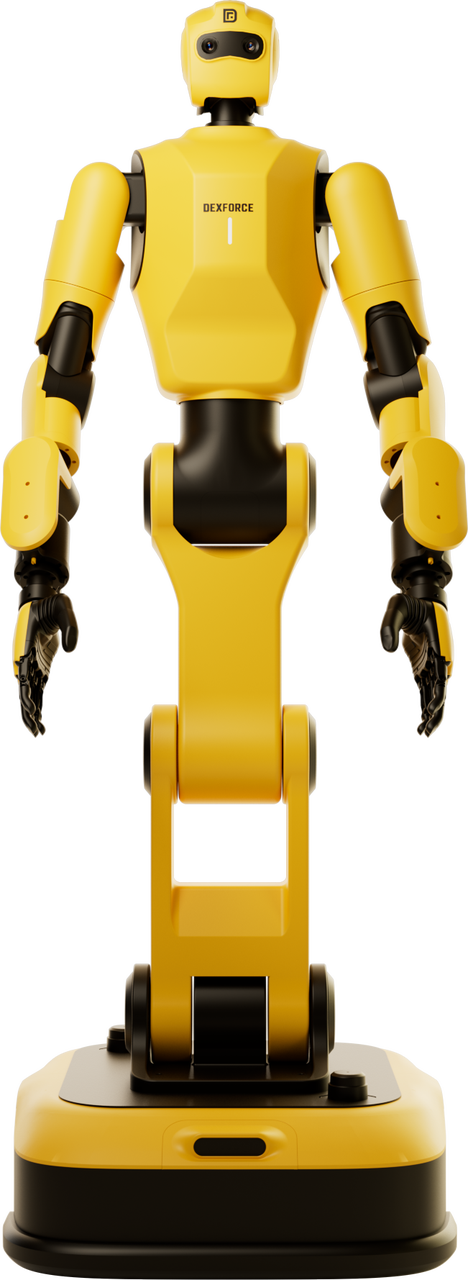 | Dexforce W1 is a full-stack humanoid robotics solution designed for cutting-edge research and higher education.It integrates a complete solution combining advanced hardware (Dexforce W1 Pro), an intelligent development system (X-Wiz), and a data engine (Embodychain), aiming to provide unprecedented depth and breadth for research and teaching in the fields of robotics and artificial intelligence. The solution is built on a core concept: Sim2Real (Simulation-to-Reality). We employ a practical, real-world technological approach to achieve efficient, low-cost research and development in embodied intelligence. Our focus is on a key challenge in embodied intelligence—visuomotor closed-loop manipulation with force feedback. Through powerful sim-to-data generation capabilities, we enable research that previously relied on expensive and time-consuming real-world data collection to be completed at extremely low cost and high speed. |
|---|
1.1 Copyright and Disclaimer
Copyright © DexForce Technology Co.,Ltd. All rights reserved.
No entity or individual may reproduce, reprint, or use any part of this manual in any form without the prior written permission of the Company. This manual is provided for guidance purposes only and shall not constitute any express or implied warranty of any kind. Although the Company endeavors to ensure the accuracy and completeness of the information contained herein, it assumes no liability whatsoever for any errors, omissions, or losses arising from the use of this information.
This company reserves the right to update the contents of this manual from time to time without prior notice. The latest version will be made available on the official website. Please stay tuned.
1.2 Customer Service Support
If you have any questions regarding the contents of this manual, or if you identify any omissions or errors, please contact us.
Customer Service Email: contact@dexforce.top
Service Phone: +86 755-86727102
For further support, please visit the official website: https://www.dexforce.com/w1pro.html
1.3 About This Manual
Before using the W1 Pro, please read this manual carefully to ensure you understand and follow the relevant operating and safety guidelines. Retain this manual for future reference. This manual covers product function descriptions, usage instructions, troubleshooting of common issues, safety precautions, and risk warnings. It also provides detailed guidance for new users on unpacking, deployment, and task execution.
1.4 Safety Instructions
This section contains important safety information for operating the robot. Please read and understand this section carefully before powering on the robot. You must follow the precautions outlined in this section as well as other relevant sections during use. Failure to comply with the safety instructions and precautions may result in equipment damage, personal injury, or even death.
For any questions or suggestions regarding safety, please contact Customer Service Support.
1.4.1 Symbols
| Symbol | Mark | Meaning |
|---|---|---|
 | Warning | Failure to comply with the corresponding warning measures may result in equipment damage, personal injury, or even fatal injury. |
 | Caution | Failure to comply with the corresponding caution notices may lead to unexpected results or undesired system states. |
1.4.2 Safety Risks Due to Misuse
The specific scenarios applicable to the W1 Pro include, but are not limited to, industrial settings such as logistics and warehousing (e.g., pharmaceutical sorting in pharmacy warehouses), commercial scenarios such as barista, and research scenarios such as R&D and education. To more clearly identify risks and define operational boundaries, typical misuse scenarios and their associated safety risks are listed below for reference.
Personnel Safety-Related Misuse: The core risk of this type of misuse lies in directly placing personnel in hazardous environments or indirectly causing injury due to improper operation. Personal injury is the primary violation that must be avoided.
Personnel Transport: The robot is not designed for carrying personnel. Any attempt to forcibly transport personnel may lead to falls or collision injuries due to structural instability or mismatched braking performance.
Applications in Medical and Life-Threatening Situations: Any robot that has not obtained medical safety certification and lacks sterility, precise control capabilities, or emergency response mechanisms may delay treatment, cause medical accidents, or endanger lives when used in medical treatment or life-support scenarios.
Environmental Compatibility Misuse: This type of misuse ignores the robot's applicable environmental range and operates the equipment outside its intended scenarios, which may directly lead to equipment damage and subsequent safety hazards.
Outdoor Use: Industrial robots designed for indoor mobility are not equipped with protective features such as waterproofing, dust/sand resistance, or extreme temperature tolerance. Outdoor use may result in equipment failures, including short circuits and component corrosion. Furthermore, complex outdoor terrains (e.g., gravel, standing water) may cause the robot to lose control, indirectly leading to personal injury.
Steep Slopes on the Route: The robot's power system and anti-slip design are intended only for gentle terrain. Steep slopes fall outside its terrain adaptability limits and may cause the robot to slip or tip over. Such incidents may not only damage the equipment but also result in injury to nearby personnel.
Load Specification Misuse: This type of misuse involves violating the robot's load design standards or functional positioning, which may result in mechanical imbalance and overload damage to core components.
Robot Overload: Exceeding the maximum rated load will disturb the robot's center of gravity balance, potentially causing tipping or load detachment. Such conditions may not only deform the equipment structure but also pose risks of personal injury or damage to nearby objects from the falling load.
For traction: If the robot's power output and connection interface are not designed for towing or traction purposes, forcibly towing other equipment or objects may result in drive motor overload and burnout, failure of the towing connection, and subsequent equipment damage. Additionally, the detached towed object may pose safety risks.
Material Characteristics Misuse: This type of misuse overlooks the compatibility between the material's inherent properties and the robot's design. Forcibly handling incompatible materials may result in material leakage, deterioration, or equipment damage, and may also cause harm to personnel health due to the material's characteristics.
Transporting Liquids or Food: The robot is not equipped with leak-proof sealing structures or food-grade securing devices. During liquid transport, motion-induced shaking may cause spills, potentially resulting in equipment short circuits or slippery floor surfaces that pose a slipping hazard to personnel. During food transport, improper securing may cause food to fall and become contaminated, leading to property damage and associated safety risks.
Handling Chemicals: Chemicals (including corrosive, volatile, and toxic substances) may react adversely with the robot's materials, such as corroding the outer shell or sealing rings. Moreover, the robot is not designed with chemical containment or leak-proof features. Forcibly handling such materials could result in chemical leaks, potentially damaging equipment components and endangering personnel health via direct contact or inhalation of volatile fumes.
1.4.3 Safety Function Limitations
To ensure safe robot operation, extend its service life, and minimize potential accident risks, the following operational restrictions shall be strictly observed.
Load Capacity Limit: The robot is rated for a maximum effective load. Exceeding this rated limit will disturb the robot's center of gravity balance, potentially leading to unstable operation or tipping. Accordingly, the load rating shall be strictly observed, and overloading shall be avoided.
Operating Speed Limit: Appropriate speed settings ensure that the robotic arm maintains the ability to respond promptly to emergencies across various working scenarios. This helps prevent collisions that may result from excessive speed, which can compromise timely braking.
Speed Limitation: Appropriate speed settings ensure that the robot stays on its preset navigation path, thereby minimizing path deviations. Avoiding improper path deviations reduces unnecessary chassis wear and tear and extends the equipment's service life.
Working Time Limit: The robot has a specified limit on continuous operating time. Prolonged uninterrupted operation is not permitted. The robot shall be stopped at defined intervals to perform comprehensive maintenance and inspection, thereby ensuring stable and reliable long-term performance.
Working Environment Restrictions: This robot is intended solely for indoor industrial environments. Use outdoors or in potentially explosive atmospheres is strictly prohibited.
Limited Collaboration Range: The robot's collaborative operating range is restricted. During operation, any contact or collision with other equipment or personnel must be strictly avoided. Such incidents are prohibited, and cross-operation is likewise forbidden.
1.4.4 Personnel Safety
To ensure the safety of operators, nearby personnel, and the surrounding environment, the following safety boundaries must be observed to prevent personal injury accidents.
When operating remotely, ensure an open, obstacle-free area to prevent the robot from colliding with objects or being inadvertently contacted by personnel.
When the robot is started, personnel shall maintain a minimum safe distance of 1.5 meters to avoid the risk of collision or crushing injury resulting from equipment motion.
Do not insert fingers or any other body parts into the robot's joint movement areas. Such actions may result in injury or limb compression during joint operation.
Children and pets are strictly prohibited from entering the work area during operation. Furthermore, no person under the age of 18 shall operate the equipment without adult supervision.
Ensure the emergency stop switch has been released before use. In an emergency, press the emergency stop button to disconnect power to the equipment. This action enables rapid risk mitigation and ensures personnel safety.
1.4.5 Equipment Safety Requirements
The following prohibited operations may result in equipment damage, malfunction, or secondary injury. To ensure equipment safety and effective troubleshooting, the guidelines below must be strictly observed.
Do not place heavy objects on the robot chassis. The chassis is designed to support only specified loads. Placing excessive weight on it may result in deformation or damage, thereby compromising the stability of equipment movement.
Non-professionals are strictly prohibited from manually forcing joint angle adjustments. Such forced adjustments may damage the joint transmission mechanism and compromise sensor accuracy, potentially resulting in equipment malfunction. Additionally, improper operation by untrained personnel may create safety hazards.
If the equipment malfunctions, cease operation immediately to prevent secondary damage. Consult the Troubleshooting section for troubleshooting guidance. If the issue persists, contact customer service support.
Unauthorized personnel are strictly prohibited from disassembling or modifying the robot or its internal structure. Any unauthorized disassembly or modification may compromise the safety and stability of the original factory design, potentially resulting in component damage, functional failure, or safety incidents.
This product shall not be operated or used in unconventional environments, including but not limited to high temperature, extreme cold, chemical corrosion, or water immersion. Crossway assumes no liability for any malfunctions or damages arising from such conditions.
Failures and risks resulting from normal wear and tear of components or battery aging under standard use conditions shall be deemed normal usage risks of the product. Cross-Dimensional shall not assume any liability or responsibility for such consequences.
1.4.6 Battery Safety
The W1 Pro is equipped with a standard 48V 40Ah lithium iron phosphate (LiFePO₄) battery. A Battery Management System (BMS) is employed to monitor the battery's operating status and collect key data, including battery capacity, output voltage, and output current.
When the status light on the robot's chest flashes green, this indicates a fully charged battery. A flashing yellow light indicates a low battery. When the charge level falls below 30%, recharging is required.
Warning:
Use only the original chargers (wired power adapters or charging stations) supplied by DexForce Technology.
Do not immerse the battery connector or power adapter in water or other liquids. Avoid using the equipment in high-temperature, high-humidity, or high-dust environments. Keep the equipment away from fire sources and flammable materials during operation.
Do not disassemble the battery or charger. Unauthorized disassembly of the battery may result in an internal short circuit, potentially causing decomposition of internal materials, fire, or explosion.
Do not squeeze, puncture, or disassemble the battery. The battery is equipped with a safety protection system (BMS). Damage to the BMS may cause the battery to overheat, explode, or catch fire.
1.5 Product Capabilities
The Dexforce W1 solution is equipped with a comprehensive, multi-layered functional system designed to support task execution in a wide variety of complex scenarios. It delivers customized tool support and technical assurance, demonstrating high adaptability and multi-functional integration capabilities. The core functions include:
Teleoperation : Utilizing high-precision motion capture and multi-degree-of-freedom collaborative control, the system maps human movements to robot commands in real time with high accuracy. When combined with intelligent trajectory planning and dynamic balancing algorithms, this ensures smooth, stable robot motion and faithful reproduction of complex teleoperation tasks.
Autonomous Navigation and Movement : Equipped with a high-precision positioning unit and intelligent path planning algorithms, the system supports dynamic obstacle recognition and avoidance. This enables autonomous positioning, path optimization, and stable movement across complex indoor and outdoor environments.
Application Development : Built upon the ROS 2 operating system, the solution offers an open development architecture with comprehensive secondary development interfaces. This empowers developers to extend functionality and create customized applications, reducing the development barrier and supporting diverse use cases ranging from scientific research experiments to tailored industry solutions.
Human-Computer Interaction: Using voice commands and audio-visual feedback, the system delivers intuitive and convenient interaction, allowing users to quickly assess device status and perform operations.
Safety Protection : The system implements a comprehensive, full-link safety protection mechanism that provides end-to-end protection through hierarchical response. Key features include active obstacle avoidance, contact buffering, and emergency braking.
Emergency Stop Button: In an emergency, for example, when the robot is about to fall, collide, or experience motor runaway, pressing the emergency stop button located on the back of the robot immediately disconnects power to the motors, quickly halting robot motion and preventing accidents. To trigger an emergency stop without physical contact with the robot, a remote emergency stop cable shall be used. Only the remote emergency stop cable supplied by the original manufacturer shall be used, and proper connection to the chassis contacts must be verified.
Anti-Collision Strips: Mounted on the robot chassis, these strips generate a signal upon contact with an obstacle, causing the robot to cease movement.
1.6 Product Delivery List
| Fitting Method | Name | Description | Quantity | Unit |
|---|---|---|---|---|
| Standard | W1 Pro robot | Flight case packaging. Hardware configuration is subject to the robot version. | 1 | Set |
| Standard | Manual Charger | Used for manual plug-in charging. Chargers are not interchangeable between different robot versions; a matching charger must be used. 【HW V0.23】 Input:220VAC~240VAC,socket power rating must be greater than 1950W Output:Voltage:48V-60VDC , Maximum Current: 35A 【HW V0.24】 Input:220VAC~240VAC Output:54.8V,40A±10%A | 1 | pcs |
| Optional | Automatic Charging Station | Used for the robot's automatic recharging function. Charging Station are not interchangeable between different robot versions; a matching charging station must be used. 【HW V0.23】 Input:220VAC~240VAC,socket power rating must be greater than 1950W Output:Voltage:48V-60VDC , Maximum Current: 35A 【HW V0.24】 Input:220VAC~240VAC Output:54.8V,40A±10%A | 1 | pcs |
| Standard | Control Handle | Used for manual control of robot movement. 、Model: Logitech G F710 | 1 | pcs |
| Standard | Delivery Documentation | Robot factory test report, certificate of conformity, quality assurance report, etc. | 1 | Set |
| Optional | VR headset and Touch Plus Controllers | Used for teleoperation of the robot. Model: Meta Quest 3S 128GB | 1 | pcs |