V1.8.2 Release Notes
V1.8.2 Release Notes
Preface
| Version Number | Camera SDK | ||
|---|---|---|---|
| PickWiz: | 1.8.2 | Xema: | 1.5.5 |
| PickLight: | 1.8.2 | Finch: | 1.3.1.1 |
| GLIA: | 0.5.1 | Sparrow: | 3.5.3 |
| RLIA: | 0.3.4 | Stereo: | 4.3.4 |
| MixedAI: | 0.6.1 | Enumerate: | 1.0 |
PickWiz 1.8.2 is an optimized version based on PickWiz 1.8.1. It newly supports functions such as function processing visualization, template-based segmentation model and image feature matching project types, communication with left-handed coordinate system Robots, collision detection for bins and Target Objects, and Shadow Mode support for general/surface Target Objects. It also optimizes function parallelization, Camera exception reporting mechanisms, One-Click Linking training for stereo models, and Eye in hand random pose automatic sampling methods.
New Features
1. Welcome Page
- Two new project types have been added: “Surface Target Object Ordered Loading/Unloading (Image Matching)” and “Surface Target Object Positioning and Assembly (Image Matching Only)”. These support generating template sample data in “Point Cloud Template Creation,” which can be used directly for subsequent Instance Segmentation and pose estimation without One-Click Linking training models. See Visual Parameter Tuning Guide for Surface Target Object Ordered Loading/Unloading and Positioning Assembly (Image Matching).
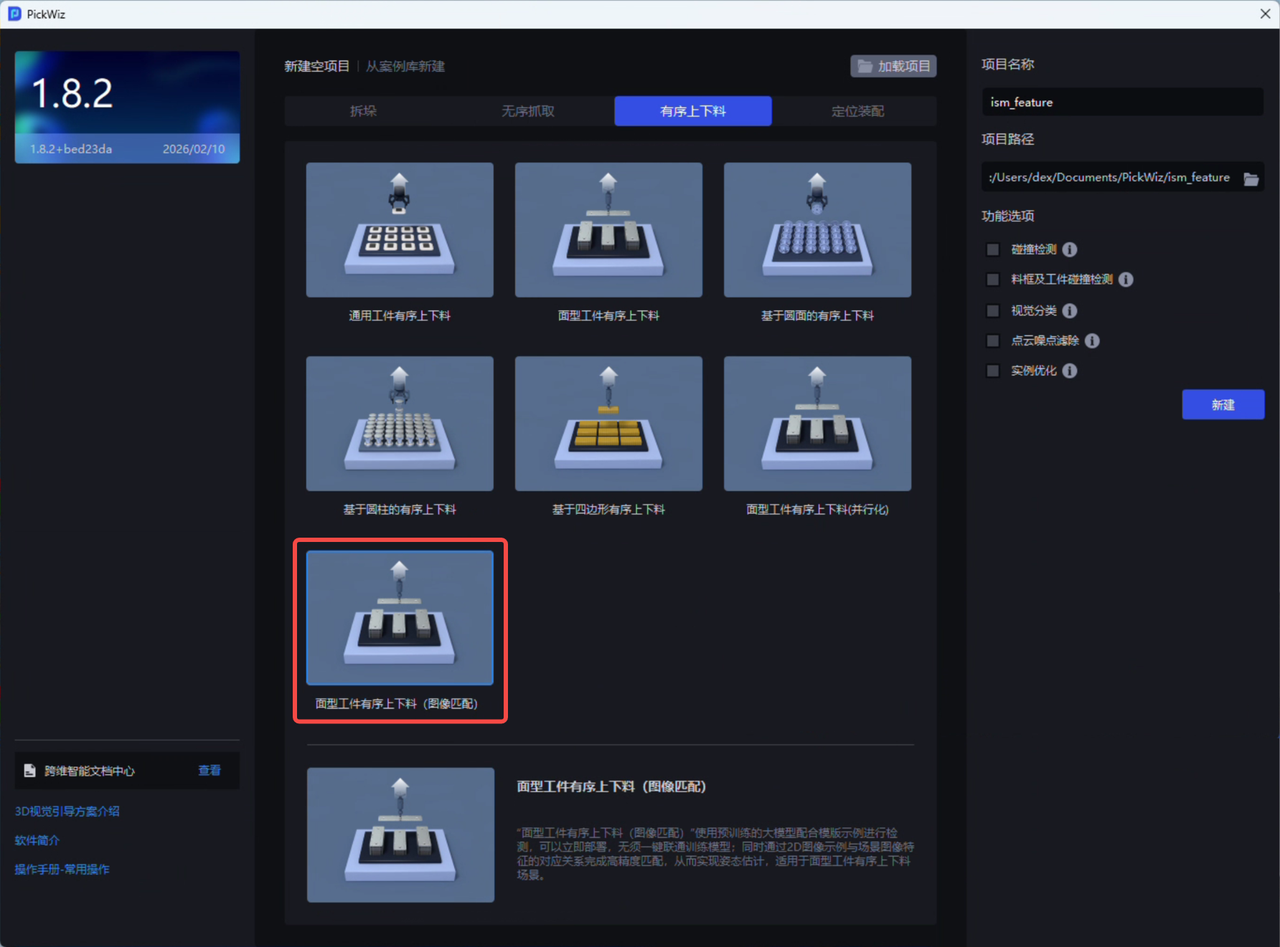 “Surface Target Object Ordered Loading/Unloading (Image Matching)” uses a pre-trained large model together with template examples for detection, enabling immediate deployment without One-Click Linking training models; at the same time, it completes high-precision matching through the correspondence between 2D image examples and scene image features, thereby achieving pose estimation. It is suitable for surface Target Object ordered loading/unloading scenarios.
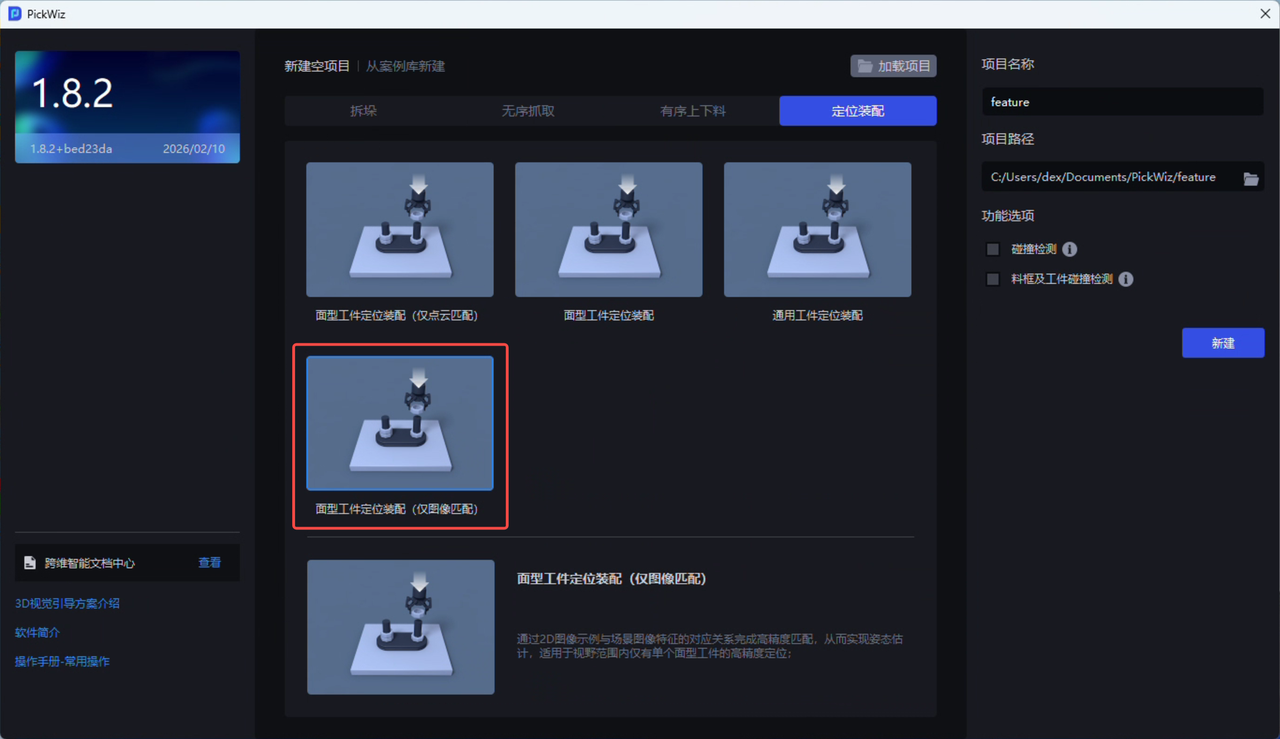
“Surface Target Object Positioning and Assembly (Image Matching Only)” achieves high-precision matching through the correspondence between 2D image examples and scene image features, thereby achieving pose estimation. It is suitable for high-precision positioning scenarios where there is only a single surface Target Object within the field of view.
For easier distinction, the original “Surface Target Object Positioning and Assembly (Matching Only)” under “Positioning and Assembly” has been renamed to “Surface Target Object Positioning and Assembly (Point Cloud Matching Only)”. Its internal functions, Workflow, algorithms, procedures, and so on remain unchanged.
2. Point Cloud Template Creation
- A new “Generate Template from Historical Data” function has been added. It can obtain scene Point Clouds through historical data or on-site acquisition, then use them to generate Target Object Point Cloud templates and the template data required by the two project types “Surface Target Object Ordered Loading/Unloading (Image Matching)” and “Surface Target Object Positioning and Assembly (Image Matching Only)”. See Point Cloud Template Creation Guide .
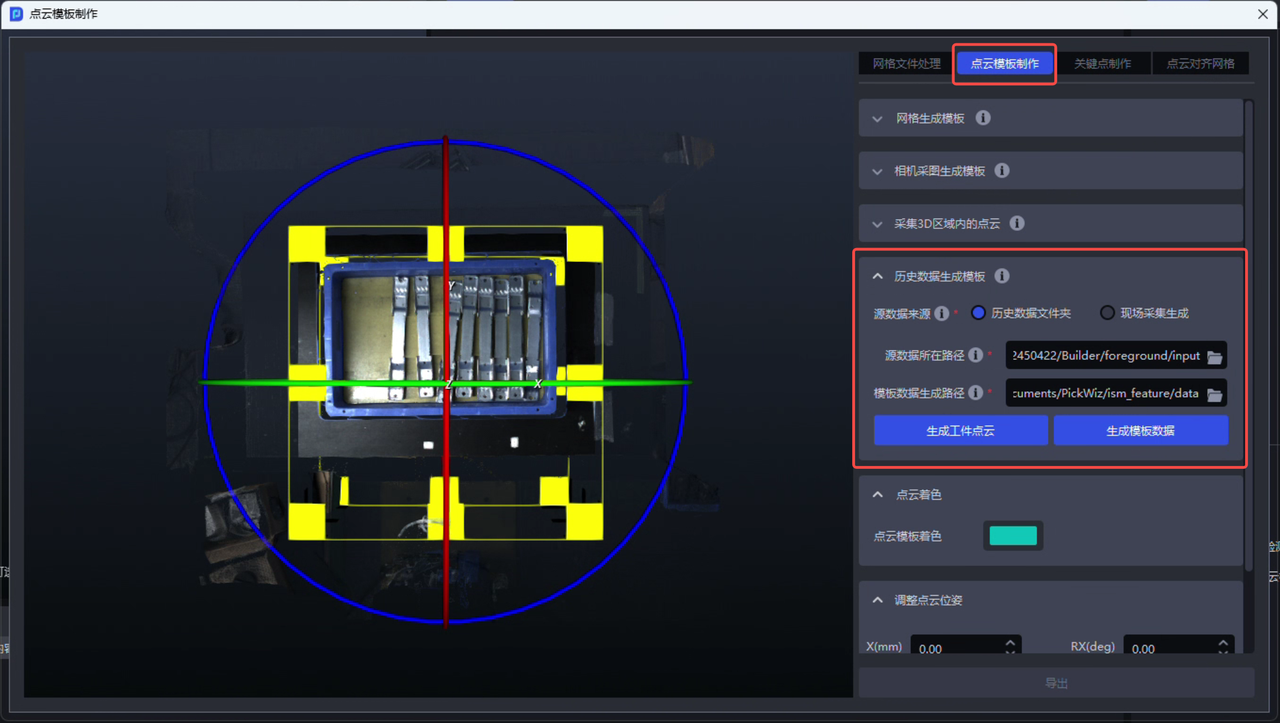 Generate template data from historical data Generate template data from historical data | 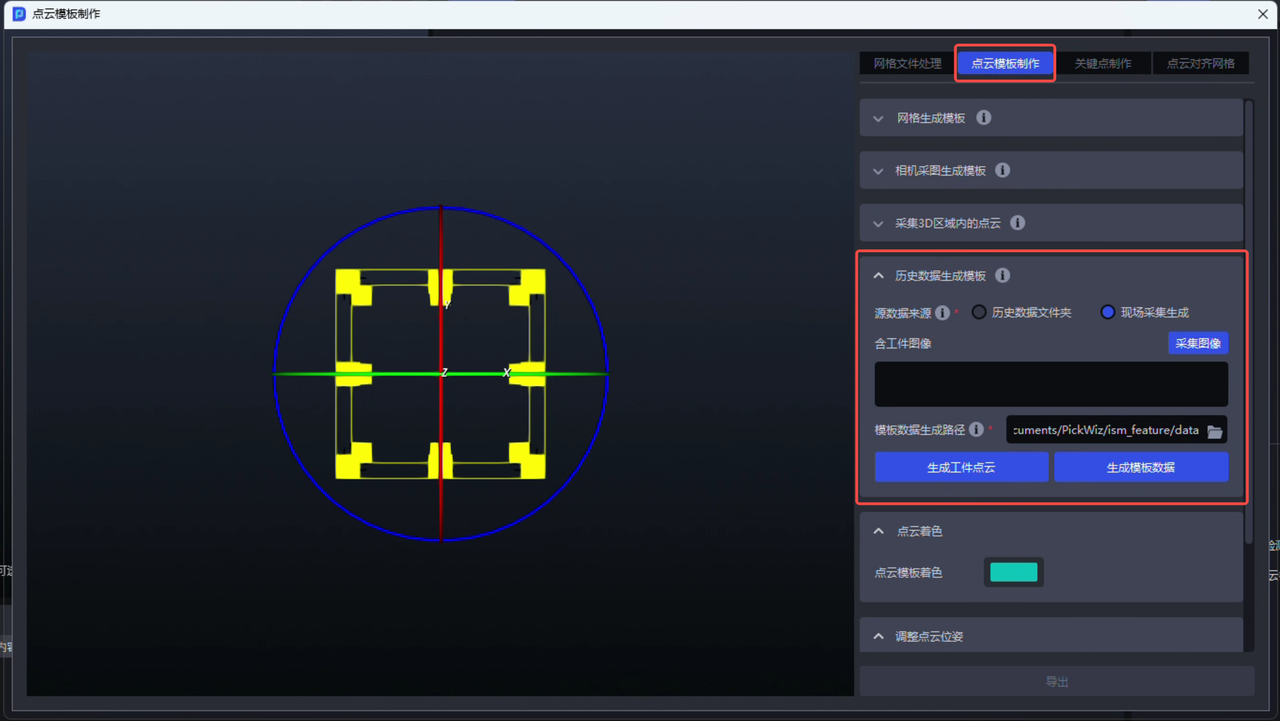 Generate template data from on-site acquired images Generate template data from on-site acquired images |
|---|
When generating template data from historical data, the uploaded “source data path” must contain 4 files: a scene Point Cloud image containing the Target Object (.ply), the original color image (.png), the depth image (.tiff), and the Camera Intrinsic Parameter json file (.json). These 4 files must belong to the same historical data record.
3. Robot
- Newly supports communication and interaction with left-handed coordinate system Robots. You only need to select “left-handed coordinate system” in the “coordinate system type” field on the “Robot Configuration” page to communicate and interact with left-handed coordinate system Robots. This is independent of the communication protocol, and functions such as eye-hand calibration, Pick Point teaching, and Visual Parameter configuration can also be used normally. The system automatically converts between left-handed and right-handed coordinate systems without manual conversion or modification. See TCP Server Communication Configuration .
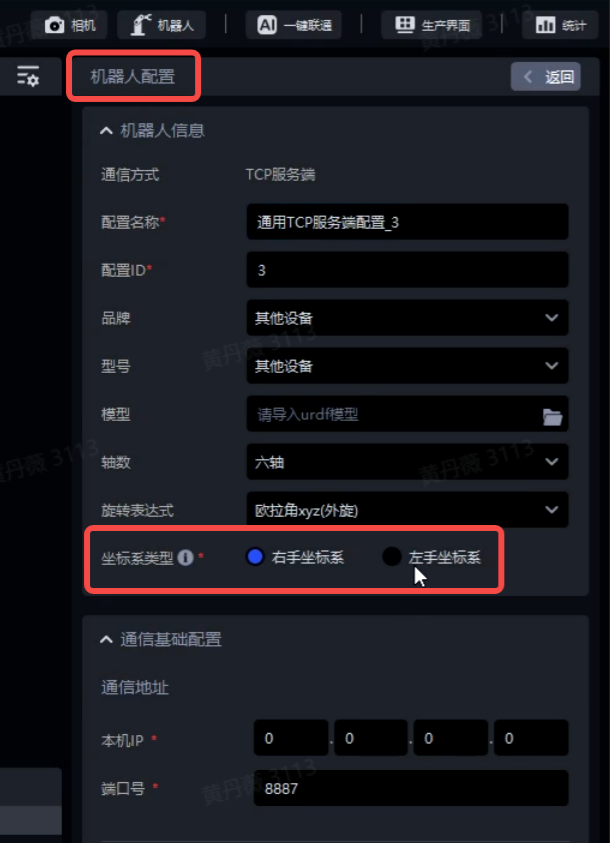 Supports left-handed coordinate system Robots Supports left-handed coordinate system Robots | 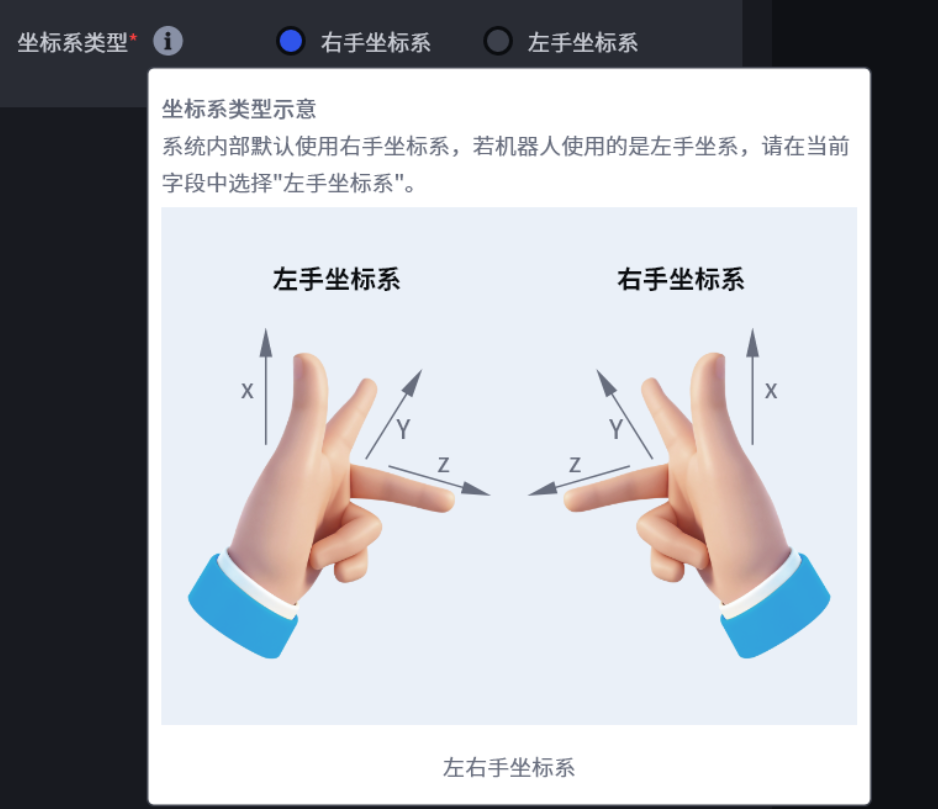 Illustration of left-handed/right-handed coordinate systems Illustration of left-handed/right-handed coordinate systems |
|---|
4. Visual Parameters
- A new “Bin and Target Object Collision Detection” plugin has been added. It supports collision detection for fixtures and bins, fixtures and Target Objects around the Pick Point, and fixtures, bins, and Target Objects around the Pick Point, filtering out Picking Poses that may cause collisions. Compared with the previous “Collision Detection” plugin, the “Bin and Target Object Collision Detection” plugin supports vision computing acceleration (i.e., function parallelization), and will also provide better extensibility and performance in subsequent versions. See Bin and Target Object Collision Detection Usage Guide .

- The “Filter Pick Points Where the Target Object and Fixture Collide” function in the “Pick Point Filtering” node has been optimized with a new technical implementation, making the function faster to compute and usable whether the “vision computing acceleration” function is enabled or disabled.
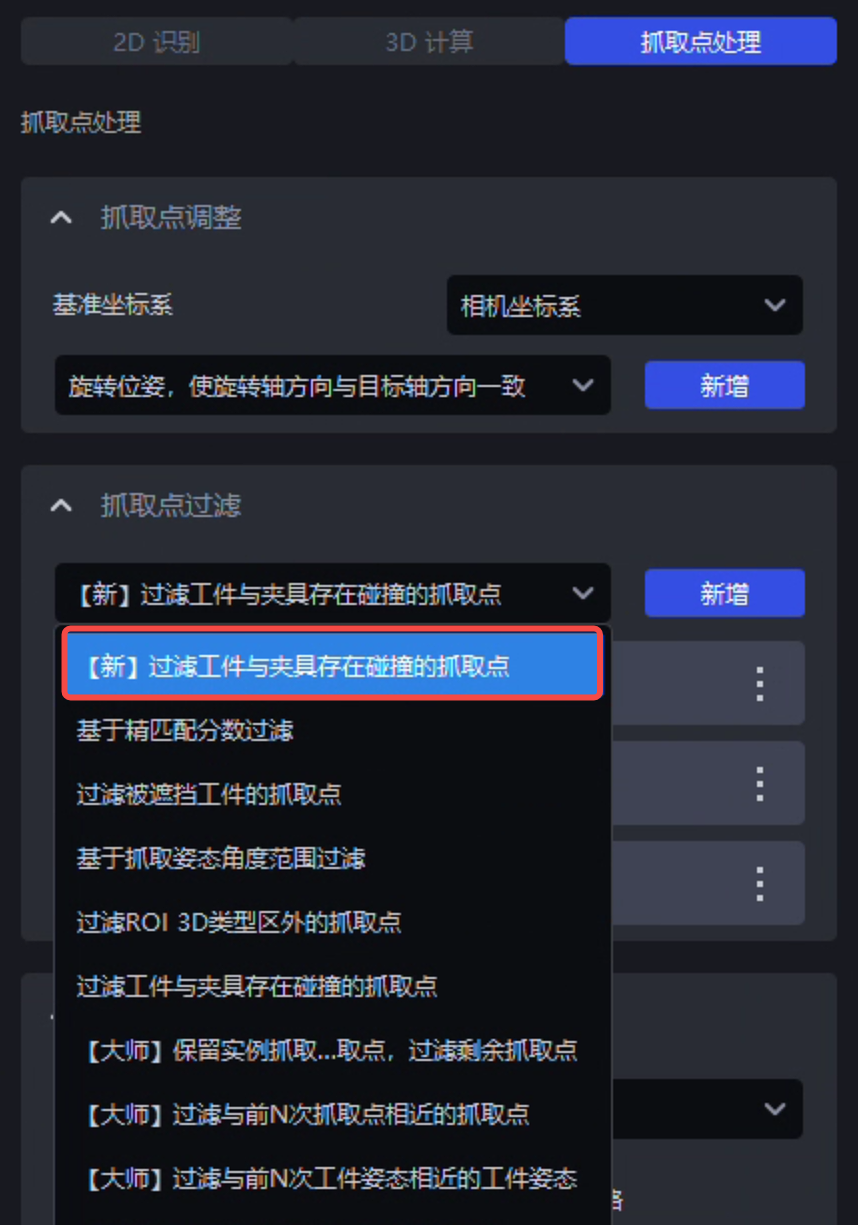
5. Visualization Window
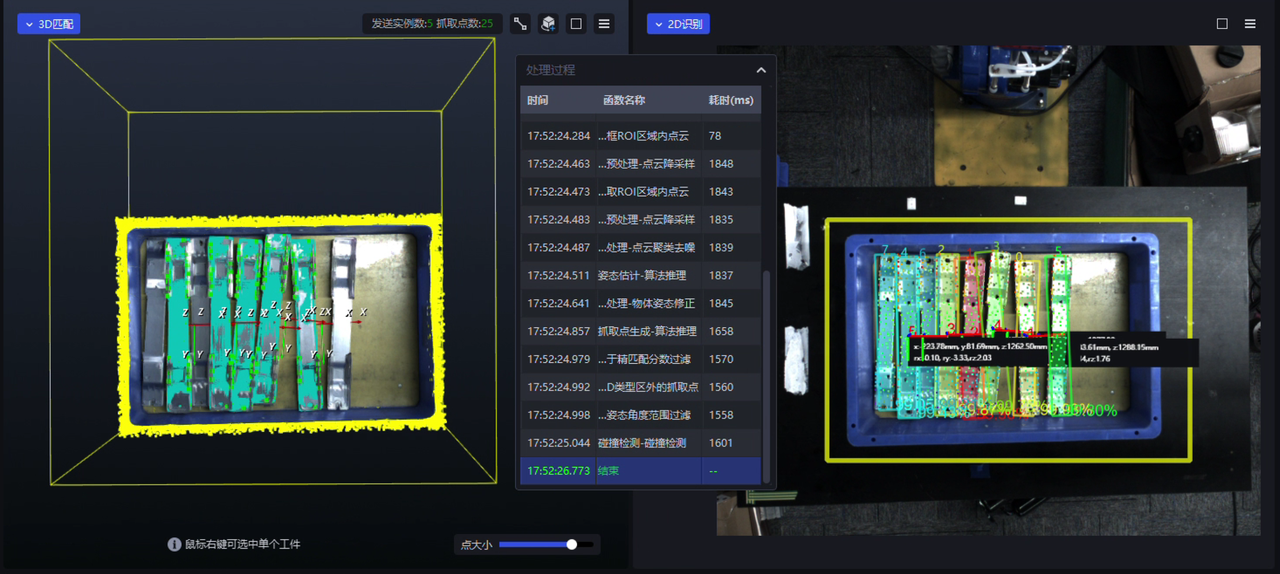
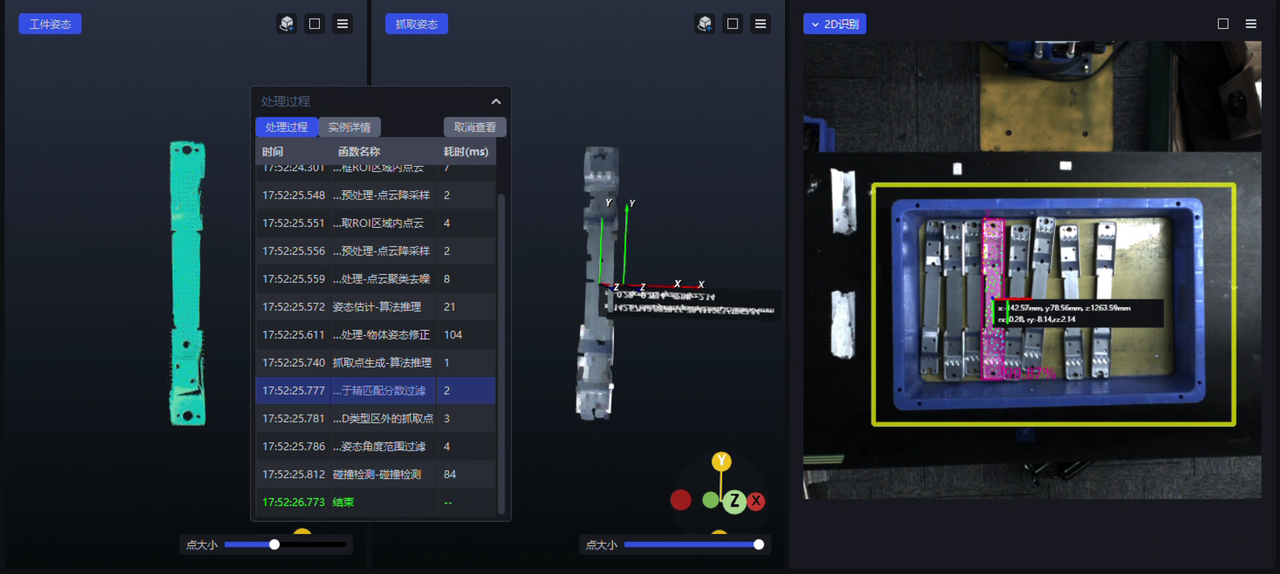
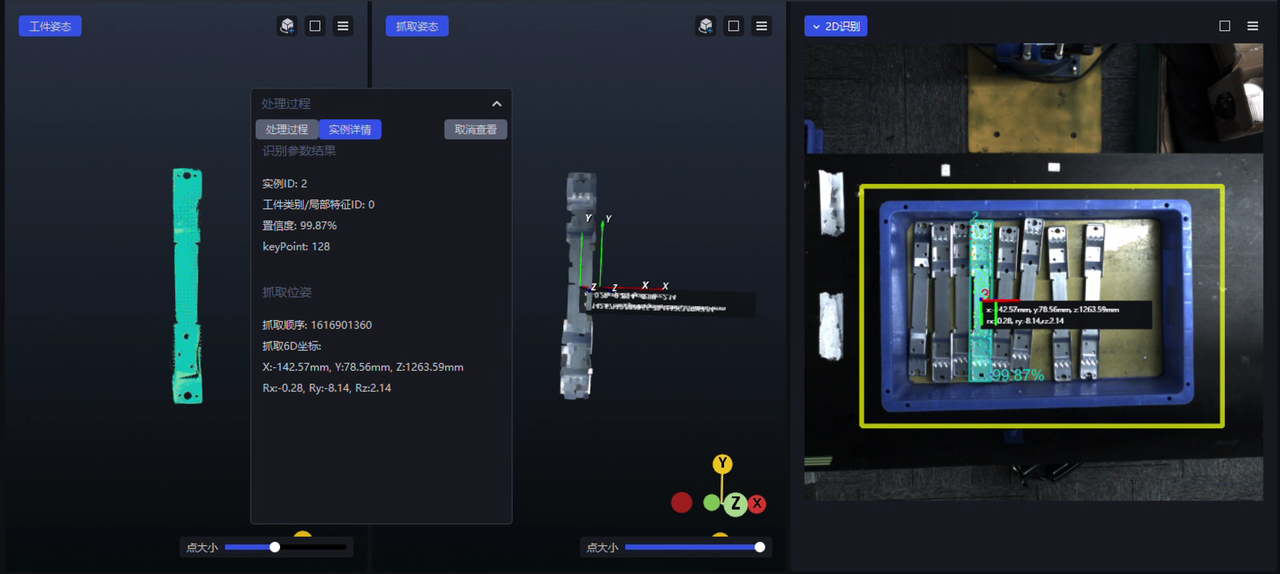
- A new function processing visualization feature has been added. In the visualization window, you can see the 2D/3D effects produced after the latest run data passes through each algorithm/function. Clicking different function names in the “Processing Procedure” floating window lets you view the 2D/3D effect corresponding to each function. The first-level window displays the 2D recognition/3D Matching effect of the entire scene. Right-click the instance Point Cloud of a specific single Target Object to enter the second-level window, where you can view the function processing Procedure of that Target Object instance, together with the corresponding Target Object Pose, Picking Pose, 2D effect, and so on. See Visualized Parameter Tuning Guide .
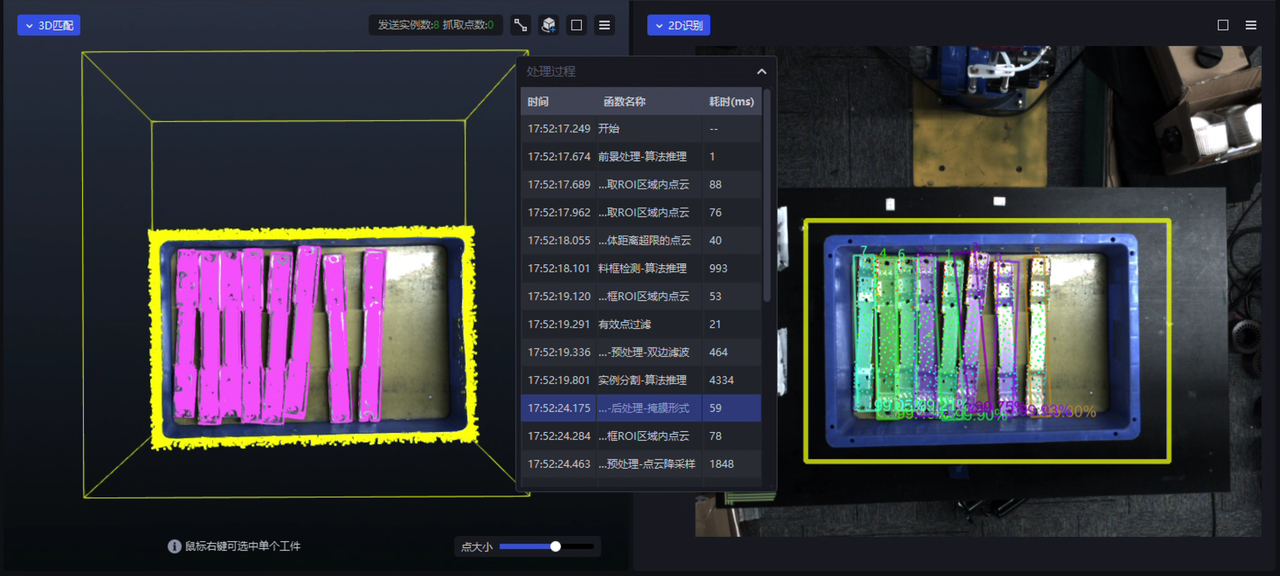 |  |
|---|
Function processing visualization (first-level window)
 |  |
|---|
Function processing visualization (second-level window)
The function processing visualization feature currently only supports scenarios using serial function processing, and does not yet support scenarios using function parallelization (with vision computing acceleration enabled);
The function processing visualization feature currently only supports visualization of the function processing Procedure in debug mode, and does not yet support turbo mode;
The function processing visualization feature is an extension and enhancement of the original “real-time parameter tuning” function in the visualization window. Therefore, after the function processing visualization feature went live, the switch Button for the original “real-time parameter tuning” function in the visualization window was removed.
Feature Optimizations
1. Camera
- The stereo imaging model now supports the TRT type, making the model inference architecture more standardized and technically helping future breakthroughs in the inference efficiency bottleneck of pth models.
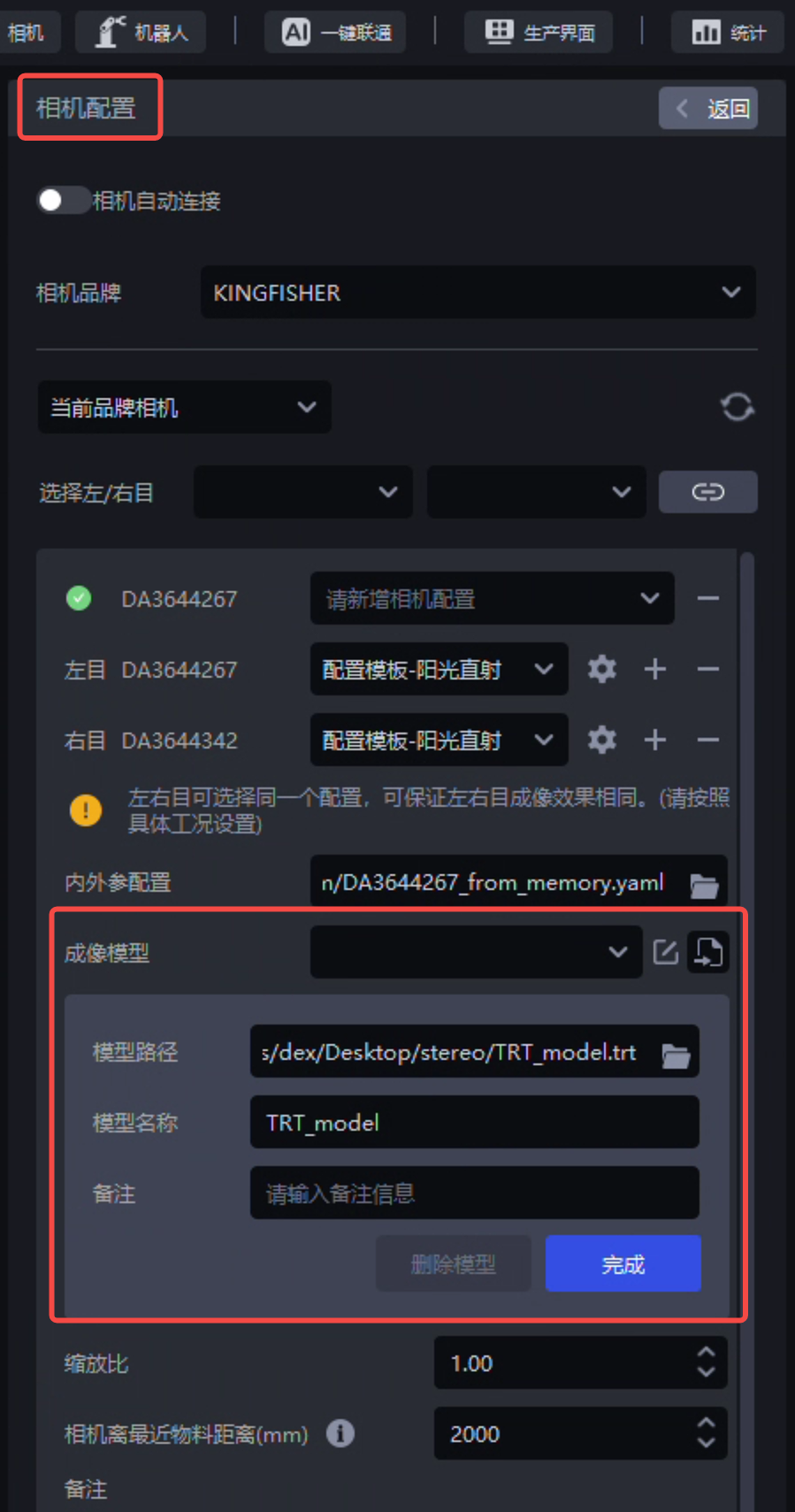
On-site tests were carried out for the depalletizing stereo imaging TRT model in debug mode, turbo mode, with auto exposure enabled/disabled, and with high dynamic range (HDR) enabled/disabled. Compared with the pth model, the TRT model has basically the same imaging effect, takes less time (not obvious when auto exposure and high dynamic HDR are enabled), but occupies more video memory;
Due to the video memory usage issue, the TRT type stereo imaging model currently only supports low-resolution stereo Cameras, and does not yet support high-resolution stereo Cameras;
- The “Distance from Camera to Nearest Material (mm)” field on the “Camera Configuration” page has been optimized so that the minimum value can be set to 200, to match the minimum working distance of 200mm for the KINGFISHER-S-601 Camera;
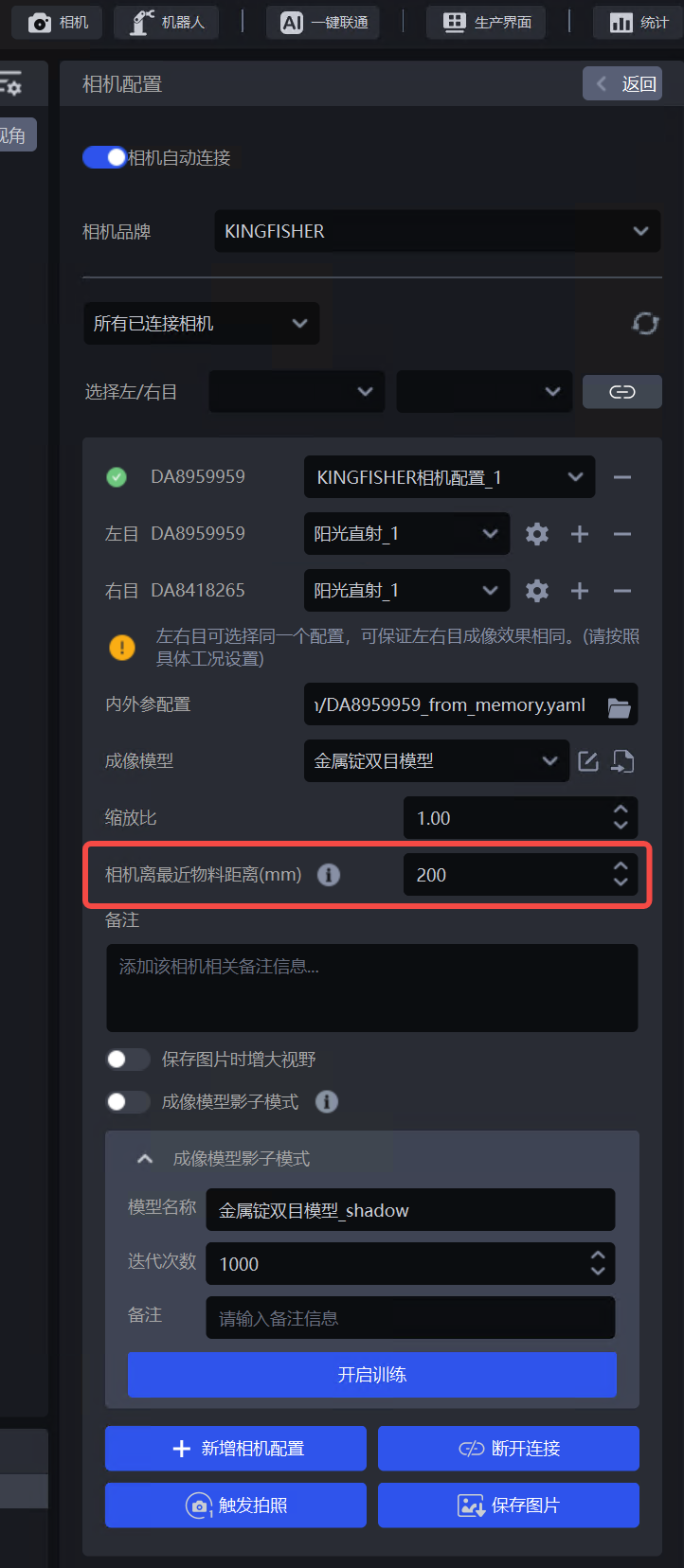 The minimum Camera-to-nearest-material distance can be set to 200mm The minimum Camera-to-nearest-material distance can be set to 200mm | 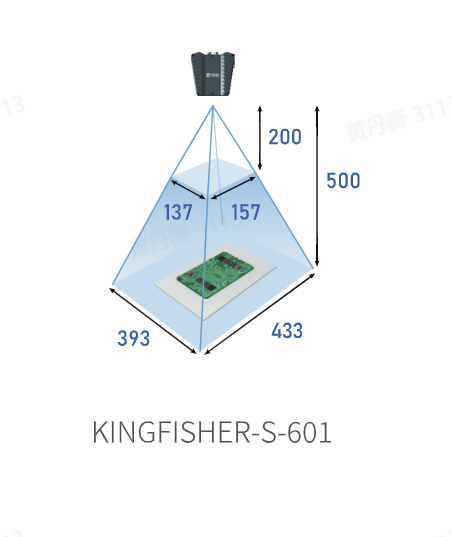 |
|---|
2. Robot
- The placeholders in communication commands with the Robot have been optimized, supporting adjusting placeholders in commands sent from the Robot to PickWiz (such as specifying or switching the target ROI ID), making it convenient to perform further processing on commands sent from the Robot to PickWiz. See External Script Usage Guide .
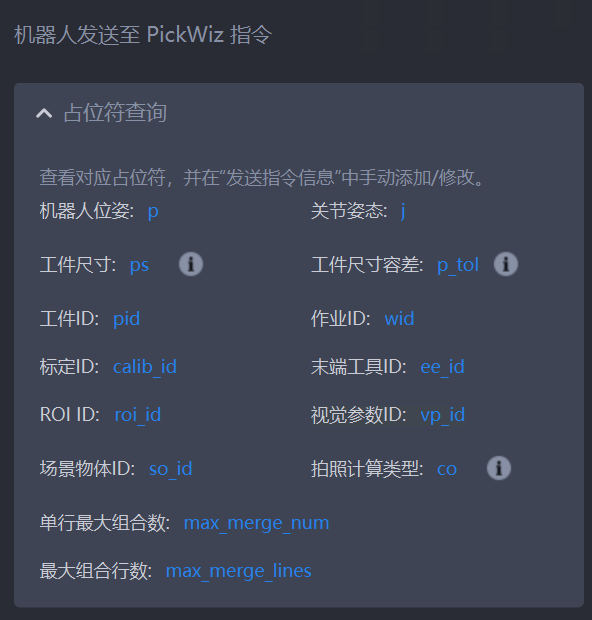
Placeholders in commands sent from the Robot to PickWiz
The external script has been optimized to support obtaining the center point of 2D ROI/3D ROI through the external script, making it convenient to perform subsequent processing based on the ROI center point;
If the Workflow selects the “Visual Classification” plugin, then in the command sent by PickWiz to the Robot, the information of each instance will additionally include the corresponding classification type ID of that instance, making the message structure clearer and more reasonable.
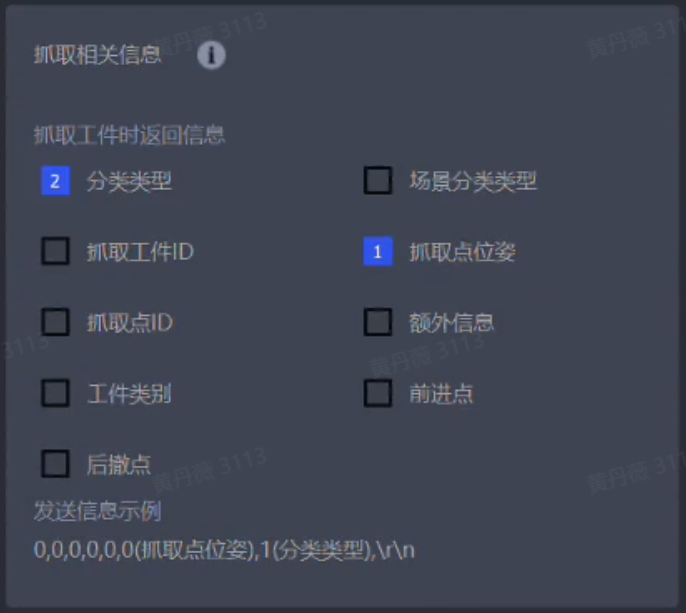
Picking information sent by PickWiz to the Robot
3. One-Click Linking
The One-Click Linking training stereo imaging model function has been optimized. If the task is not properly connected to a Camera, selecting the corresponding stereo Camera model on the One-Click Linking page still allows you to create a One-Click Linking task and train the stereo imaging model. At the same time, the crop size has been increased during data rendering, and dual GPUs are used by default during model training, improving the training results of stereo imaging models.
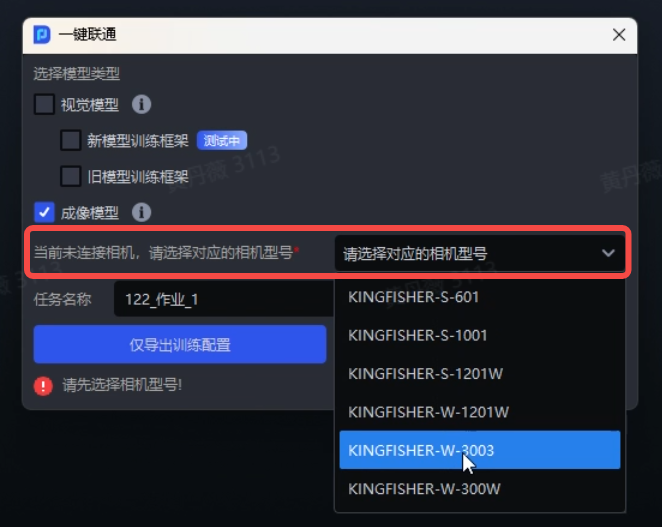
A One-Click Linking task can still be created without a connected Camera as long as the Camera model is selected
Currently, One-Click Linking still only supports imaging model training for KINGFISHER Cameras.
4. Shadow Mode
The ordered loading/unloading scenario for surface Target Objects has been optimized to support local secondary training of imaging models and detection models for surface Target Objects through Shadow Mode.
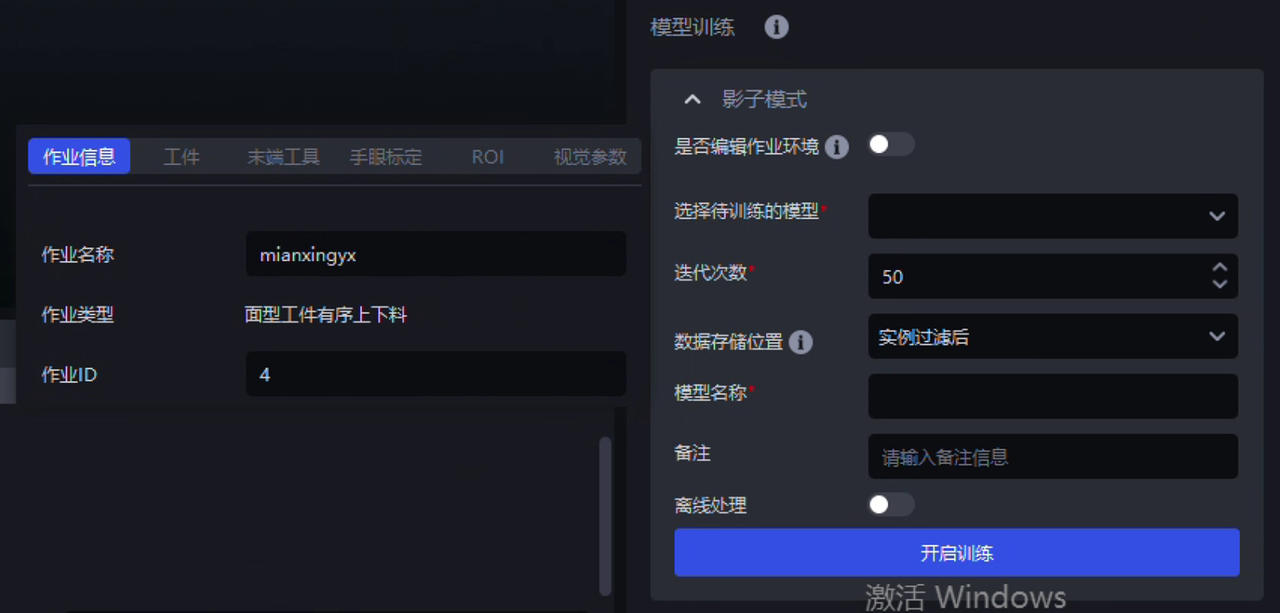
Ordered loading/unloading of surface Target Objects supports Shadow Mode
5. Eye-Hand Calibration
- Random pose automatic sampling for Eye in hand has been optimized to use spherical sampling, which can effectively avoid the issue of the Calibration Board going out of the Camera field of view during sampling, thereby increasing the sampling success rate and also laying the foundation for improving the precision of Eye in hand eye-hand calibration later. See Random Pose Automatic Sampling .
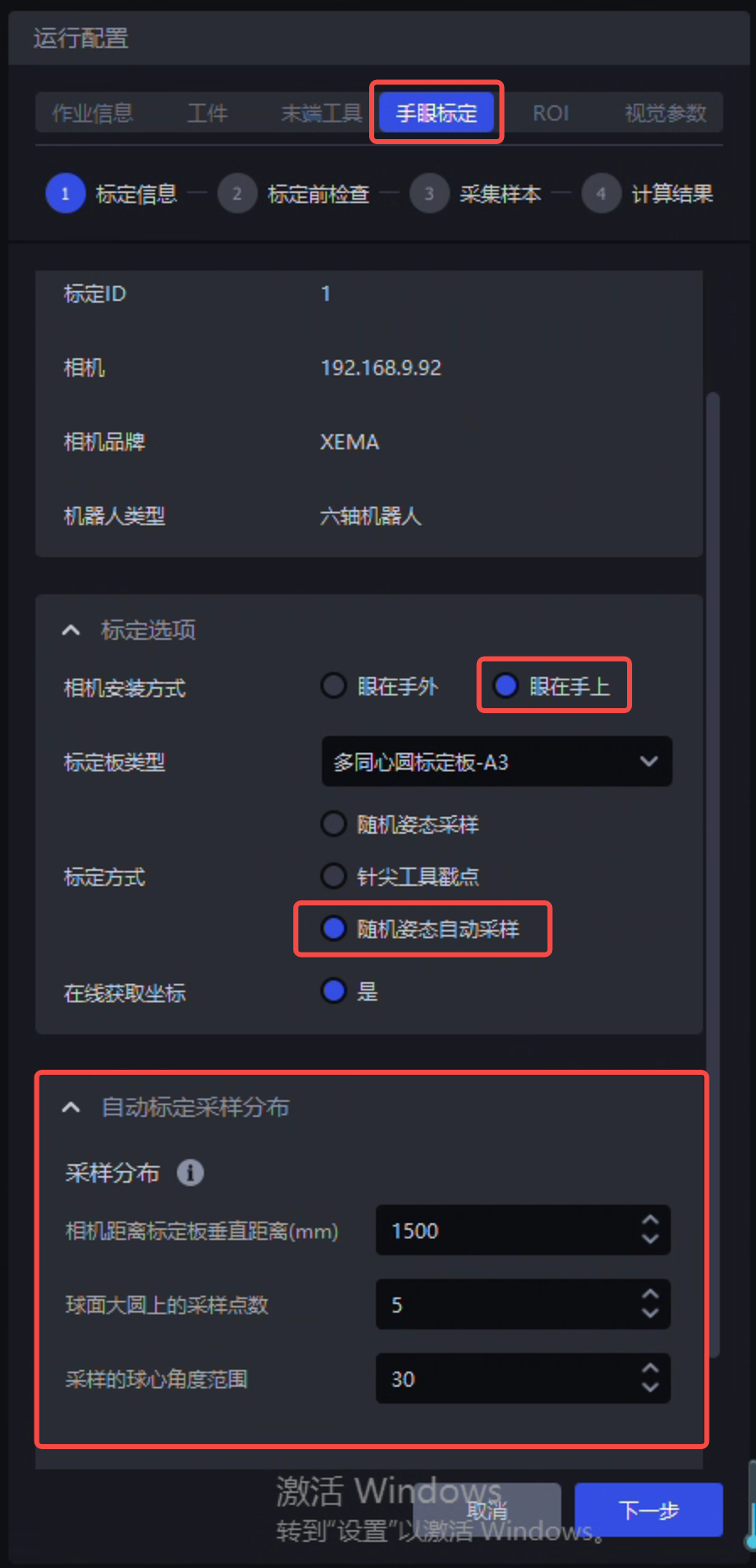 Random pose automatic sampling for Eye in hand Random pose automatic sampling for Eye in handusing spherical sampling | 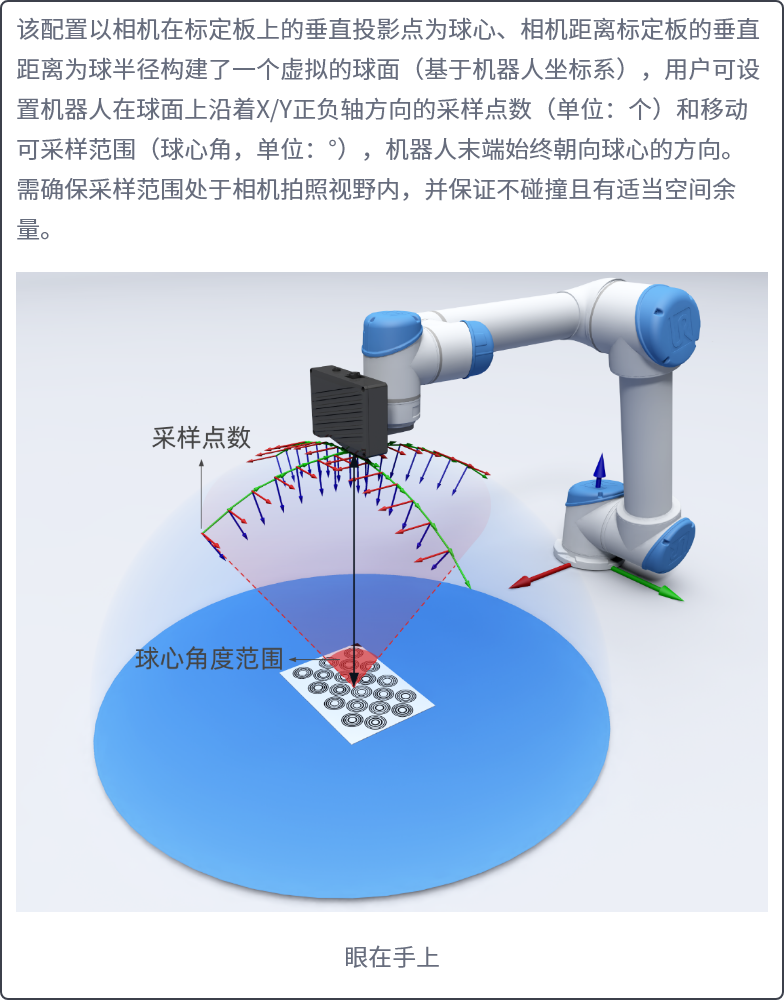 Illustration of spherical sampling Illustration of spherical sampling |
|---|
6. Visual Parameters
- The vision computing acceleration (i.e., function parallelization) feature has been optimized by adding support for function processing parallelization in nodes or functions such as Instance Segmentation, instance filtering, pose estimation, Pick Point filtering, and Pick Point adjustment. When vision computing acceleration (i.e., function parallelization) is enabled, the functions within these nodes can also be configured and take effect normally.
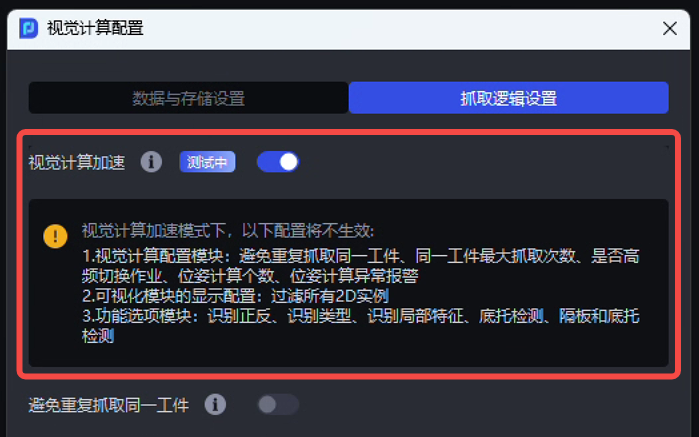
Enabling vision computing acceleration enters function processing parallelization mode
Scenarios that still do not support function processing parallelization: single bag depalletizing, ordered loading/unloading of surface Target Objects, unordered picking of surface Target Objects, loading/unloading of surface Target Objects (mutually isolated materials), ordered loading/unloading of surface Target Objects (Image Matching), and positioning assembly;
Plugins that still do not support function processing parallelization: face recognition, recognition types, local feature recognition, pallet detection, divider and pallet detection, and Point Cloud outlier filtering;
On-site teams are currently conducting systematic comparative testing of serial and parallel function processing modes, and a comparative test report will be released later;
Since the underlying implementation logic and tools used by serial and parallel function processing are not completely the same, the output results of serial and parallel function processing may also not be completely the same at present. However, within each individual serial or parallel mode, the output results are consistent from run to run.
- The Instance Segmentation Parameters in function parallelization scenarios have been optimized. It now supports configuring the two Parameters “Whether color is required for Point Cloud generation” and “Bounding box scale ratio” in “Visual Parameters” — “2D Recognition” — “Instance Segmentation”.
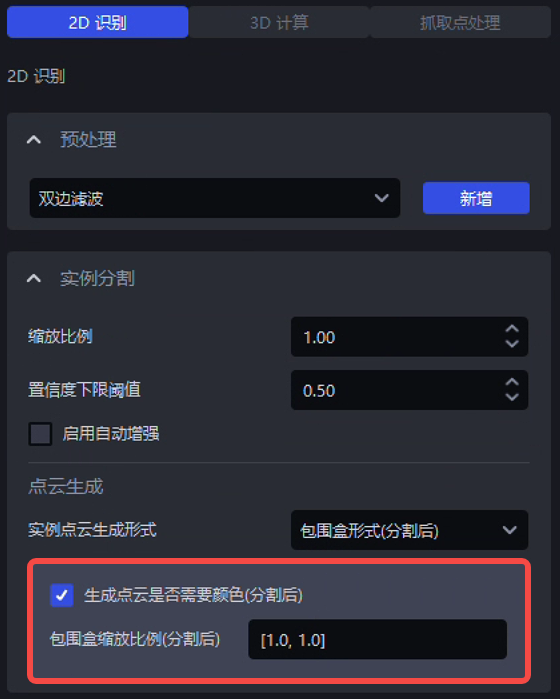
Instance Segmentation result settings in function parallelization
- The method of loading the detection model in the “Auto Enhancement” function has been optimized. In “2D Recognition” — “Instance Segmentation,” whether enabling auto enhancement by checking it or disabling auto enhancement by unchecking it, the detection model still needs to be reloaded. However, if only the scale ratio and selected angle Parameters of the “Auto Enhancement” function are modified, then the detection model no longer needs to be reloaded, thereby reducing the overall system time consumption.
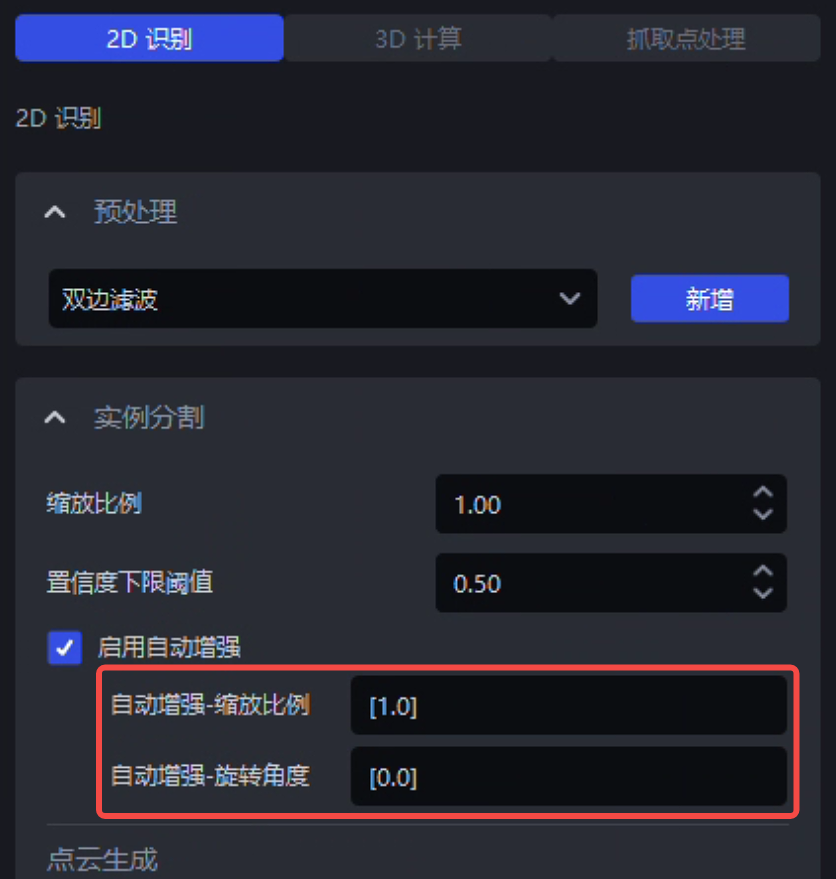
The detection model does not need to be reloaded when modifying Parameters in the “Auto Enhancement” function
- The Parameters of the rectangle fitting algorithm in the single carton depalletizing scenario have been optimized. It now supports configuring the “2D rectangle fitting threshold (mm)” and “Maximum iterations” Parameters of the rectangle fitting algorithm in “Visual Parameters” — “3D Computation” — “Pose Estimation”. See Depalletizing Visual Parameter Tuning Guide.
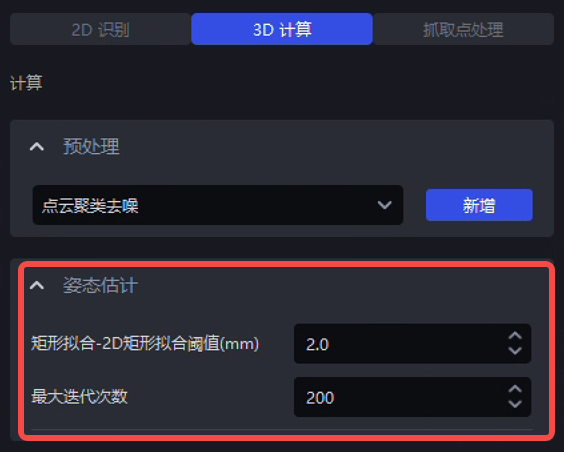
Configurable Parameters for the rectangle fitting algorithm in the carton depalletizing scenario
- The fitting effect of the rectangle fitting algorithm has been optimized in the single carton depalletizing and ordered loading/unloading based on quadrilaterals scenarios, improving the precision of the rectangle fitting algorithm. Further optimization of the rectangle fitting effect in cases where elongated Target Objects have extremely short edges will continue later.
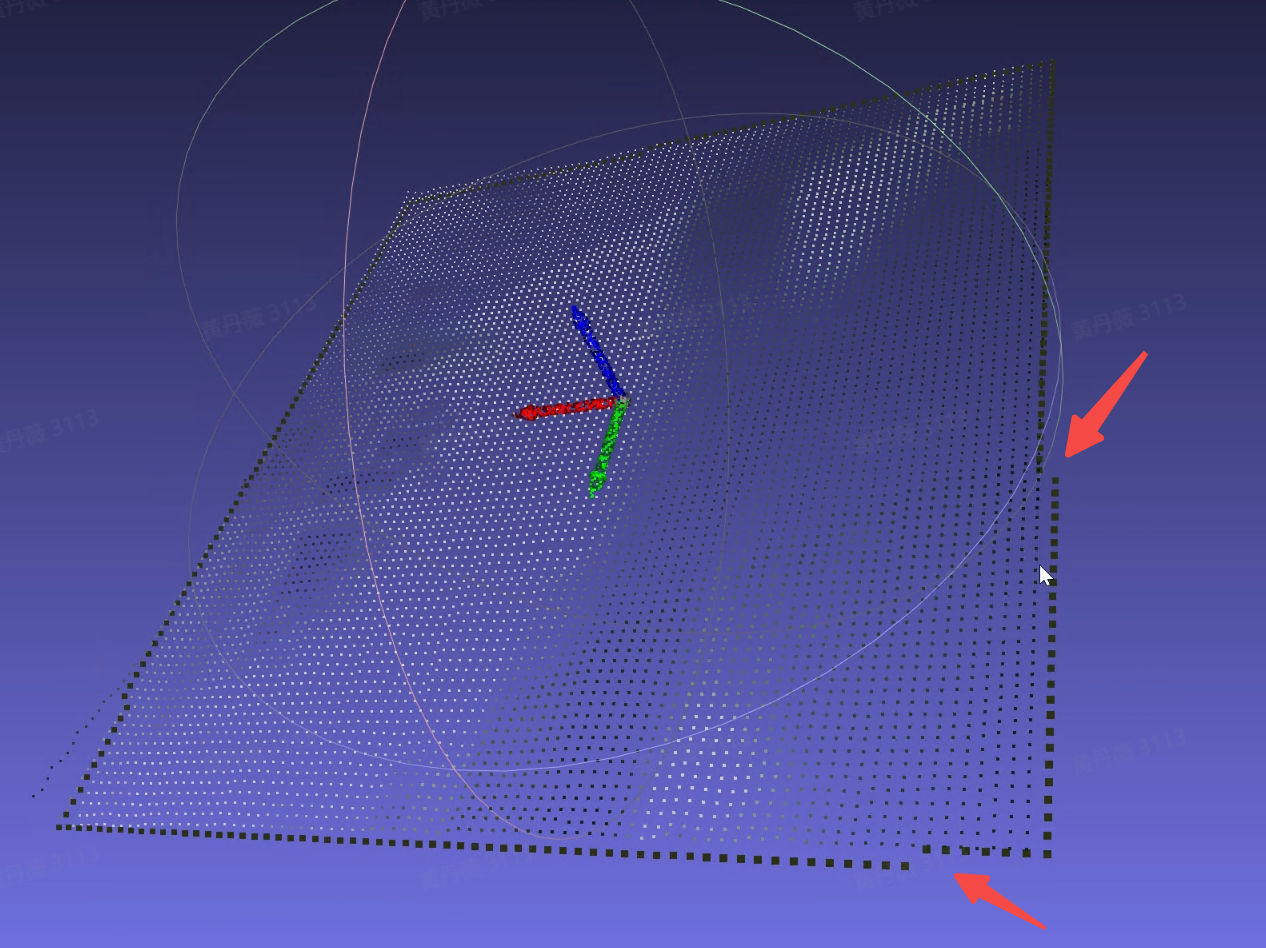 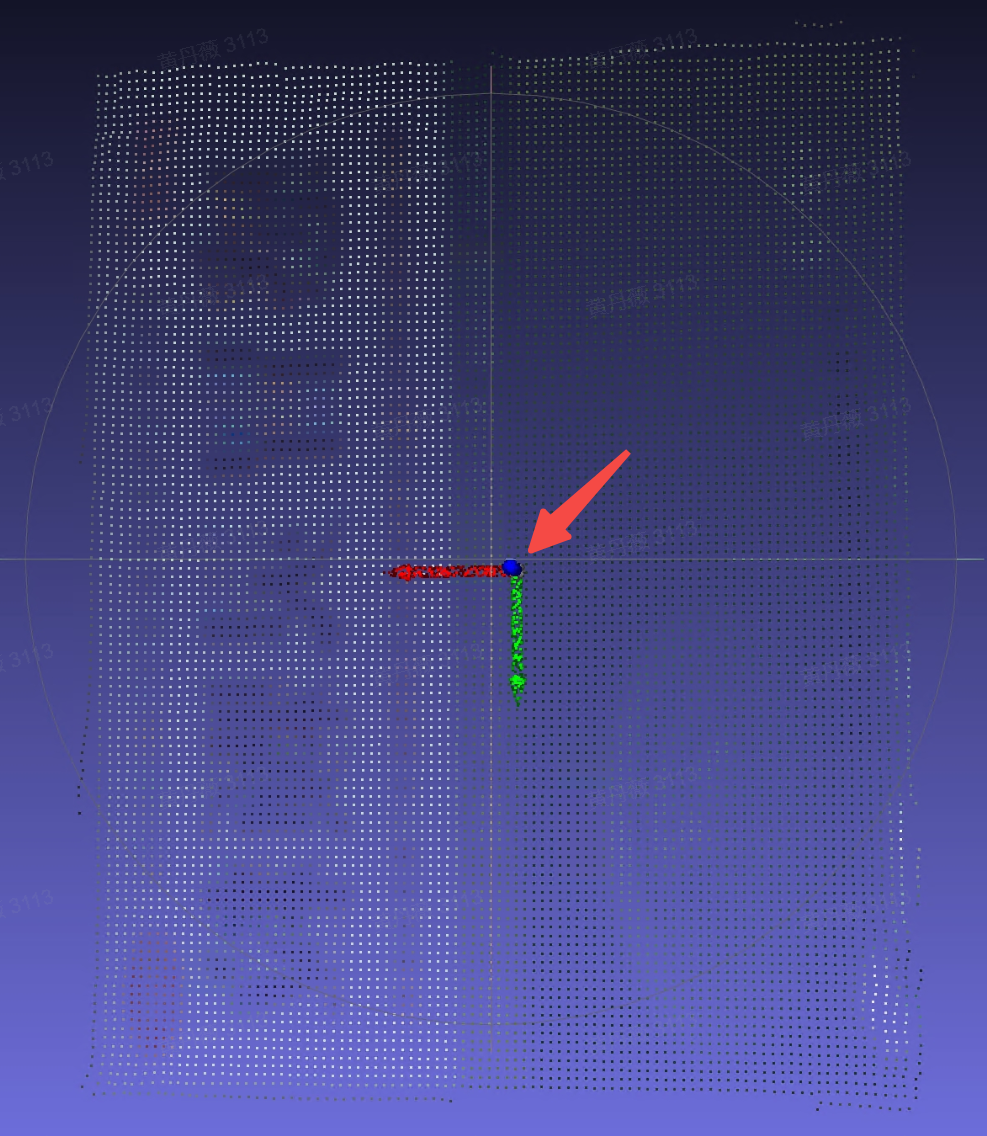 Before optimization Before optimization | 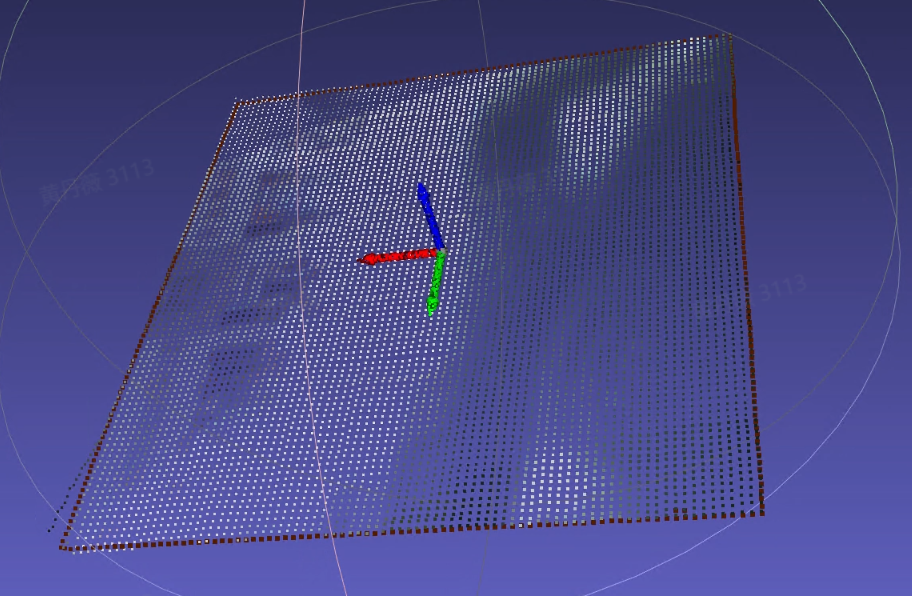 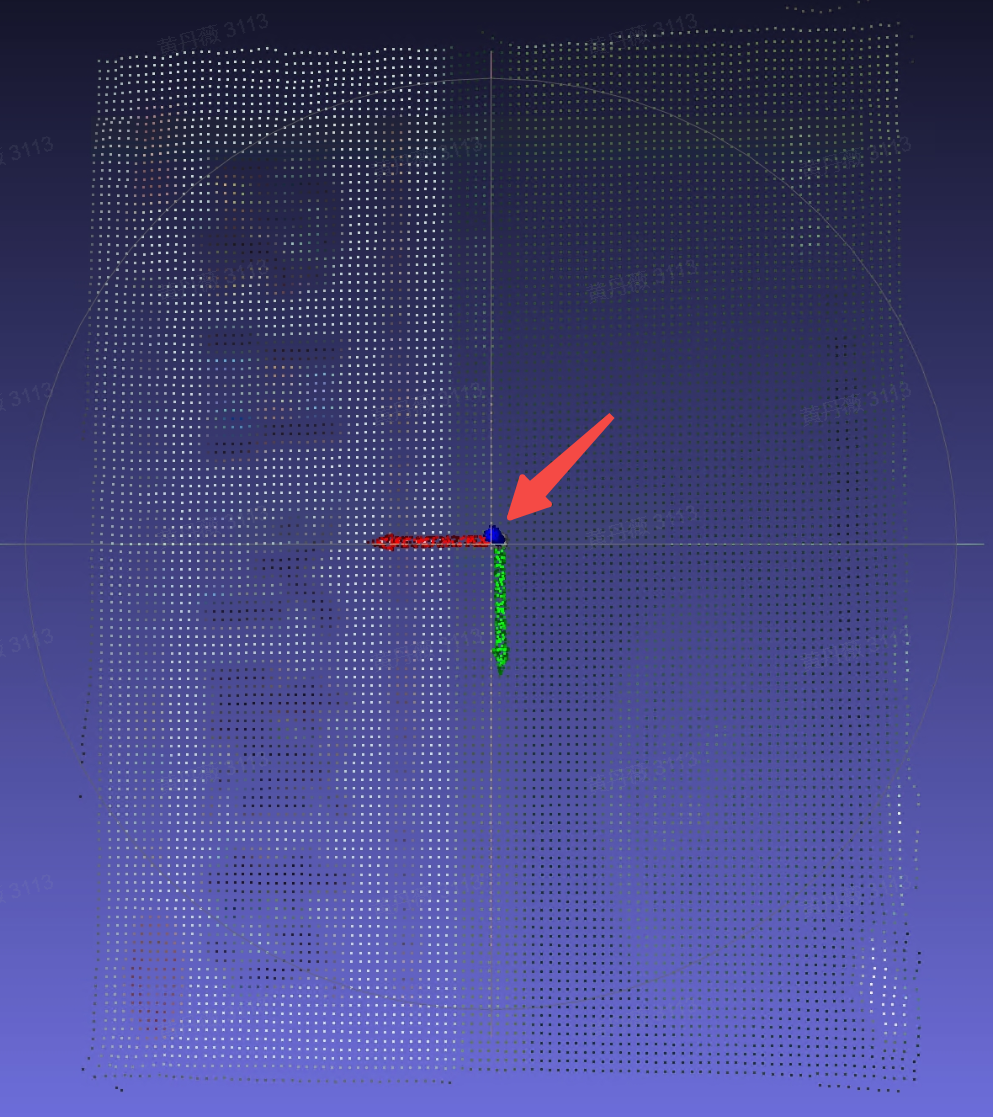 After optimization After optimization |
|---|
- The “Point Cloud Outlier Filtering” plugin has been optimized, improving the plugin’s computation speed in serial function processing mode.
Issue Fixes
The following issues were fixed:
- An issue caused by an internal bug in Robot communication where reconnecting the Robot was required before photo triggering could work.
Source: [Issue Collection] After clicking Run manually, the Robot reports an error when triggering the software to capture an image again.
- An issue where the Robot disconnect alarm was triggered because the heartbeat mechanism for modbus communication with the Robot was unreasonable.
Source: [Project Support] The modbus communication heartbeat writing logic needs optimization
- An issue where 3D Matching performance became worse after enabling the vision computing acceleration function because the general Target Object ordered loading/unloading vision computing acceleration process did not use the Fine Matching template for pose matching estimation.
Source: 1.8.0.1 general ordered loading/unloading, 3D recognition Matching performance becomes worse after enabling vision computing acceleration
- An issue where a runtime error occurred because the source input of the Fill Depth Image Holes function was set incorrectly in surface Target Object loading/unloading (mutually isolated materials).
Source: <Productization> Function visualization - create surface ordered loading/unloading (isolated), add the Fill Depth Image Holes function in 2D Recognition preprocessing, and a runtime error occurs
- An issue where the “Rotate Pose so that the Z-axis direction is aligned with the Z-axis of the target coordinate system” function reported an error in depalletizing parallelization scenarios due to an internal algorithm bug.
Source: [Issue Collection] On-site carton single depalletizing, hoping to improve Takt Time to within 5s
- An issue where the visualization calculation error increased when the Target Object was too long/too large, while also improving the stability of cylinder fitting.
Source: [Issue Collection] Cylinder Matching offset
- The error log was optimized for cases where the “Pose Adjustment Based on Axis Rotation” function is not suitable for the Target Object.
Source: [Issue Collection] Surface task dual-template, pose adjustment based on axis rotation does not take effect.
- An issue where selecting “Depth Map to Gray Image” in the “2D Recognition” — “Preprocessing” — “Convert Image Color Type” function caused subsequently added preprocessing functions to not take effect.
Source: [Issue Collection] Cylinder Matching offset
- An issue where an error was reported because no Fine Matching score was output when all instances had been filtered out correctly.
Source: <Productization> Run a cylinder ordered task. When there is only one cylinder material, an unknown error occurs, prompting: pose estimation has no correct result, 'NoneType' object is not subscriptable
- An issue where the overall time consumption increased due to an internal bug in the bin detection algorithm.
Source: [Issue Collection] Nantianmen water gun surface ordered scenario -- after adding parallel collision detection, the Takt Time did not decrease and time consumption increased
- An issue where a One-Click Linking training task failed due to an internal bug in material placement for pattern place during data rendering.
Source: [Defect]<Productization> dexverse platform upload of incorrectly formatted One-Click Linking ZIP package causes an error
- An issue where a One-Click Linking training task failed because the loss field had a nan value during model training.
Source: [Defect]<Productization>. One-Click Linking produces NAN loss
[Defect] BUG where a NAN loss value appears during the One-Click Linking model generation process
- An issue where image acquisition Takt Time was long and unstable due to a bug in the heartbeat mechanism inside the Camera SDK.
Source: [Defect]<Productization> Camera image acquisition Takt Time is long and unstable
Known Issues
- There is an issue where the output results of serial/parallel function processing (such as the number of instances and Pick Point positions) are not completely consistent due to differences in the processing mechanisms of serial and parallel function processing themselves, as well as differences in the underlying open-source tool libraries used. This is planned to be resolved in a later version.
Source: [Defect]<Productization> Ordered loading/unloading based on cylinders - default Workflow, serial/parallel comparative test, output Pick Point coordinates are inconsistent.
[Defect]<Productization> Ordered loading/unloading based on round surfaces - default Workflow, serial/parallel comparative test, output Pick Point coordinates are inconsistent.
[Defect]<Productization> Parallelization - load a task based on round surfaces from the case library. Historical run can normally output Pick Points. When running the same historical data and comparing the results before and after vision acceleration, the output Pick Points are not completely consistent
[Defect]<Productization> Parallelization - load a project configuration based on circular ordered scenarios from the case library, set the number of pose calculations to 60, use only the 【Filtering Based on Fine Matching】 function in Pick Point filtering, set the filtering score to 0.9, and compare the results before and after enabling vision acceleration. The number of filtered instances and the filtered instances themselves are inconsistent between serial and parallel modes
[Defect]<Productization> Parallelization - create a quadrilateral ordered loading/unloading project, remove all optional functions, compare serial and parallel results, and the final output Pick Point results are inconsistent
[Defect]<Productization> Depalletizing - create a carton depalletizing project, use the same historical data for repeat positioning accuracy calculation, and the repeat positioning accuracy is 1.6mm, which needs optimization
- There is an issue where function parallelization may take longer than serial processing in some cases because data needs type conversion between GPU and CPU during function parallelization. This is planned to be resolved in a later version.
Source: [Defect]<Productization>-Visual Parameters-2D Recognition: running the Point Cloud generation (bounding box form) script shows ERROR - serial_result and parallel_result are not the same
- There is an issue where log printing is incomplete and inconsistent during function parallelization. This is planned to be resolved in a later version.
Source: [Defect]<Productization> Parallelization - cylinder ordered task, no-instance detection scenario, 1) inconsistent log prompts: serial mode has no ERRO prompt, parallel mode has an ERROR prompt, and the log prompt is not instructive. 2) The parallelization log needs to print the fitting score
- There is an issue where OBB-type bounding boxes are temporarily not supported in function parallelization, causing runtime errors in the two scenarios general Target Object ordered loading/unloading and general Target Object unordered picking if the “elongated” Target Object property is checked on the “Target Object” configuration page. This is planned to be resolved in a later version.
Source: [Defect]<Productization>-Visual Parameters-2D Recognition: generating instance bounding boxes and running the script shows serial_result and parallel_result are not the same
- There is an issue where function parallelization in depalletizing scenarios temporarily does not support modifying Pick Points to output corner points. This is planned to be resolved in a later version.
Source: [Defect]<Productization> Vision acceleration - create a carton depalletizing scenario, set the Pick Point to the upper-left corner of the box (lower-left, upper-right, lower-right), enable vision acceleration, click Run, and the output result is still the box center. When vision acceleration is disabled, the Pick Point output is correct
- There is an issue where, in function parallelization mode, after adjusting the collection Parameter in frozen_config, part of the functions (Instance Segmentation, Point Cloud generation (Mask form), Point Cloud generation (bounding box form), pose estimation, pose adjustment based on axis rotation, pose refinement function based on plane normals, Target Object Pose correction, etc.) do not take effect after the frozen Parameters are modified. This is planned to be resolved in a later version.
Source: [Defect]<Productization> Parallelization - modification of the frozen parameter collection did not take effect
- There is an issue where the “Filter Target Object Poses Similar to the Previous N Target Object Poses” function does not take effect in function parallelization mode. This is planned to be resolved in a later version.
Source: [Defect]<Productization> Parallelization - load a project based on circular ordered scenarios from the case library, use the parallelization script to test the 【Filter Target Object Poses Similar to the Previous N Target Object Poses】 function, set the Parameters according to the reproduction steps, and the serial and parallel results are inconsistent
[Defect]<Productization> Parallelization - load a project configuration based on round surface ordered projects from the case library, use the parallelization script to test the 【Filter Pick Points Close to the Previous N Pick Points】 function, and the serial and parallel results are inconsistent
- There is an issue where overly large Target Object dimensions (especially elongated Target Objects) can easily cause insufficient video memory in mirror symmetry mode when using the “Symmetric Center Pose Optimization” function. This is planned to be resolved in a later version.
Source: [Defect]<Productization> Parallelization - create a general unordered scenario project, run with historical data and Pick Points can be generated normally, add the Symmetric Center Pose Optimization function in Visual Parameters - Pick Point Adjustment, set the symmetric center type to mirror symmetry, then run again with historical data. In turbo mode, whether vision acceleration is enabled or not, this function takes too long and causes video memory overflow, which needs optimization
[Defect]<Productization> Quadrilateral - in the ordered loading/unloading scenario based on quadrilaterals, if the Visual Parameters 【Symmetric Center Pose Optimization】 function selects 【Mirror Symmetry】, running the Workflow causes GPU video memory leakage
- There is an issue where the stereo TRT model occupies more video memory than the pth model in depalletizing scenarios. This is planned to be resolved in a later version.
Source: [Defect]<Productization> Stereo TRT model inference - when PickWiz runs the entire Workflow of a project, the TRT model occupies nearly twice as much GPU memory as the pth model and needs optimization.
V1.8.2.1 Release Notes
PickWiz 1.8.2.1 is a bugfix version based on PickWiz 1.8.2. It fixes or optimizes some known issues to provide a more stable and user-friendly version. The main fixes and optimizations are as follows:
1.System Installation
- Fixed the issue where the software would crash when connecting to a Camera after installing V1.8.2.
Source: [Issue Collection] 182 software crash
2.Camera
- Optimized the issue of high video memory usage of TRT models. Under the same conditions, TRT models now have video memory usage and precision close to pth models, while TRT models take about half the time of pth models.
Source: [Defect]<Productization> Stereo TRT model inference - when PickWiz runs the entire project Workflow, the TRT model occupies nearly twice as much GPU memory as the pth model and needs optimization.
[Defect]<Productization> Camera - create any project, connect a stereo Camera, use the depalletizing general model to trigger image capture, video memory usage is 2.7/6. Switch to compatible/incompatible trt models for different graphics cards, trigger image capture again, and video memory usage reaches 5.5/6, which is abnormal
[Defect]<Productization> Stereo Camera - high-resolution stereo video memory degradation test. In a scale 1.0 scenario, triggering image capture through the Camera takes 4s+, video memory is nearly full (7.7G/8.0G), and video memory is not released after image capture is completed
3.Robot
- Fixed the issue where the “Run” Button could not be clicked when the Robot only triggered image capture.
Source: [Defect]<Productization> Robot - Robot configuration photo type ${co}, communication assistant sends command:2 to trigger Camera image acquisition, prompt parsing failed: local variable 'ret' referenced before assignment
4.Point Cloud Template Creation
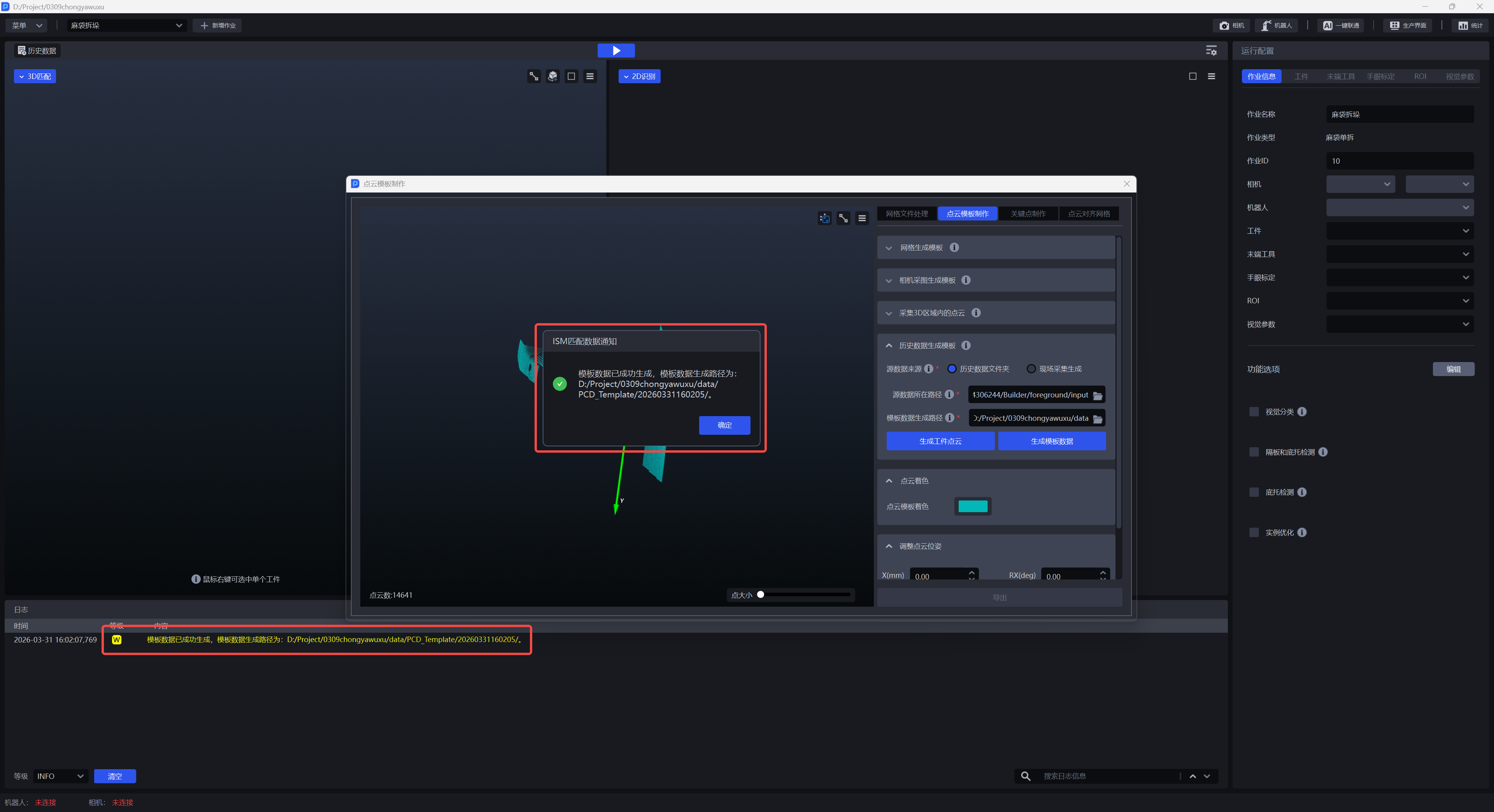
- Optimized the result prompt method for generating template data in “Generate Template from Historical Data”. In addition to log prompts, page pop-up prompts for successful or failed data generation have been added.
Source: [Defect]<Productization> Point Cloud Template Creation - Generate Template from Historical Data, generating template data takes a long time, 1min+, and the frontend cannot tell whether generation is complete. It is recommended to add pop-up prompts for generating/in generation complete
- Optimized the Point Cloud template generation method. When clicking the “Generate Template” Button in “Generate Template from Mesh”, “Generate Template from Camera Images”, and “Capture Point Cloud in a 3D Region”, the system will automatically align the center of the generated Point Cloud template to the origin of the Camera coordinate system.
Source: [Issue Collection] Point Cloud Template Creation exception issue
- Fixed issues in Point Cloud Template Creation when adjusting the Point Cloud Pose, such as unreasonable Point Cloud rotation angles, repeated reappearance of deleted Point Clouds, and occasional cases where +1000mm and -1000mm had the same adjustment direction
Source: [Issue Collection] Point Cloud Template Creation exception issue
5.One-Click Linking
- Fixed the issue in general Target Object unordered picking tasks where training failed for taller objects because of problems in the Camera height rendering logic of One-Click Linking.
Source: [Defect]<Productization> One-Click Linking - launch old model training for general unordered detection, rendering stage reports zero-size array to reduction operation maximum which has no identity
- Optimized the interaction for selecting the Camera model when creating a One-Click Linking task to train an imaging model while the task is not connected to a Camera.
Source: [Requirement]【Optimization】【One-Click Linking】Optimize the interaction for selecting the Camera model when One-Click Linking is not connected to a Camera
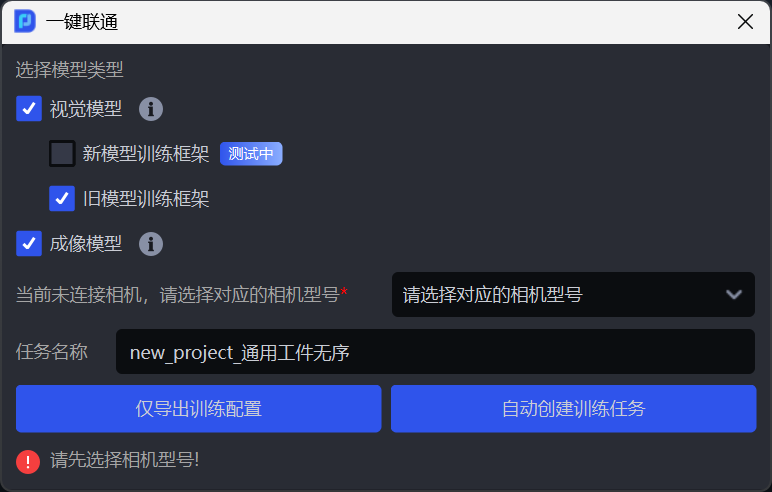
- Optimized the task name of One-Click Linking tasks by adding name validation rules: it supports up to 30 characters and only supports four types of characters: Chinese, uppercase/lowercase English letters, numbers, and underscores, keeping it consistent with the rules for task names.
Source: [Defect]<Productization> Task names do not handle spaces, causing the platform to fail to request the corresponding resource
6.Shadow Mode
- Optimized the training effect of Shadow Mode in “general Target Object ordered loading/unloading” tasks. By adding the saving of keypoint information for general Target Objects, the training effect of general Target Object Shadow Mode is improved.
Source: [Defect]<Productization> Shadow Mode - create a general Target Object scenario, configure the corresponding task information, enable Shadow Mode, run the task to accumulate data, and the saved shadow data does not contain the corresponding keypoint information
7.Visual Parameters
- Fixed the issue of incorrect display of pose generation Parameters in Visual Parameters — 3D Computation in single bag depalletizing and single carton depalletizing tasks.
Source: [Issue Collection] In 1.8.2 single bag depalletizing, the frontend removed the domain length and width, which need to be displayed as adjustable on the frontend.
Single bag depalletizing task, effective for bag pose generation 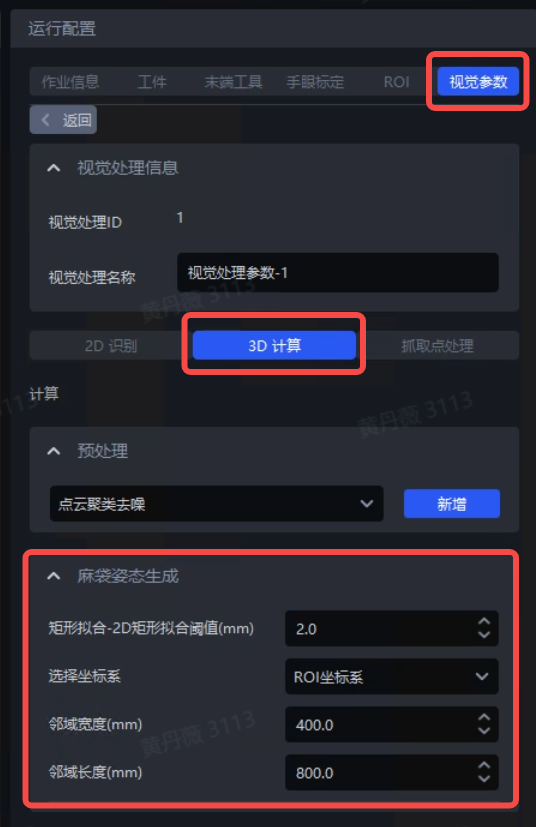
Single carton depalletizing task, only effective for pallet detection and divider and pallet detection options 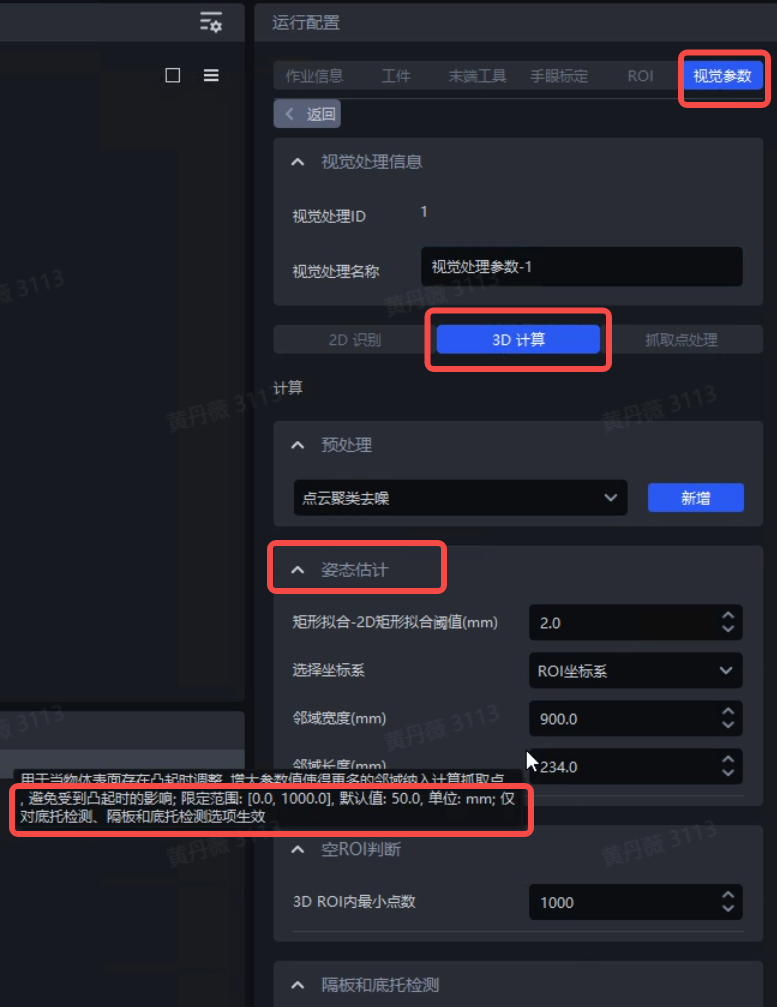
- Fixed the issue where modifying the task ID caused Visual Parameter modifications to not take effect
Source: [Issue Collection] Modifying the model Point Cloud downsampling Parameters does not take effect
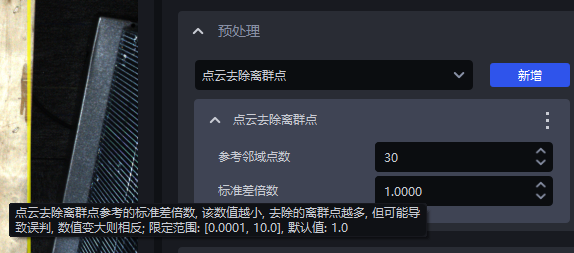
- Optimized the unreasonable default value setting of the Parameter “standard deviation multiplier” in the “Point Cloud Outlier Removal” function.
Source: [Requirement]【Optimization】【Visual Parameters】Modify the default value of the Point Cloud Outlier Removal Parameter 【standard deviation multiplier】
The default value of “standard deviation multiplier” was changed from 0.0050 to 1.0000
8.Function Parallelization
- Fixed the issue where the “Point Cloud Outlier Filtering” plugin did not take effect in function parallelization mode.
Source: [Defect]<Productization> Point Cloud outlier removal parallelization, outliers were not removed
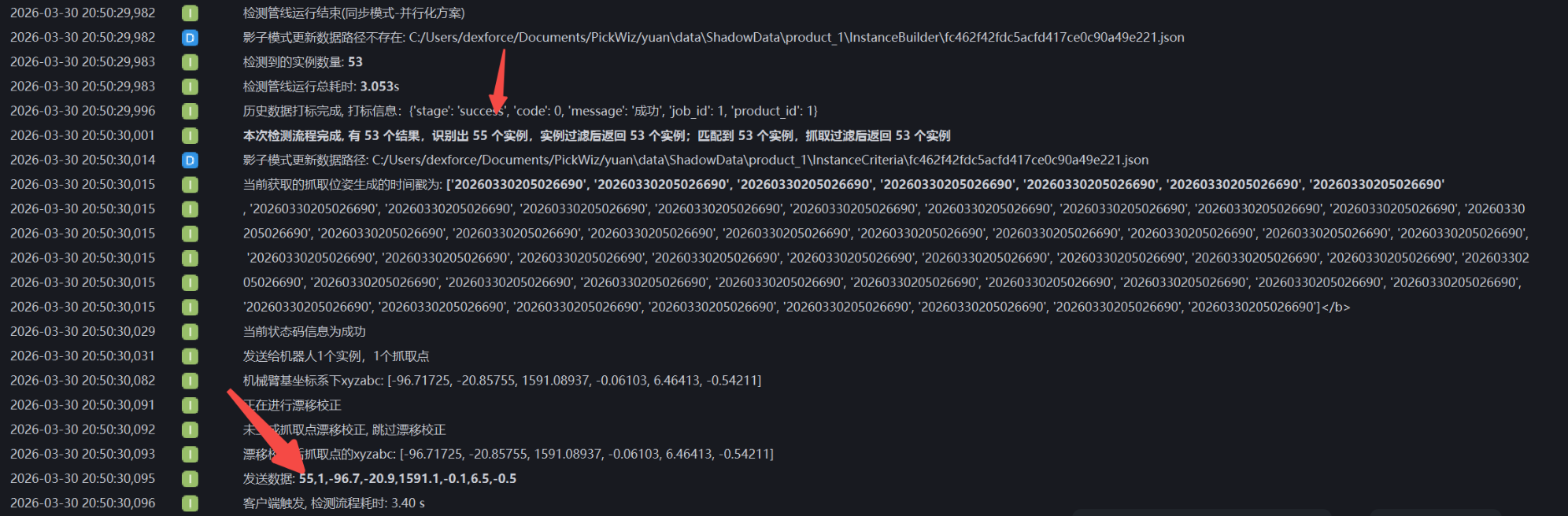
- Fixed the issue where, in function parallelization mode, the number of remaining instances after function filtering was inconsistent with the number of instances sent to the Robot.
Source: [Issue Collection] The information returned by the Robot is incorrect when parallelization is enabled
The number of remaining instances after function filtering is consistent with the number of instances sent to the Robot
- Fixed the issue where, in function parallelization mode, the “Point Cloud Generation (Bounding Box Form)” function did not take effect in tasks other than Surface Target Object Ordered Loading/Unloading (Parallelized).
Source: [Defect]<Productization> Parallelization - in task scenarios other than surface parallelization, after enabling parallelization, the function 【Point Cloud Generation (Bounding Box Form)】 in 2D instance generation post-processing did not take effect
- Fixed the issue where, in function parallelization mode, the “Point Cloud Downsampling” function in 3D Computation — Preprocessing did not take effect in circle, cylinder, and quadrilateral tasks.
Source: [Defect]<Productization> Parallelization - load circle, cylinder, and quadrilateral projects from the case library, enable parallelization, add the Point Cloud Downsampling function in 3D Computation preprocessing, and the function does not take effect
- Fixed the issue where, in function parallelization mode, because OBB-type bounding boxes were not supported, the system reported an error when the “elongated” Target Object attribute was checked on the “Target Object” configuration page in the two tasks general Target Object ordered loading/unloading and general Target Object unordered picking.
Source: [Defect]<Productization>-Visual Parameters-2D Recognition: running the instance bounding box generation script shows serial_result and parallel_result are not the same [Requirement]【Optimization】【Parallelization】Parallel inference supports OBB bounding box type
9.Visualization
- Fixed the issue where the default truncation value for Point Cloud length was too short, causing incomplete Point Cloud imaging display.
Source:[Issue Collection] Stereo Point Cloud imaging is incomplete, image capture height around 4.3m
10.Task Configuration
- Optimized the validation rules for task names. It now supports up to 30 characters and only supports four types of characters: Chinese, uppercase/lowercase English letters, numbers, and underscores.
Source:[Project Support] Add an upper limit to the number of characters in task names
- Fixed the issue where the same configuration file had to be manually reloaded when running on different industrial PCs.
Source:[Defect]<Productization> ISM - in a Visual Classification scenario, after exporting the configuration, changing the industrial PC and project path, loading the configuration and running again, initialization of the depth feature classifier fails