Common Scenarios and Solutions for Abnormal Takt Time
1. System Configuration
(1) Mode selection: Debug Mode -> Fast Mode
- Reduce the amount of saved historical data
(2) Shadow Mode: On -> Off
- Save shadow mode data
- When there are many instances, Mask serialization is also very time-consuming
(3) Memory Mode: On -> Off
- Enabling memory mode requires comparison with the previous result. The more instances there are, the more time it takes.
(4) Number of pose calculations: The more results calculated, the more time it takes.
(5) Picking logic:
- One photo, one pick: recalculates every time
- One photo, multiple picks: caches the result after one calculation and directly retrieves it from the cache the next time
(6) Timing of instance Point Cloud generation:
- After segmentation: full instance calculation
- After filtering: calculate after some instances are filtered out (may affect global sorting)
(7) Pick Strategy
- Dynamic adjustment mechanism: selecting workpiece pose-related strategies dynamically delays the sorting stage, sorting only after the poses of all instances are calculated, which is very time-consuming (except when Vision Computing Acceleration Mode is enabled)
2. 2D Recognition
(1) CAD-based Synthetic Data Training (One-click Connection)
| Scene | Expected Takt Time | Troubleshooting | Remarks | |
|---|---|---|---|---|
| Depalletizing (cartons / sacks) | 0-2000 ms | There are many instances (more than 50), and the Takt Time is greater than 2s Do not select whether to return the Mask 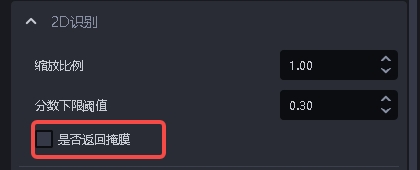 | / | |
| General workpiece (ordered / random / positioning and assembly) | Axis-aligned Bounding Box | 0-2000 ms | / | |
| Oriented Bounding Box | 0-3500 ms | Using a `trt` model can reduce the Takt Time to 0 - 2000 ms | ||
| Surface-type workpiece (ordered / random / positioning and assembly) | 0-2000 ms | / | ||
| Circular surface / cylinder / quadrilateral | 0-2000 ms | / | ||
Note: The Takt Time for automatic enhancement is multiplied by the number of scale ratios and rotation angles. For example, if there are 2 scale ratios and 2 rotation angles, the expected Takt Time is 2*2=4 times the normal Takt Time.
| Scale Ratio | Rotation Angle | Expected Takt Time |
|---|---|---|
| [1.0] | [0, 90] | 2x the normal Takt Time |
| [0.5, 0.8, 1.0] | [0, 90] | 6x the normal Takt Time |
(2) Point Cloud Segmentation
3D instance segmentation
| Scene | Expected Takt Time | Troubleshooting | Remarks |
|---|---|---|---|
| Ordered surface-type workpiece loading and unloading (materials isolated from each other) | 0-3000 ms | If the Scene Point Cloud is too large, appropriately increase the downsampling point spacing and also increase the Point Cloud search radius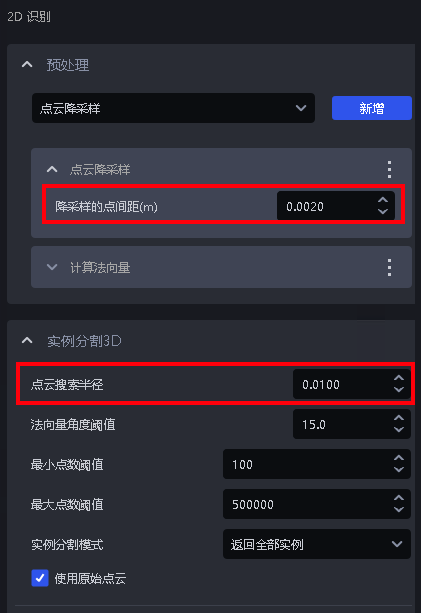 | The more Point Cloud data there is, the longer the Takt Time; the more instances there are, the longer the Takt Time |
3. 3D Matching
| Type | Expected Takt Time | Troubleshooting | Remarks | |
|---|---|---|---|---|
| Rigid Transformation | 0-500 ms | None at present | When dual models are used, the Takt Time will be 0-1000ms | |
| Mask-based Pick Point Generation | 50-1000 ms | None at present | Choosing the self-vertical coordinate system for sack depalletizing increases the processing time by about 200ms | |
| Basic Geometric Shape Fitting | 0-500ms | None at present | / | |
| 3D Registration Takt Time of `icp` | Coarse Matching | 0-500ms | Downsampling parameters | / |
| Fine Matching | 0-2000ms | Point Cloud downsampling (workpiece Point Cloud) | / | |
4. Functional Plugins
| Type | Expected Takt Time | Troubleshooting | Remarks |
|---|---|---|---|
| Bottom Support Detection | 50-1000 | None at present | / |
| Collision Detection | Bin detection: 0-500 msCollision detection: 0-300 ms | None at present | / |
| Vision Classification | 0-500 ms | None at present | / |
5. Common Functions
(1)2D Preprocessing
| Type | Expected Takt Time | Troubleshooting | Remarks |
|---|---|---|---|
| Edge Enhancement | 20-200 | If the Takt Time is slow, close other unnecessary programs in Task Manager to provide more computing resources for edge enhancement | Filters out points whose normal is greater than the angle Threshold. It uses multithreaded parallel computation. When too many other running programs occupy a large amount of CPU computing resources, lag may occur. |
| Extract Upper-layer Texture | 0-800ms | Reduce the number of clustered Point Clouds | 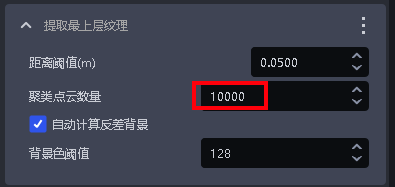 |
| Remove Image Background Outside `roi3d` | 0-300 | None at present | / |
(2) Point Cloud Generation
| Type | Expected Takt Time | Troubleshooting | Remarks |
|---|---|---|---|
| Via Mask | 0-500 | None at present | About 130ms for running 10 instances |
| Via Bounding Box | 0-300 | None at present | About 30ms for running 6 instances |
Remove Image Background Outside roi3d | 0-300 | None at present | / |
(3)3D Preprocessing
| Type | Expected Takt Time | Troubleshooting | Remarks |
|---|---|---|---|
| Point Cloud Downsampling | 0-200 ms | None at present | Point Cloud quantity within 200,000 |
| Remove Outliers from Point Cloud | 0-500 ms | None at present | Point Cloud quantity within 200,000 |
| Point Cloud Plane Segmentation | 0-200 ms | None at present | Point Cloud quantity within 200,000 |
| Compute Normals | 0-200 ms | None at present | Point Cloud quantity within 200,000 |
| Filter Out Point Clouds Whose Object Distance Exceeds the Limit | 0-300 ms | None at present | / |
| Point Cloud Cluster Downsampling | 0-300ms | Add [Point Cloud Downsampling (workpiece Point Cloud)] before this function | >=1.7.2 |
| Point Cloud Contour Extraction | 0-300ms | None at present | / |
| Remove Points Whose Normals Exceed the Angle Threshold | 20-200ms | None at present | / |
(4) Pick Point Filtering
| Type | Expected Takt Time | Troubleshooting | Remarks |
|---|---|---|---|
| Collision Detection for Fixture Picking | 0 - 500 ms | None at present | Related to the number of triangles of the input fixture. The more triangles there are, the longer the Takt Time. The number of triangles is limited to within 500. |
| Determine Upper-layer Occlusion of Pick Points | 5-30 | None at present | / |
(5) Pick Point Adjustment
| Type | Expected Takt Time | Troubleshooting | Remarks |
|---|---|---|---|
| Pose Adjustment Based on Axis Rotation | 0-2000ms | Reduce the rotation angle range (symmetric angle) Independently create a template with more Point Cloud features and a smaller quantity, and pass the template Point Cloud path into the function, or use edges for optimization Select Fast acceleration for evaluation mode. Warning: if the Initial Pose is inaccurate or the Pick Point is not at the symmetry center, the effect may be affected 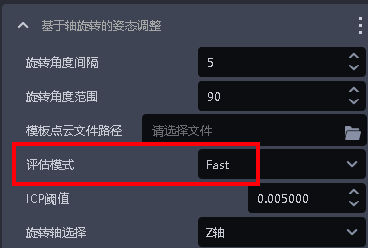 | The larger the Point Cloud template, the longer the processing time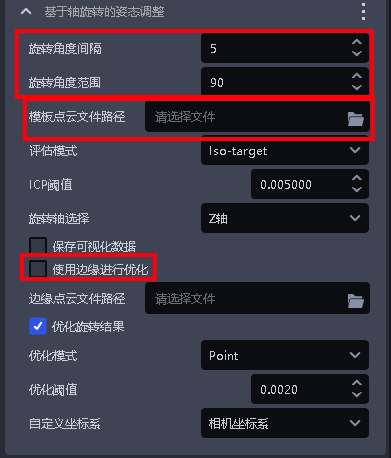 |
| Pose Refinement Function Based on Plane Detection | 0 - 200 ms | None at present | / |
| Symmetry-Center Pose Optimization | 0-1000ms | Reduce the search range Increase the image scale ratio In mirror mode, reduce the rotation angle (10-30) If accuracy requirements are low, reduce the projection resolution | Version 1.7.1 has issues with abnormal GPU memory usage and processing time in rotation mode. If mirror symmetry conditions are met, use mirror symmetry mode; otherwise contact the product and R&D team. Customization or upgrade to 1.7.2 is required.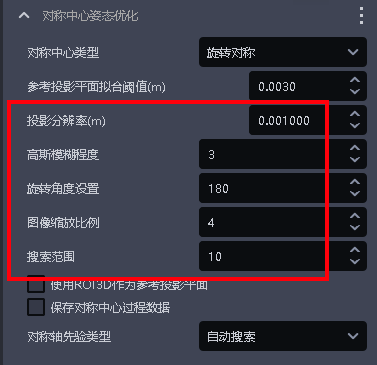 |
| Compute Normals | 0-200 ms | None at present | Point Cloud quantity within 200,000 |
| Filter Out Point Clouds Whose Object Distance Exceeds the Limit | 0-300 ms | None at present | / |
| Point Cloud Cluster Downsampling | 0-300ms | Add [Point Cloud Downsampling (workpiece Point Cloud)] before this function | >=1.7.2 |
| Point Cloud Contour Extraction | 0-300ms | None at present | / |
| Remove Points Whose Normals Exceed the Angle Threshold | 20-200ms | None at present | / |
(6) Instance Sorting
- Strategies such as XYZ,
roidistance, and robot arm distance that need to extract Point Clouds - Expected time for a single workpiece: 0.003s-0.03s. The more workpiece Point Cloud data there is, the longer the processing time.