eye-hand calibration Operation Guide
In this context, the “hand” refers to the Robot, and the “eye” refers to the 3D camera. eye-hand calibration is used to determine the corresponding relationship between the camera coordinate system and the Robot coordinate system, helping PickWiz accurately convert pose information in the camera coordinate system into the spatial coordinate information required for Robot motion, thereby enabling accurate vision-guided picking and placing.
The eye-hand calibration procedure is as follows:

Pre-calibration preparation: prepare the required materials and conditions for eye-hand calibration;
Calibration information configuration: select the eye-hand calibration configuration based on the camera installation method, calibration method, and other factors;
Pre-calibration check: check whether the Robot, Calibration Board, and other items have been installed and meet the calibration requirements;
Collect samples: take pictures to collect Calibration Board samples;
Calibration result inspection and analysis: inspect and analyze the results to determine whether the calibration accuracy meets actual needs;
Select the calibration configuration: select the corresponding calibration configuration for the task scenario.
Please refer to this operation guide to perform eye-hand calibration for the camera and the Robot. In addition, eye-hand calibration must be performed again after any of the following situations occur:
The position between the camera and the Robot base**(EyeToHand)** or between the camera and the Robot end Flange**(EyeInHand)** changes;
Replace the camera with another one;
Replace the Robot with another one.
1. Pre-calibration Preparation
Before eye-hand calibration, the following preparations must be completed:
(1)Complete the hardware setup of the 3D vision guidance kit
Please first complete the installation and connection of the Robot, camera, and industrial PC
(2)Complete creating a new Project and a new task
Please refer to Project Operation Guide and Task Operation Guide to create a new Project and task that meet the actual scenario requirements
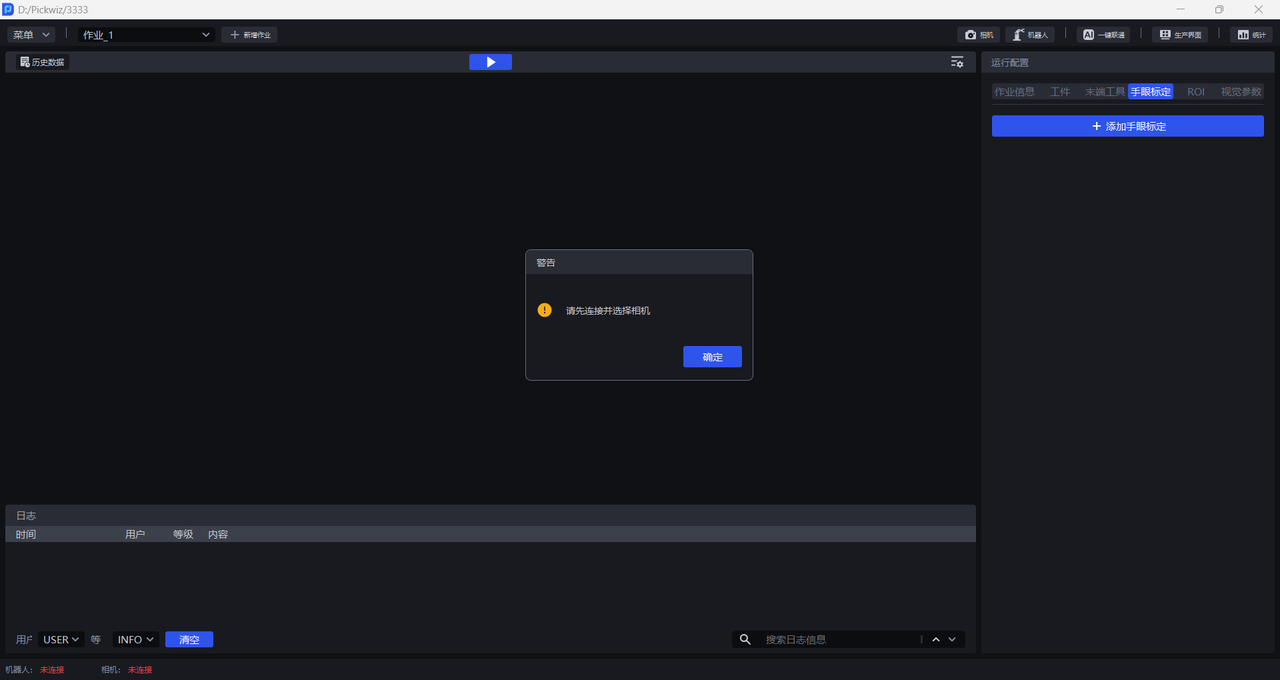
(3)Complete camera connection and parameter adjustment
Please refer to Camera Connection and Parameter Adjustment Guide to connect the camera, adjust camera imaging quality, and verify camera accuracy
(4)Complete Robot communication configuration
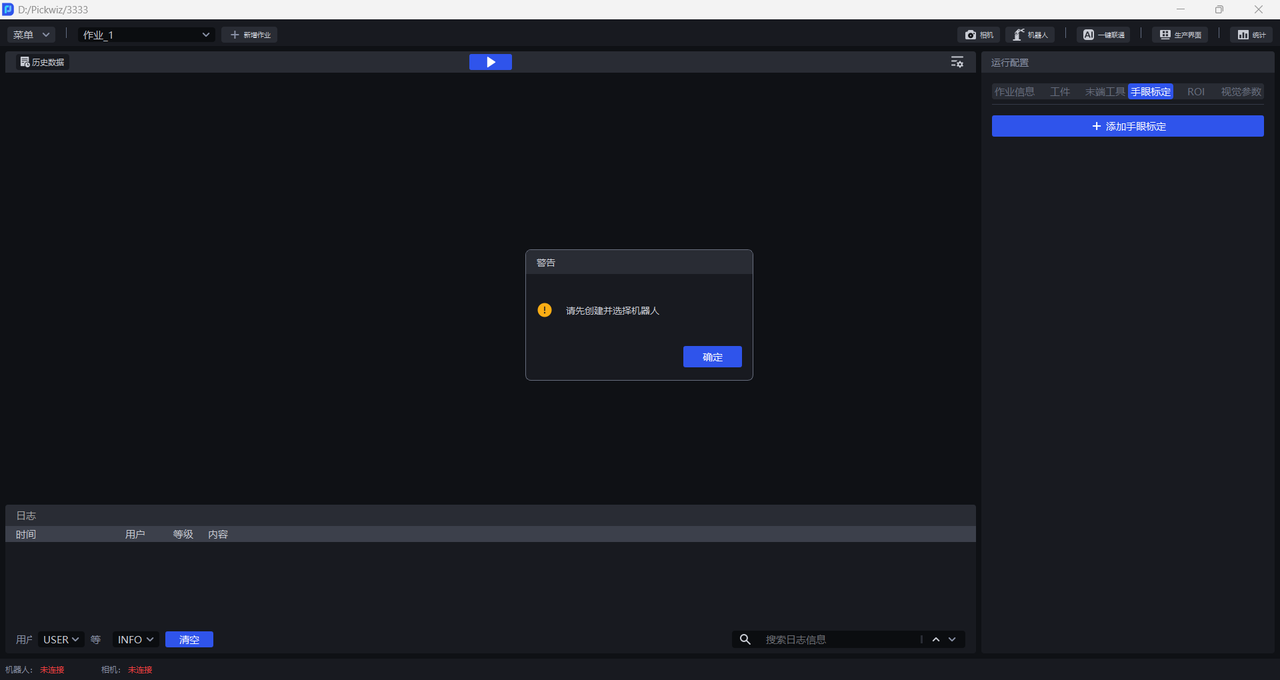
Please refer to Robot Configuration and Communication Operation Guide to establish communication between the Robot and PickWiz
(5)Prepare the materials required for calibration
Please ensure that the Calibration Board is flat and clear, without obvious scratches, stains, bends, or deformation
If the camera is installed outside the robotic arm, the Calibration Board needs to be installed on the Robot end Tool. Please ensure that the Calibration Board is firmly installed and located within the camera field of view.
First install the Calibration Board connector onto the Robot end Flange, and then install the Calibration Board onto the connector. If a non-removable gripper is installed on the Robot end Flange, the Calibration Board can be directly installed onto the gripper.
If the calibration method uses Needle-tip Tool Touch Calibration, please ensure that the needle tip is intact and not deformed. The Needle-tip Tool needs to be installed on the Robot and can be installed on the Robot end Flange or gripper.
2. Calibration Information Configuration
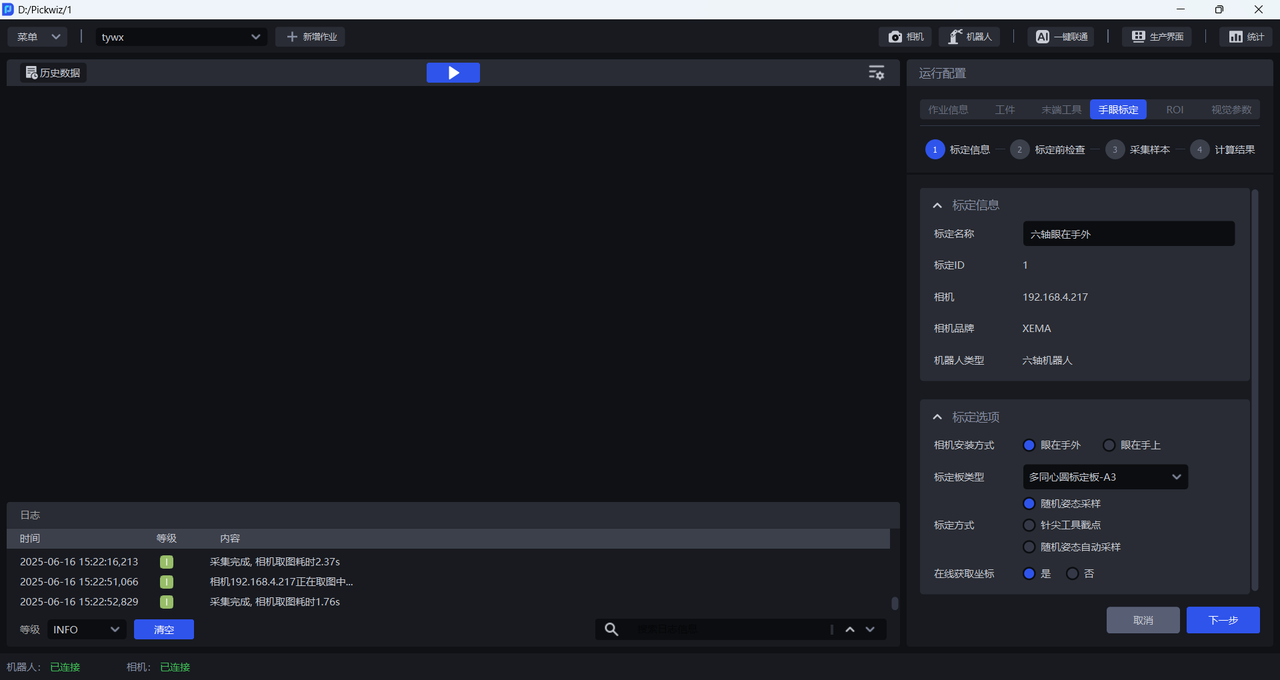
Calibration Namecan be used to freely name the current calibration configurationCalibration IDis used by the Robot to switch calibration configurationsCamerais the IP address of the currently connected cameraCamera Brandis the brand of the currently connected cameraRobot Typemust be consistent with the Robot type in Robot Configuration
eye-hand calibration needs to determine the exact position and orientation of the camera in the Robot coordinate system. Therefore, the camera type, camera installation method, Robot type, and data collection method all affect the specific calibration method and procedure;
Before collecting samples, Camera Installation Method, Calibration Board Type, Calibration Method, and Online Coordinate Acquisition need to be configured. The completed eye-hand calibration configuration cannot be modified. If the configuration is incorrect, delete the calibration and create a new one.
2.1 Camera Installation Method
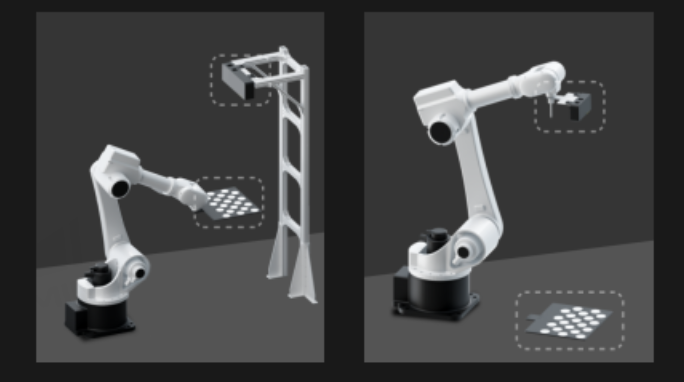
- Eye in hand(EyeInHand): the camera is fixed on the end Tool of the robotic arm and moves with the robotic arm. The camera is fixed relative to the Robot end Flange, and the Calibration Board is fixed relative to the Robot base.
If the camera is fixed on the end Tool of the robotic arm and the Robot type is a three-axis Robot, please refer to Eye in hand Three-axis Robot Calibration for the calibration procedure
If the camera is fixed on the end Tool of the robotic arm and the Robot type is a four-axis Robot, please refer to Eye in hand Four-axis Robot Calibration for the calibration procedure
If the camera is fixed on the end Tool of the robotic arm and the Robot type is a six-axis Robot, please refer to Eye in hand Six-axis Robot Calibration for the calibration procedure
- Eye to hand(EyeToHand): the camera is fixed outside the robotic arm and does not move with the robotic arm. The camera is fixed relative to the Robot base, and the Calibration Board is fixed relative to the Robot end Flange.
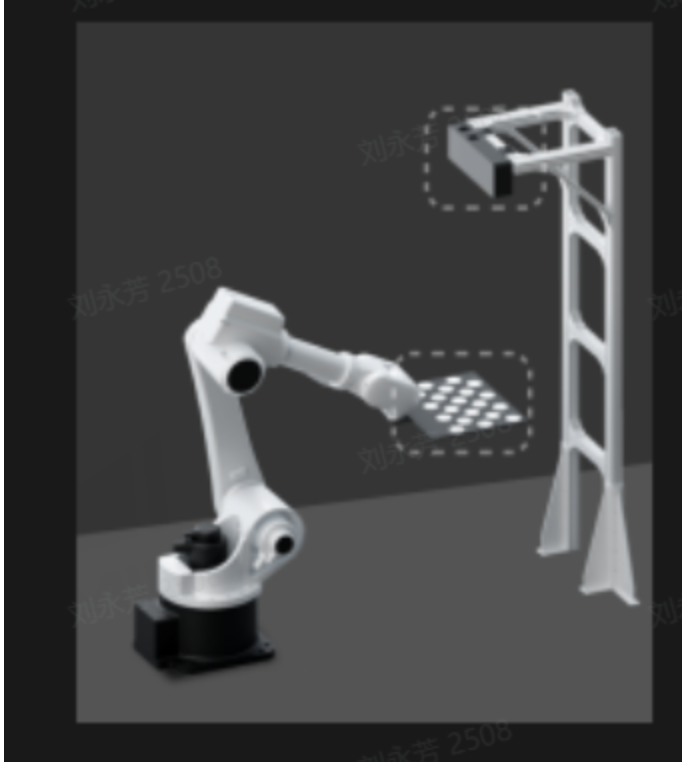
If the camera is fixed outside the robotic arm and the Robot type is a three-axis Robot, please refer to Eye to hand Three-axis Robot Calibration for the calibration procedure
If the camera is fixed outside the robotic arm and the Robot type is a four-axis Robot, please refer to Eye to hand Four-axis Robot Calibration for the calibration procedure
If the camera is fixed outside the robotic arm and the Robot type is a six-axis Robot, please refer to Eye to hand Six-axis Robot Calibration for the calibration procedure
2.2 Calibration Board Type
Selecting an appropriate Calibration Board affects the usability of the calibration process and the accuracy of the calibration result, and is one of the keys to successful eye-hand calibration. The existing Calibration Boards of Dexforce are shown in the table below, and the Calibration Board drawings can be downloaded and printed.
| Robot Type | Recommended Working Distance | Recommended Calibration Board |
|---|---|---|
| Six-axis Robot | Below 0.5 m | A6 Multi-concentric-circle Calibration Board |
| Below 1.5 m | A5 Multi-concentric-circle Calibration Board | |
| 1.5 m -- 2.5 m | A4 Multi-concentric-circle Calibration Board | |
| Above 2.5 m | A3 Multi-concentric-circle Calibration Board | |
| Three-axis/Four-axis Robot | Below 0.5 m | A6 Multi-concentric-circle Calibration Board |
| Below 1.5 m | A5 Multi-concentric-circle Calibration Board | |
| 1.5 m -- 2.5 m | A4 Multi-concentric-circle Calibration Board | |
| Above 2.5 m | A3 Multi-concentric-circle Calibration Board |
2.3 Calibration Method
Random Pose Sampling Calibration: randomly move the Robot end Tool, collect Calibration Board samples at multiple positions, recognize the feature points on the Calibration Board, and collect random poses of the end Tool.
Needle-tip Tool Touch Calibration: install the Needle-tip Tool on the Robot end Flange, place the Calibration Board on the work platform, keep the Needle-tip Tool vertical to the Calibration Board, and let the Needle-tip Tool touch different circle points on the Calibration Board.
Needle-tip Tool Touch Calibration is suitable for situations where the Robot operating space is limited or the Calibration Board cannot be installed. This method is recommended for 3-axis and 4-axis robots.
- Automatic Random Pose Sampling: compared with “Random Pose Sampling,” this calibration method supports setting a movement range. The system automatically calculates random movement points within the range, after which the Robot moves according to those points, collects Calibration Board samples at multiple positions, recognizes the feature points on the Calibration Board, and collects random poses of the end Tool. This calibration process is faster and requires simpler interaction.
2.4 Online Coordinate Acquisition
If the Robot has a corresponding calibration program and automatically sends poses to PickWiz when running that program to sample the Calibration Board, select Yes for Online Coordinate Acquisition. If you need to write the calibration program yourself, please refer to Robot Program Collection
If the Robot does not have a corresponding calibration program, you need to manually enter the pose of the Robot end Tool when sampling the Calibration Board, so select No for Online Coordinate Acquisition.
3. Pre-calibration Check
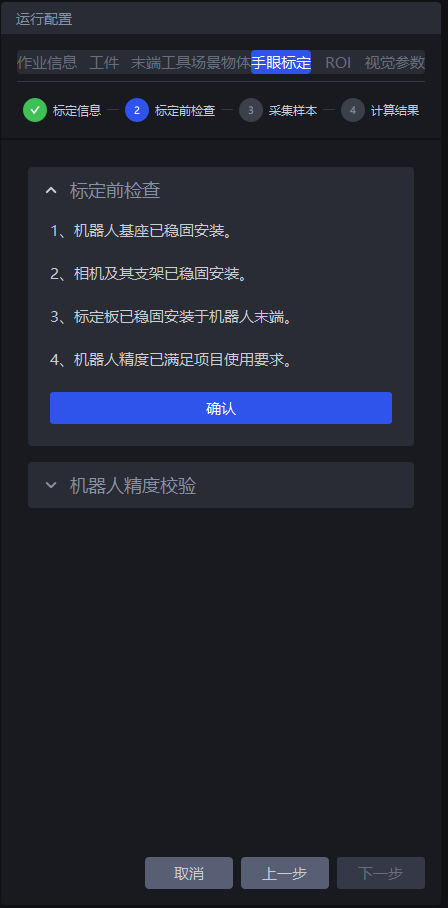
- Ensure that the Robot base is securely installed
Before performing eye-hand calibration, carefully check the installation of the Robot base. If the Robot base is not firmly installed, the Robot will shake noticeably during movement, affecting Robot accuracy and thus the calibration result.
Check whether the installation of the Robot base meets the requirements according to the following steps:
First, the surface on which the Robot base is installed must be flat and kept clean;
Second, operate the Robot to translate or rotate significantly at 100% speed and observe whether there are signs of shaking. If there is shaking, readjust and secure the Robot base to ensure that no displacement, tilting, or similar problems occur during Robot movement;
Third, check whether the Robot body and the base are tightly connected, and tighten the screws to prevent loosening.
- Ensure that the camera and its bracket are securely installed
Before performing eye-hand calibration, carefully check the installation of the camera and its bracket. If the camera and its bracket are not firmly installed, camera imaging quality will be affected, thereby affecting the calibration result.
Check whether the installation of the camera and its bracket meets the requirements according to the following steps:
First, check whether the camera bracket is a machined part; aluminum profiles should be avoided for the bracket material;
Second, manually shake the bracket and observe whether there is obvious shaking. If there is shaking, readjust and secure the bracket;
Third, move the sliding parts on the bracket and observe whether there is obvious shaking. At the same time, test the repeat positioning accuracy to ensure that it meets the actual scenario requirements;
Fourth, shake the camera and observe whether there is obvious shaking to ensure that the camera is securely installed.
- Ensure that the Calibration Board is installed in place
If the camera installation method is Eye to hand and the camera is fixed outside the robotic arm, the Calibration Board should be installed at the Robot end. Shake the Calibration Board to check whether there is obvious shaking. If there is shaking, tighten the screws and readjust to secure the Calibration Board.
If the camera installation method is Eye in hand and the camera is fixed on the end Tool of the robotic arm, there is no need to install the Calibration Board. The Calibration Board should be laid flat on the work surface while ensuring that it is within the camera field of view and covers the area where the workpieces are located.
If the calibration method is Needle-tip Tool Touch Calibration, the Calibration Board should be fixed on the work platform to prevent the Calibration Board from shifting when the Needle-tip Tool touches points on it during calibration.
- Ensure that the Robot accuracy meets the Project requirements
If the Robot accuracy does not meet the Project requirements, please refer to Calibration Verification to correct the Robot accuracy.
4. Collect Samples
Select different calibration procedures according to different camera installation methods and Robot types
| Camera Mount | Robot Type | Calibration Process |
|---|---|---|
| Eye in hand | Three-axis Robot | Eye in hand Three-axis Robot Calibration |
| Eye in hand | Four-axis Robot | Eye in hand Four-axis Robot Calibration |
| Eye in hand | Six-axis Robot | Eye in hand Six-axis Robot Calibration |
| Eye to hand | Three-axis Robot | Eye to hand Three-axis Robot Calibration |
| Eye to hand | Four-axis Robot | Eye to hand Four-axis Robot Calibration |
| Eye to hand | Six-axis Robot | Eye to hand Six-axis Robot Calibration |
5. Calibration Result Inspection and Analysis
The accuracy of eye-hand calibration results is one of the important factors affecting Robot picking accuracy. Therefore, after calibration is completed, the calibration result needs to be checked to determine whether its accuracy can meet actual scenario requirements. If Calibration Error exceeds the normal range, the cause of the error needs to be identified. Please refer to Calibration Result Inspection and Analysis to analyze the calibration result, solve the problem, and check again until the calibration result accuracy meets the scenario requirements.
6. Select the Calibration Configuration
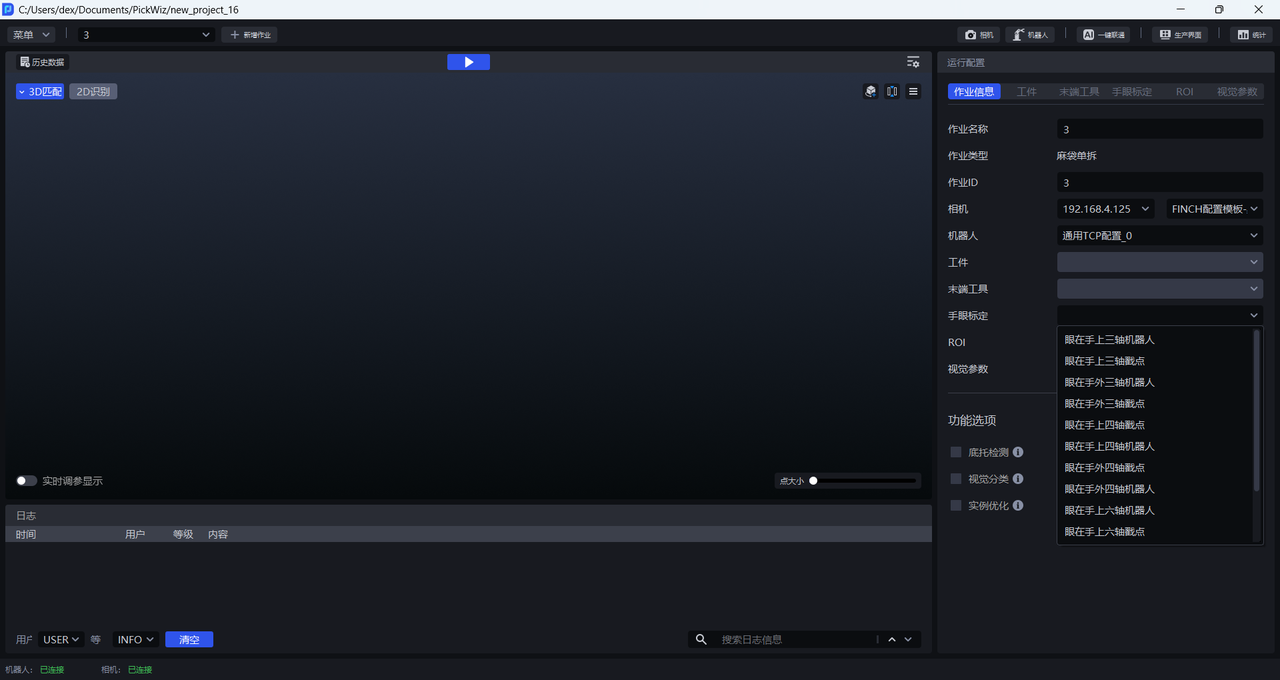
After the calibration procedure is completed, return to the Run Configuration page, click Task Information, click the drop-down list of Eye-Hand Calibration, and select the corresponding eye-hand calibration configuration.
7. Appendix
7.1 Terms and Concepts
Camera Intrinsic Parameter: Camera Intrinsic Parameter refers to the basic internal parameters of the camera, including lens focal length, principal point coordinates, distortion coefficients, and so on, which reflect the internal imaging characteristics of the camera. Among them, focal length represents the optical characteristics of the camera lens, principal point coordinates are the center position of the 2D image, and distortion coefficients are used to correct various distortions generated during camera imaging. Camera Intrinsic Parameter is used to describe the relationship between the pixel coordinate system and the camera coordinate system. Generally, the Intrinsic Parameter is calibrated before the camera leaves the factory and stored inside the camera.
Camera Extrinsic Parameter: Camera Extrinsic Parameter reflects the position and orientation of the camera in external space, including two parameters: the rotation matrix and the translation vector. The rotation matrix describes the rotational relationship of the camera coordinate system relative to the world coordinate system. It consists of three rotation angles (such as the rotation angles around the x, y, and z axes) and is used to represent the pose of the camera; the translation vector indicates the position of the camera coordinate system origin in the world coordinate system. Camera Extrinsic Parameter is used to describe the relationship between the camera coordinate system and the world coordinate system. It changes with the position and pose of the camera, so the camera Extrinsic Parameter needs to be recalibrated for each shooting situation.
Camera Accuracy: Camera Accuracy refers to the calibration accuracy of the camera, that is, how close the measurement results are to the true values in actual use. Higher camera accuracy means that the camera can capture and measure the Object Pose more accurately. Camera Accuracy is affected by many factors, including the hardware quality of the camera (such as lens quality, image sensor performance, etc.), the accuracy of the calibration method, the use environment (such as lighting conditions, temperature, humidity, etc.), as well as the installation and debugging of the camera.
eye-hand calibration: The relative pose between the Robot and the camera is not fixed in different usage scenarios. Calibration must be performed on site to obtain the eye-hand relationship between the camera and the Robot.
Calibration Method: The method for collecting Calibration Board samples. It is divided into Random Pose Sampling Calibration and Needle-tip Tool Touch Calibration, both of which are manual calibration methods.
Camera Installation Method: The installation method of the camera in the vision guidance kit. It is divided into Eye in hand and Eye to hand.
Calibration Point: It refers to the pose of the Robot when the camera collects Calibration Board samples during calibration. In Random Pose Sampling Calibration, the Calibration Point is the pose of the center of the Robot flange during each sampling. In Needle-tip Tool Touch Calibration, the Calibration Point is the needle-tip pose during each sampling.
Feature Point: It refers to the center of the concentric circles on the Calibration Board. During calibration, the software calculates the pixel coordinates of the center of the Calibration Circle and the coordinates of the center in the camera coordinate system from the collected Calibration Board images (2D image and depth image). It then calculates the camera Extrinsic Parameter based on the collected Calibration Circle data.
Point Cloud Error (Average Distance): It indicates Point Cloud fluctuation. If the Point Cloud Error (Average Distance) is greater than 0.002, it indicates that the Point Cloud fluctuation is too large.
Reprojection Pixel Error: It indicates the distortion coefficient of the camera Intrinsic Parameter. If the Reprojection Pixel Error is greater than 0.1, it indicates that the distortion coefficient of the camera Intrinsic Parameter is too large.
Rotation Freedom: It indicates how evenly the current sample and the collected samples are distributed in rotational space,