Common Scenes and Solutions for Cycle Time Abnormalities
1. System configuration
(1) Mode selection: Debug mode -> Speed mode
- Reduce the amount of historical data saved
(2) Shadow mode: On -> Off
- Save shadow mode data
- When there are many instances, mask serialization is also very time-consuming.
(3) Memory mode: On ->Off
- Turning on the memory mode needs to be compared with the previous result. The more instances there are, the more time-consuming it will be.
(4) Number of pose calculations: The greater the number of calculations, the more time-consuming it is
(5) Fetching logic:
- Capture one: recalculate each time
- Take one shot and capture many: after calculating once, the result will be cached, and the next time it will be obtained directly from the cache
(6) Instance Point Cloud generation timing:
- After splitting: full instance calculation
- After filtering: Calculation after filtering out some instances (may affect global sorting)
(7) Crawl strategy
- Dynamic adjustment mechanism: Selecting Target posture-related strategies will dynamically adjust the sorting timing backwards, calculating the postures of all instances before sorting, which is very time-consuming (except after turning on the visual computing acceleration mode)
2. 2D recognition
(1) CAD-based synthetic data training (one-click connection)
| Scene | Expected Cycle time | Exception handling | Remarks | |
|---|---|---|---|---|
| Depalletizing (cartons/sacks) | 0-2000 ms | There are many instances (more than 50), and the Cycle time is greater than 2s Uncheck whether to return the mask 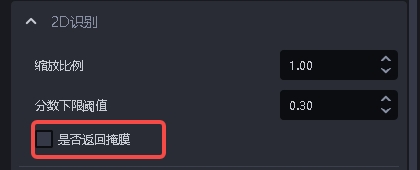 | / | |
| Universal Target (ordered/unordered/positioned assembly) | axially symmetric bounding box | 0-2000 ms | / | |
| directed bounding box | 0-3500 ms | Using the trt model can reduce the Cycle time to 0 - 2000 ms | ||
| surface type Target (ordered/unordered/positioned assembly) | 0-2000 ms | / | ||
| Circle/Cylinder/Quadrilateral | 0-2000 ms | / | ||
Note: The automatic enhancement cycle time is superimposed according to the scaling ratio and the number of rotation angles. For example, with 2 scaling ratios and 2 rotation angles, the cycle time is expected to be 2*2=4 times the normal cycle time.
| Scaling ratio | Rotation angle | Expected Cycle time |
|---|---|---|
| [1.0] | [0, 90] | 2x normal Cycle time |
| [0.5, 0.8, 1.0] | [0, 90] | 6x normal Cycle time |
(2) Point Cloud segmentation
Instance Segmentation3D
| Scene | Expected Cycle time | Exception handling | Remarks |
|---|---|---|---|
| surface type Target is in order (materials are isolated from each other) | 0-3000 ms | ScenePoint Cloud is too large, appropriately increase the downsampling point spacing, and simultaneously increase the Point Cloud search radius 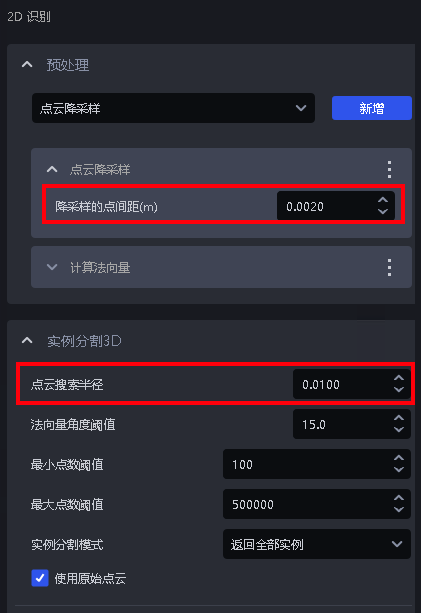 | Point The larger the number of Clouds, the longer the Cycle time, the more instances there are, and the longer the Cycle time. |
3. 3D matching
| type | Expected Cycle time | Exception handling | Remarks | |
|---|---|---|---|---|
| Rigid body transformation | 0-500 ms | No | uses dual model Cycle time will be in 0-1000ms | |
| Mask-based Pick Point generation | 50-1000 ms | No | Selecting your own vertical coordinate system for depalletizing sacks will increase the time by about 200ms | |
| basic geometry fitting | 0-500ms | No | / | |
| 3D registration icp’s Cycle time | Coarse Matching | 0-500ms | downsamplingParameter | / |
| Fine matching | 0-2000ms | Point Clouddownsampling(TargetPoint Cloud) | / | |
4. Functional plug-ins
| type | Expected Cycle time | Exception handling | Remarks |
|---|---|---|---|
| Pallet Detection | 50-1000 | No | / |
| Collision detection | Material frame detection: 0-500 ms Collision detection: 0-300 ms | No | / |
| Visual classification | 0-500 ms | No | / |
5. Commonly used functions
(1) 2D preprocessing
| type | Expected Cycle time | Exception handling | Remarks |
|---|---|---|---|
| edge enhancement | 20-200 | Cycle time is slow. You can close other redundant programs in the task manager to provide more computing resources for edge enhancement. | filters the points where the normal vector is greater than the angle Threshold and uses multi-threaded parallel calculation. Too many other running programs occupy a large amount of CPU computing resources, causing lags. |
| Extract upper texture | 0-800ms | Reduce the number of clustering Point Clouds | 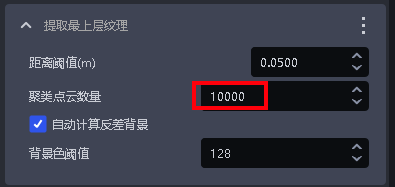 |
| Remove the picture background outside of roi3d | 0-300 | No | / |
(2) Point Cloud generation
| Type | Expected Cycle time | Exception handling | Remarks |
|---|---|---|---|
| By mask | 0-500 | None | 10 instances running about 130ms |
| By bounding box | 0-300 | None | 6 instances running 30ms |
| Remove image background outside of roi3d | 0-300 | None | / |
(3) 3D preprocessing
| type | Expected Cycle time | Exception handling | Remarks |
|---|---|---|---|
| Point Clouddownsampling | 0-200 ms | No | Point Cloud quantity is within 200,000 |
| Point Cloud removes outliers | 0-500 ms | No | Point Cloud quantity is within 200,000 |
| Point Cloud Plane Split | 0-200 ms | No | Point Cloud quantity is within 200,000 |
| calculation normal vector | 0-200 ms | No | Point Cloud quantity is within 200,000 |
| Filter out Point Cloud where the object distance exceeds the limit | 0-300 ms | No | / |
| Point Cloud clustering downsampling | 0-300ms | Add [Point Clouddownsampling (TargetPoint Cloud)] before the function | >=1.7.2 |
| Point Cloud contour extraction | 0-300ms | No | / |
| Remove points whose normals are greater than the angle Threshold | 20-200ms | No | / |
(4)Pick Point filtering
| type | Expected Cycle time | Exception handling | Remarks |
|---|---|---|---|
| Collision detection for fixture grabbing | 0 - 500 ms | No | is related to the number of patches input to the fixture. The greater the number of patches, the longer the Cycle time. The number of patches is limited to 500. |
| Determine the upper layer of Pick Point is blocked | 5-30 | No | / |
(5)Pick Point adjustment
| type | Expected Cycle time | Exception handling | Remarks |
|---|---|---|---|
| Attitude adjustment based on axis rotation | 0-2000ms | Reduce the rotation angle range (symmetrical angle) Create a separate template with many Point Cloud features and a small quantity, pass the template Point Cloud path into the function, or use edges for optimization Select Fast in evaluation mode for acceleration. Warning: if the Initial Pose is inaccurate or the Pick Point is not at the center of symmetry, the effect will be affected 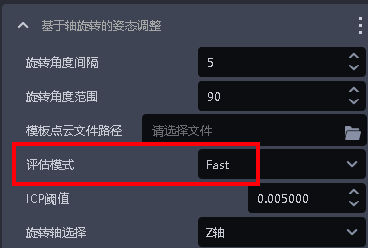 | Point The larger the Cloud template is, the longer it takes 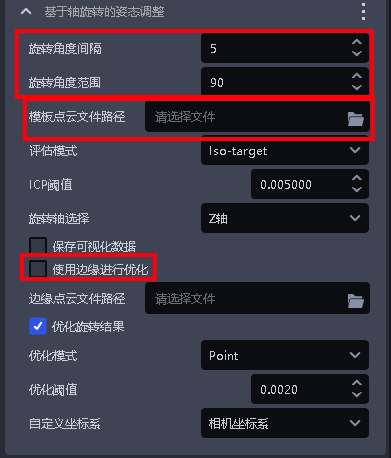 |
| Refined attitude function based on plane discovery | 0 - 200 ms | No | / |
| Symmetric center posture optimization | 0-1000ms | Reduce the search range Increase the image zoom ratio | 1. Need to contact to customize or upgrade1.7.2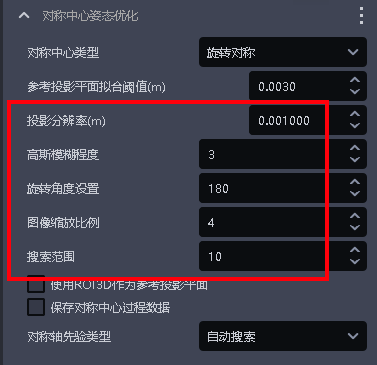 |
| calculation normal vector | 0-200 ms | No | Point Cloud quantity is within 200,000 |
| Filter out Point Cloud where the object distance exceeds the limit | 0-300 ms | No | / |
| Point Cloud clustering downsampling | 0-300ms | Add [Point Clouddownsampling (TargetPoint Cloud)] before the function | >=1.7.2 |
| Point Cloud contour extraction | 0-300ms | No | / |
| Remove points whose normals are greater than the angle Threshold | 20-200ms | No | / |
(6) Instance sorting
- XYZ, roi distance, robot arm distance and other strategies that need to extract Point Cloud
- The expected time consumption of a single Target is: 0.003s-0.03s. The more TargetPoint Clouds, the more time it takes.