
SIPE End-to-End Pose Estimation Guide
SIPE (End-to-End Stereo-based Pose Estimation) is a task run mode introduced in PickWiz 1.9.0. It takes an RGB image from either camera view as input and directly outputs pose estimates for instance point clouds, replacing the conventional sequence of depth reconstruction followed by target identification.
This guide covers the applicability, activation, configuration differences, runtime validation, and forward compatibility of SIPE end-to-end pose estimation. For a general description of task run modes, see the “Task Run Modes” section of the Task Operation Guide.
1. Overview
Conventional stereo vision uses separate imaging and detection stages: it reconstructs depth from stereo images, then identifies target objects in the reconstructed point cloud. This longer processing chain can cause two problems in industrial applications:
- Point cloud generation is slow, affecting task cycle time.
- Stereo disparity becomes less accurate as the working distance increases, reducing positioning accuracy.
SIPE combines imaging and pose estimation into one end-to-end process. It takes an RGB image from either camera view and directly produces pose estimates for instance point clouds, shortening the processing chain. In internal tests with identical scenes, targets, task configurations, cameras, and industrial PCs, SIPE mode used approximately 50% less video memory on average and reduced average task runtime by approximately 20%–50% compared with serial or parallel modes.
2. Applicability
2.1 Supported Task Types
In PickWiz 1.9.0, the following task types support end-to-end pose estimation:
- Loading and unloading of neatly arranged general type target objects
- General Target positioned assembly
The “End-to-End Pose Estimation” option does not appear in the “Task Run Mode” dropdown for other task types.
2.2 Supported Cameras
End-to-end pose estimation supports only stereo cameras from these two brands:
- KINGFISHER
- KFC
You can select this mode if no camera is connected to the current task or if the connected camera is one of the stereo cameras listed above. If the connected camera is not a stereo camera, the software displays: “End-to-End Pose Estimation mode does not support the currently selected camera type.”
3. Select End-to-End Pose Estimation Mode
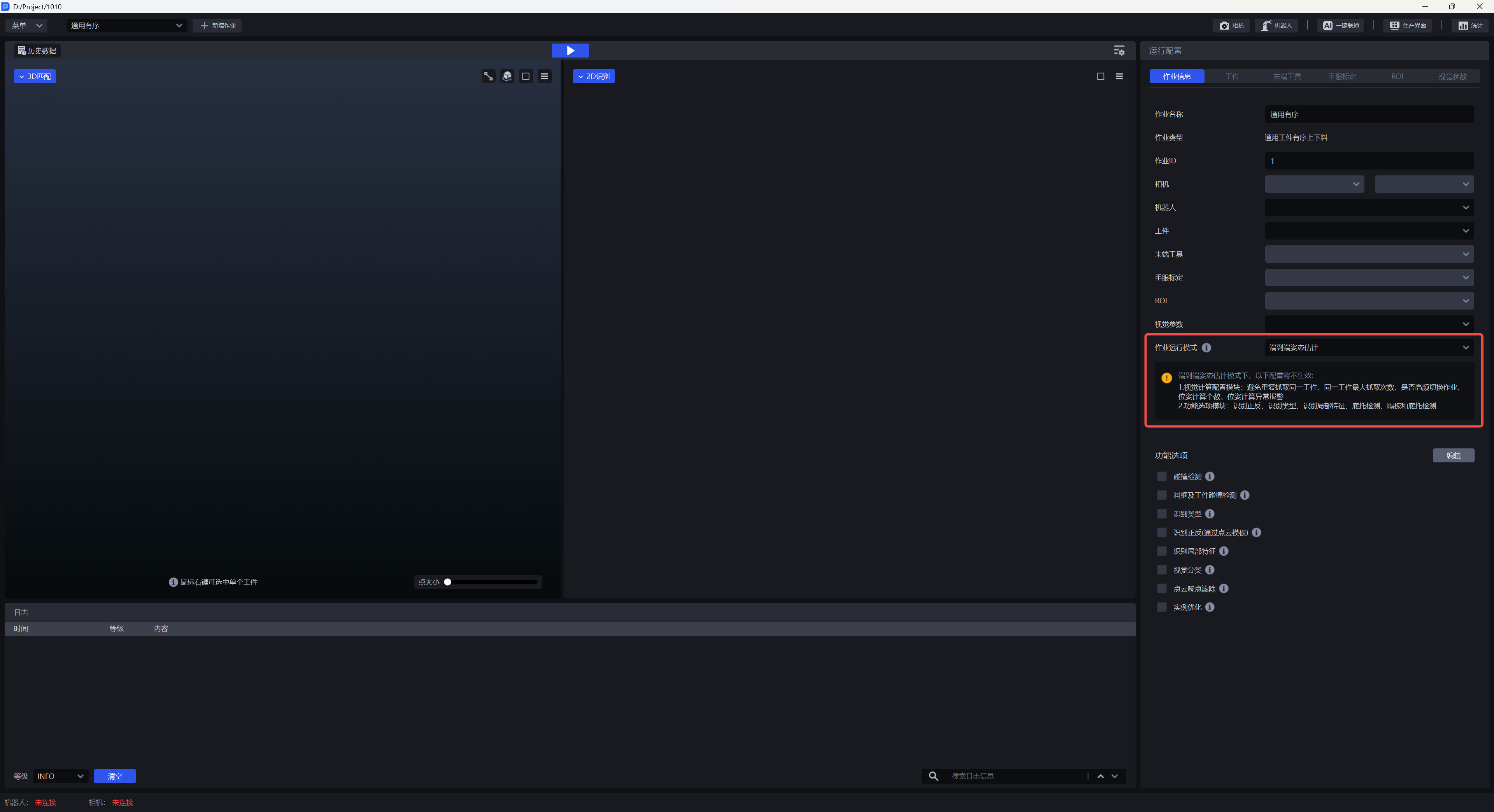
Select the run mode using the “Task Run Mode” field on the Task Information configuration page:
Open the Task Information configuration page for the current task.
Select
End-to-End Pose Estimationfrom the “Task Run Mode” dropdown.Complete the camera and target configuration for end-to-end mode as described in Section 4.
“Task Run Mode” is a required, single-choice field. A task can use only one run mode at a time.
Hover over the icon to the right of “Task Run Mode” to display the field description: “Set the run mode for the current task. Options include Serial, Parallel (Vision Computation Acceleration), and End-to-End Pose Estimation. Supported run modes vary by task type.”
4. Configuration Differences in End-to-End Mode
After you select end-to-end pose estimation, some configuration pages change automatically. Pages and fields not listed below remain the same as in Serial mode.
| Configuration page | Changes in end-to-end mode |
|---|---|
| Camera Configuration | “Camera Brand” supports only KINGFISHER and KFC |
| Target Configuration | Configure the “End-to-End Model” |
| Vision Parameters | The following vision computation settings are not supported: prevent repeated picking of the same target, maximum pick attempts for the same target, whether to switch tasks frequently, number of poses to calculate, and pose calculation error alarm |
| Function Options | Front-Back Identification, Type Identification, Local Identification, Pallet Detection, and Partition and Pallet Detection are not supported |
| One-Click Connection / Shadow Mode / Mask Mode | SIPE end-to-end models do not currently support these features |
| Statistics Page | Features and page remain unchanged |
| Production Interface | Features and page remain unchanged; the log messages in the log area, real-time operating conditions, and content in the vision results window change |
4.1 Camera Configuration
After you select end-to-end pose estimation, the Camera Configuration page changes in two ways:
- The “Camera Brand” field shows only
KINGFISHERandKFC. - The “Imaging Model” field is absent.
4.2 Target Configuration
After you select end-to-end pose estimation, the Target Configuration page changes in two ways:
Configure the “End-to-End Model” field to load a SIPE model.
Note:
PickWiz 1.9.0 does not include a general-purpose SIPE model for the “End-to-End Model” field. Before use, obtain a SIPE model that matches the current target and upload it to this field. Otherwise, end-to-end pose estimation cannot run.
5. Runtime Validation and Messages
After you select end-to-end pose estimation, the software validates the current task’s data source and camera type when you run the task. If validation fails, a message appears on the current page.
The validation rules are:
| Data source | Validation condition |
|---|---|
| Camera data | The camera connected to the current task must be a KINGFISHER or KFC stereo camera, and a SIPE end-to-end model must be uploaded in the current task's Target Configuration |
| Historical data | The camera in the historical task configuration must be a KINGFISHER or KFC stereo camera, and a SIPE end-to-end model must be uploaded in the current task's Target Configuration |
If any condition is not met, the software indicates that the current task run mode supports only data captured by KINGFISHER / KFC series stereo cameras.
Note:
Historical data does not currently record whether it came from a stereo camera. When running historical data, confirm the camera source and that a SIPE end-to-end model has been uploaded in the current task's Target Configuration.
6. Mode Switching and Forward Compatibility
6.1 Default Run Mode
For a new task, “Task Run Mode” defaults to Serial. Switch to end-to-end pose estimation manually when needed.
6.2 Disable End-to-End Pose Estimation Mode
End-to-End Pose Estimation mode and Parallel (Vision Computation Acceleration) mode are mutually exclusive. A task can use only one at a time. The software records the task’s run mode before end-to-end pose estimation is enabled. When end-to-end pose estimation is disabled, the task returns to its previous run mode. If the previous run mode is empty, it switches to Serial.
6.3 Upgrade and Load Existing Tasks
- When upgrading from an older version to PickWiz 1.9.0, the existing task configuration and run mode are retained. End-to-End Pose Estimation mode is not enabled automatically.
- When loading an existing Loading and unloading of neatly arranged general type target objects or General Target positioned assembly project or task from the Menu, “Task Run Mode” displays the run mode selected for that task. End-to-End Pose Estimation mode is not enabled automatically.
7. Performance Reference
In internal tests with identical scenes, targets, task configurations, cameras, and industrial PCs, enabling end-to-end pose estimation had these effects compared with serial or parallel modes:
- Average task runtime decreased by approximately 20%–50%.
- Average video memory usage decreased by approximately 50%.
8. Related Documents
- Task Operation Guide: Definitions of task run modes, how to select them, and their relationship to task types.
- Vision Computation Configuration Feature Guide: Applicability and limitations of Parallel (Vision Computation Acceleration) mode.
- Target Configuration Guide: Descriptions of fields on the Target Configuration page.
- Camera Connection and Parameter Tuning Guide: Camera connection, Imaging Models, and camera parameter adjustment.
- 3D Pose Matching and Estimation Configuration Guide: Guidance on selecting a pose estimation method.