Common Scenarios and Solutions for Abnormal Takt Time
1. System Configuration
(1)Mode selection: Debug mode -> Ultra-fast mode
- Reduce the amount of saved historical data
(2)Shadow mode: On -> Off
- Save shadow mode data
- When there are many instances, Mask serialization is also very time-consuming
(3)Memory mode: On -> Off
- Enabling memory mode requires comparing with the previous result; the more instances there are, the more time-consuming it is
(4)Number of Object Pose calculations: the more calculations, the more time-consuming it is
(5)Pick logic:
- One shot, one pick: recalculate every time
- One shot, multiple picks: after calculating once, the result will be cached and retrieved directly from the cache next time
(6)Timing of instance Point Cloud generation:
- After segmentation: calculate all instances
- After filtering: calculate after filtering out some instances (may affect global sorting)
(7)grasping strategy
- Dynamic adjustment mechanism: selecting a strategy related to the Object Pose of the Target Object will dynamically postpone the sorting timing. Sorting is performed after calculating the Object Pose of all instances, which is very time-consuming (except when vision computation acceleration mode is enabled)
2. 2D Recognition
(1)CAD-based synthetic data training (one-click connection)
| Scene | Expected Takt Time | Troubleshooting | Remarks | |
|---|---|---|---|---|
| Depalletizing (cartons/sacks) | 0-2000 ms | There are many instances (more than 50), and the Takt Time is greater than 2s Do not check Return Mask 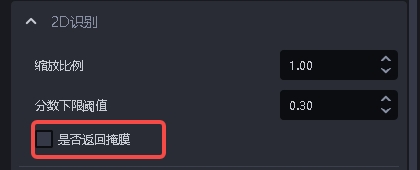 | / | |
| General Target Objects (ordered/disordered/positioning assembly) | Axis-symmetric bounding box | 0-2000 ms | / | |
| Oriented bounding box | 0-3500 ms | Using a trt model can reduce the Takt Time to 0 - 2000 ms | ||
| Surface-type Target Objects (ordered/disordered/positioning assembly) | 0-2000 ms | / | ||
| Circular surface/cylinder/quadrilateral | 0-2000 ms | / | ||
Note: The Takt Time for automatic augmentation is cumulative based on the number of scaling ratios and rotation angles. For example, with 2 scaling ratios and 2 rotation angles, the expected Takt Time is 2*2=4 times the normal Takt Time
| Scaling ratio | Rotation angle | Expected Takt Time |
|---|---|---|
| [1.0] | [0, 90] | 2x normal Takt Time |
| [0.5, 0.8, 1.0] | [0, 90] | 6x normal Takt Time |
(2)Point Cloud Segmentation
3D Instance Segmentation
| Scene | Expected Takt Time | Troubleshooting | Remarks |
|---|---|---|---|
| Ordered surface-type Target Objects (objects isolated from each other) | 0-3000 ms | The scene Point Cloud is too large. Appropriately increase the downsampling point spacing and simultaneously increase the Point Cloud search radius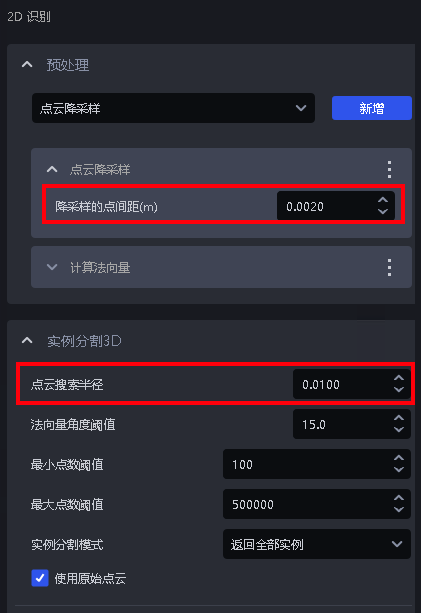 | The larger the number of Point Cloud points, the longer the Takt Time; the more instances there are, the longer the Takt Time |
3. 3D Matching
| Type | Expected Takt Time | Troubleshooting | Remarks | |
|---|---|---|---|---|
| Rigid transformation | 0-500 ms | None | With a dual model, the Takt Time will be 0-1000ms | |
| Mask-based Pick Point generation | 50-1000 ms | None | For sack depalletizing, selecting its own vertical coordinate system will increase the processing time by about 200ms | |
| Basic geometric shape fitting | 0-500ms | None | / | |
| 3D registration icp Takt Time | Rough matching | 0-500ms | Downsampling parameters | / |
| Fine matching | 0-2000ms | Point Cloud downsampling (Target Object Point Cloud) | / | |
4. Functional Plugins
| Type | Expected Takt Time | Troubleshooting | Remarks |
|---|---|---|---|
| Pallet detection | 50-1000 | None | / |
| Collision detection | Bin detection: 0-500 msCollision detection: 0-300 ms | None | / |
| vision classification | 0-500 ms | None | / |
5. Common Functions
(1)2D preprocessing
| Type | Expected Takt Time | Troubleshooting | Remarks |
|---|---|---|---|
| Edge enhancement | 20-200 | If the Takt Time is slow, close other unnecessary programs in Task Manager to provide more computing resources for edge enhancement | Filters out points whose Normal is greater than the angle Threshold, uses multithreaded parallel computation, and may lag if too many other running programs occupy a large amount of CPU computing resources |
| Extract upper-layer texture | 0-800ms | Reduce the number of clustered Point Cloud points | 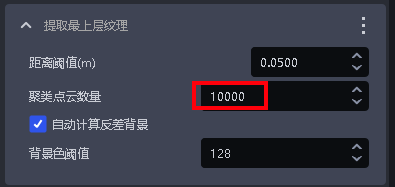 |
| Remove image Background outside roi3d | 0-300 | None | / |
(2)Point Cloud generation
| Type | Expected Takt Time | Troubleshooting | Remarks |
|---|---|---|---|
| Through Mask | 0-500 | None | 10 instances run in about 130ms |
| Through bounding box | 0-300 | None | 6 instances run in 30ms |
| Remove image Background outside roi3d | 0-300 | None | / |
(3)3D preprocessing
| Type | Expected Takt Time | Troubleshooting | Remarks |
|---|---|---|---|
| Point Cloud downsampling | 0-200 ms | None | Number of Point Cloud points within 200,000 |
| Point Cloud outlier removal | 0-500 ms | None | Number of Point Cloud points within 200,000 |
| Point Cloud plane segmentation | 0-200 ms | None | Number of Point Cloud points within 200,000 |
| Compute Normal | 0-200 ms | None | Number of Point Cloud points within 200,000 |
| Filter out Point Cloud beyond the object distance limit | 0-300 ms | None | / |
| Point Cloud clustering downsampling | 0-300ms | Add [Point Cloud downsampling (Target Object Point Cloud)] before this function | >=1.7.2 |
| Point Cloud contour extraction | 0-300ms | None | / |
| Remove points whose Normal is greater than the angle Threshold | 20-200ms | None | / |
(4)Pick Point filtering
| Type | Expected Takt Time | Troubleshooting | Remarks |
|---|---|---|---|
| Collision detection for fixture grasping | 0 - 500 ms | None | Related to the number of faces in the input fixture. The more faces there are, the longer the Takt Time. The number of faces is limited to 500 |
| Determine upper-layer occlusion of the Pick Point | 5-30 | None | / |
(5)Pick Point adjustment
| Type | Expected Takt Time | Troubleshooting | Remarks |
|---|---|---|---|
| Pose adjustment based on axis rotation | 0-2000ms | Reduce the rotation angle range (symmetry angle) Create a separate template with many Point Cloud features and a small quantity, pass the template Point Cloud path to the function, or use edges for optimization Select Fast acceleration for evaluation mode. Warning: If the Initial Pose is inaccurate or the Pick Point is not at the symmetry center, the effect will be affected 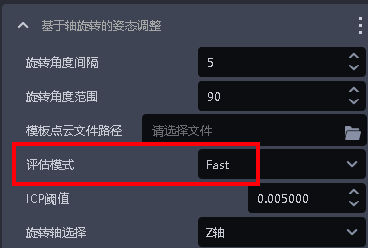 | The larger the Point Cloud template, the longer the processing time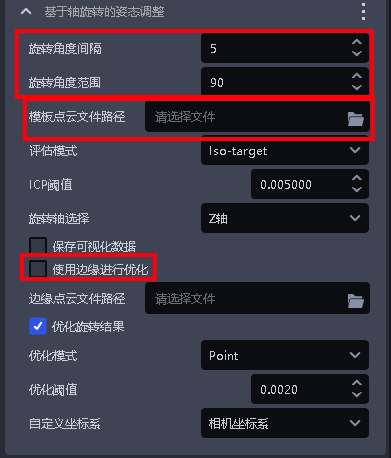 |
| Pose refinement function based on plane detection | 0 - 200 ms | None | / |
| Symmetry-center pose optimization | 0-1000ms | Reduce the search range Increase the image scaling ratio Reduce the rotation angle in mirror mode (10-30) When accuracy requirements are low, the projection resolution can be reduced | Version 1.7.1 has abnormal video memory usage and Takt Time issues in rotation mode. If the mirror symmetry condition is met, use mirror symmetry mode; if not, contact product R&D. Customization is required, or upgrade to 1.7.2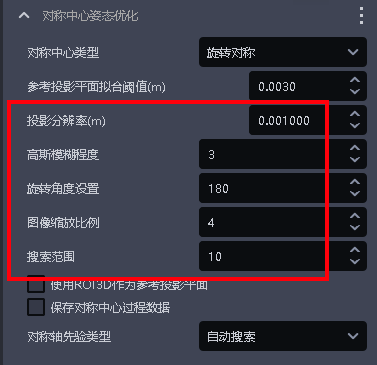 |
| Compute Normal | 0-200 ms | None | Number of Point Cloud points within 200,000 |
| Filter out Point Cloud beyond the object distance limit | 0-300 ms | None | / |
| Point Cloud clustering downsampling | 0-300ms | Add [Point Cloud downsampling (Target Object Point Cloud)] before this function | >=1.7.2 |
| Point Cloud contour extraction | 0-300ms | None | / |
| Remove points whose Normal is greater than the angle Threshold | 20-200ms | None | / |
(6)Instance sorting
- Strategies such as XYZ, roi distance, and robot arm distance require extracting Point Cloud
- Expected processing time for a single Target Object: 0.003s-0.03s. The more Target Object Point Cloud points there are, the more time it takes.