External Script Usage Guide
As software extension points, external scripts are called by Pickwiz. They let you add business logic without modifying the core code, making it possible to flexibly adapt to on-site customization requirements such as robotic arm installation error compensation, unit conversion, obstacle avoidance strategy adjustment, and protocol adaptation, without involving network communication functions. When the system runs to the corresponding stage (for example, after calculating the Picking Pose or before preparing to send data to the robotic arm), these functions in the external script are automatically called.
Currently, external scripts can be added in three locations:
When PickWiz receives messages from the robot
When PickWiz processes placeholder information
Before PickWiz sends messages to the robot
If a protocol other than Tcp is used, it will take effect only when processing placeholder information

1. Create a Python File
Create a python file in the C:\Users\dex\.dexforce\kuawei_data\robot_hooks directory, as shown below.
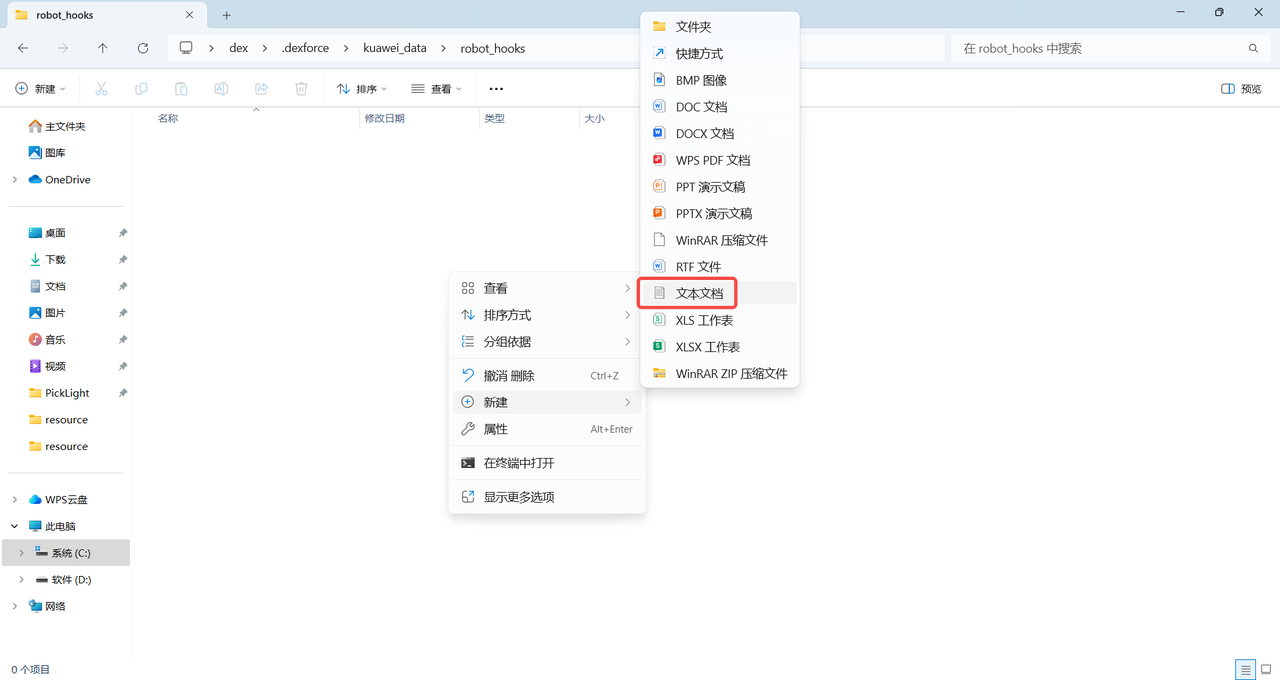
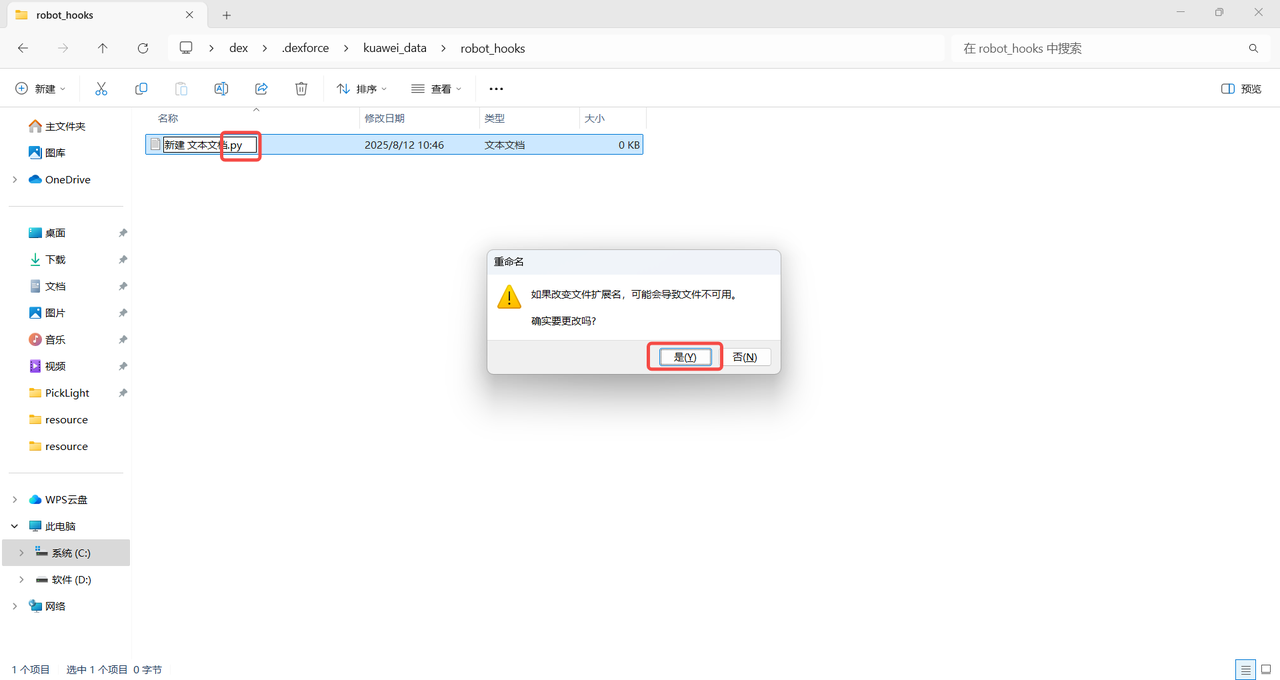
Copy the following code into the newly created Python file.
from typing import List
from PickLight.log.logger import logger_pipe

class AttrHooks(object):  # Create one AttrHooks class containing multiple hook functions; the system automatically recognizes and calls them
# All hook functions follow the same parameter format:
#@staticmethod
#def received_messages_hook(data: str, context) -> str
# PickWiz receives robot commands: received_messages_hook
# Before PickWiz sends commands to the robot: messages_hook
# PickWiz processes placeholder information: placeholder_hook
# data: the raw data to be processed; the type depends on the scenario. context: context information including additional data such as robot configuration and task configuration ID
# context: robot context information, including additional data such as robot configuration and task configuration ID. Inside the hook function, you can use context.get_available_context() to obtain the context information available to the current functioncontext:Context information, including additional information such as the robot configuration and task configuration ID. You can use context.get_available_context() to obtain the currently available context configuration. The currently available context information is as follows.
Robot configuration:robot_config
Reserved decimal places:decimals
Robot degrees of freedom:dof_type
Rotation expression:rotation_type
Length unit:translation_unit
Angle unit:euler_angle_unit
task configuration ID:config_ids
task ID:task
Calibration ID:calibration
Robot ID:robot
Vision parameter ID:vision_param
ROI ID:roi
Product ID:product
End effector ID:end_effector
Scene Object ID:scene_object (when the collision detection plugin is selected)
2. PickWiz Receives Robot Commands
When PickWiz receives commands sent by the robot, you can add the pre_receive_messages_hook function to the AttrHooks class in the newly created Python file to process the received robot messages.
The current external script functions are registered and take effect only at two specific moments:
Refresh ConfigurationandSend Inspection Result. Therefore, if you modify thepre_receive_messages_hookfunction, you need to manually switch the configuration or trigger a detection once for the modified function to take effect; otherwise, the system will still use the old function.
Example: When PickWiz receives short command codes sent by the robot (for example, short messages such as 210 and 211 in the example), the pre_receive_messages_hook function in the external script can be used to parse them and directly replace the short command codes with full commands including complete parameters that the robot can recognize and execute (for example, replacing 210 with d,0,0,0,0,0,0,1). This avoids the robot being unable to respond or executing incorrectly due to incomplete information in the short command and quickly adapts to on-site robot command interaction requirements.
    @staticmethod
    def pre_receive_messages_hook(data: str, context) -> str: # When PickWiz receives commands sent by the robot, adjust the received robot message according to the fields sent by the robot
        logger_pipe.info("available context: %s", context.get_available_context())
        logger_pipe.info("received messages: %s", data)

        if data == "210":
            data = "d,0,0,0,0,0,0,1"# When "210" is received, replace it with the full command "d,0,0,0,0,0,0,1"
        elif data == "211":
            data = "d,0,0,0,0,0,0,2"# When "211" is received, replace it with "d,0,0,0,0,0,0,2"
        return data
Example: Fix the task configuration (for example, the ROI ID in a fixed task configuration). When PickWiz receives a robot command, it first checks whether the ROI ID in the current context is 1. If it is not 1, the command content is automatically changed to d,0,0,0,0,0,0,1, thereby fixing the ROI ID to 1 and preventing errors in picking, inspection, and other tasks caused by a misconfigured ROI on site.
    @staticmethod
    def pre_receive_messages_hook(data: str, context) -> str: # When PickWiz receives a command sent by the robot, check whether the ROI ID is 1; if not, switch the ROI to 1 through the placeholder ${roi_id}
        logger_pipe.info("available context: %s", context.get_available_context())
        logger_pipe.info("raw messages: %s", data)

        if context["config_ids"]["roi"] != 1:
            data = "d,0,0,0,0,0,0,1"
        logger_pipe.info("modified messages: %s", data)
        return data
3. Modify Placeholder Information
Placeholders can be used in various system configurations and messages for dynamic substitution with actual values. The meanings, default values, and data types of each placeholder are shown in the table below.
| Placeholder | Meaning | Default Value | Data Type |
|---|---|---|---|
| s | Inspection result signal | 1 | Short integer |
| vn | Valid instance count | 1 | Short integer |
| ln | Remaining instance count | 1 | Short integer |
| rn | Returned instance count | 1 | Short integer |
| tn | Total detected instances | 1 | Short integer |
| pre_pick | Forward Point | 2,j1,j2,j3,j4,j5,j6,j1,j2,j3,j4,j5,j6 | Floating-point |
| post_pick | Retreat Point | 2,j1,j2,j3,j4,j5,j6,j1,j2,j3,j4,j5,j6 | Floating-point |
| pose_index | Pick Point Index | 1 | Short integer |
| grasp_pose | Pick Point Pose | 0,0,0,0,0,0 | Floating-point |
| grasp_pid | Picked Workpiece ID | 1 | Short integer |
| length | Workpiece length (along the image x direction) | 0.2 | Floating-point |
| width | Workpiece width (along the image y direction) | 0.2 | Floating-point |
| height | Workpiece height | 0.1 | Floating-point |
| rect_length | Workpiece length (along the image x direction) | 0.1 | Floating-point |
| rect_width | Workpiece width (along the image y direction) | 0.1 | Floating-point |
| direction | Workpiece orientation (0: horizontal along x, 1: vertical along y) | 1 | Short integer |
| left_top | Upper-left vertex | x,y,z | Floating-point |
| right_top | Upper-right vertex | x,y,z | Floating-point |
| left_bottom | Lower-left vertex | x,y,z | Floating-point |
| right_bottom | Lower-right vertex | x,y,z | Floating-point |
| entity | Returned instance type (0: workpiece, 1: pallet) | 0 | Short integer |
| category_id | Workpiece category | 0 | Short integer |
| aux_info | Additional information | ... | Floating-point |
| radius | Circular surface radius | 0.2 | Floating-point |
| pmf_height | Cylinder height | 0.2 | Floating-point |
| sr | Automatic calibration sampling result | 1 | Short integer |
| cp | Next sampling pose in automatic calibration | 0,0,0,0,0,0 | Floating-point |
| so_size_id | (Collision detection) container size ID | 1 | Short integer |
| so_size | (Collision detection) container dimensions (length, width, height, long-side thickness, short-side thickness, bottom thickness) | 0.1,0.1,0.1,0.1,0.1,0.1 | Floating-point |
| so_pose | (Collision detection) container pose | 0,0,0,0,0,0 | Floating-point |
If you need to modify placeholder information, add a placeholder_hook function to the AttrHooks class in the newly created Python file.
Example: Adjust the inspection result signal
    @staticmethod
    def s_hook(data: List[int], context) -> List[int]: # Adjust the inspection result signal; when the returned signal is not success (100), set all others to exception (-1)
        logger_pipe.info("raw signal: %s", data)
        if data and data[0] != 100:
            data[0] = -1
        logger_pipe.info("modified signal: %s", data)
        return data
Example: Adjust the picking height
    @staticmethod
    def grasp_pose_hook(data: List[float], context) -> List[float]:  # Adjust the picking height by increasing the Z coordinate of all Pick Points by 0.01. Suitable for compensating robotic arm installation errors or fine-tuning Pick Points based on workpiece height.
        logger_pipe.info("raw poses: %s", data)
        # Increase the Z coordinate value
        if data and len(data) >= 6:
            modified_data = data.copy()
            pose_size = 6 # Each pose consists of 6 values
            poses_count = len(data) // pose_size

            for i in range(poses_count):
                z_index = i * pose_size + 2 # The Z coordinate is in the 3rd position (index 2)
                if z_index < len(modified_data):
                    modified_data[z_index] += 0.01 # Increase the Z coordinate by 0.01
            logger_pipe.info("modified poses: %s", modified_data)
            return modified_data
        return data
4. Before PickWiz Sends Commands to the Robot
Before PickWiz sends commands to the robot, if message processing is required, you can add the pre_send_messages_hook function to the AttrHooks class in the newly created Python file.
When the robot is not configured with the
Split Messagefunction, thedatalist usually has only 1 element, which is the complete command message to be sent, so the function only needs to process this element.When the robot is configured with the
Split Messagefunction (that is, one complete command is split into multiple sub-messages for sending), thedatalist contains all split sub-messages, with each sub-message as one element of the list. The function needs to process each sub-message element in the list separately to ensure that every sub-message meets the sending requirements.
Example: Before PickWiz sends commands to the robot, adjust the content of the first placeholder in the command string. This function first reads the original command list data to be sent (the default list length is 1 and contains only one complete command), and then determines and modifies the content of the first placeholder in the command string according to on-site requirements (for example, when the signal corresponding to the first placeholder is not the success value 100, it is forcibly changed to -1). This ensures that the content of the first placeholder in the command received by the robot meets the task requirements and prevents robot execution errors caused by abnormal original placeholder data.
    @staticmethod
    def pre_send_messages_hook(data: List[str], context) -> List[str]:# When the first placeholder is ${s}, adjust the returned signal; when the returned signal is not success (100), set all others to exception (-1)
        logger_pipe.info("raw messages: %s", data[0])
        result = data[0]
        if result and result.split(",")[0] != "100":
            data[0] = "-1" + result[result.find(","):]
        logger_pipe.info("modified messages: %s", data[0])
        return data